


Participant
October 31, 2022
Question

impossible de changer de couleur avec une photo importée (InDesign version 18.0)

  • October 31, 2022
  • 3 replies
  • 505 views

Bonjour à tous,


Help! : J'ai un souci pour réaliser mon exercice sur InDesign
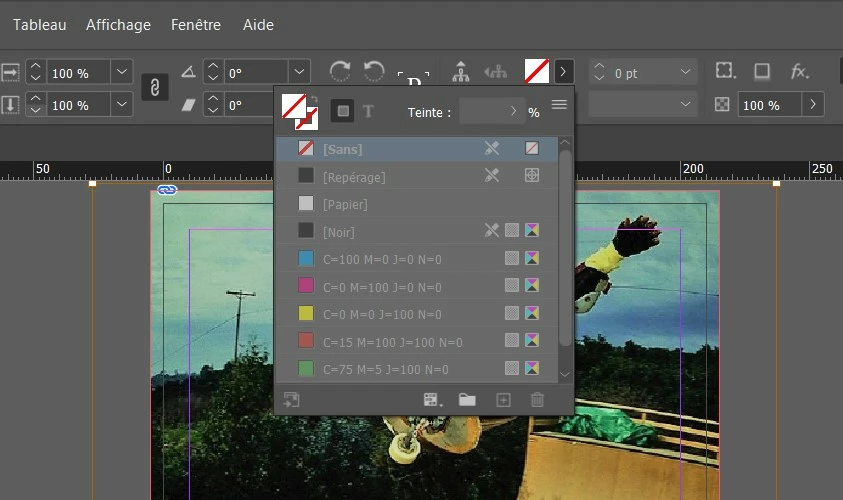
Lorsque j'importe une image en JPEG ou TIFF, je ne peux faire aucune modification de couleur (ci-joint la capture d'écran)
Quelqu'un aurait une soluce? J'ai déjà pas mal cherché sur Internet mais je ne trouve pas d'info...

Merci d'avance et bonne journée d'Halloween pour ceux/celles qui le fêtent! 😉
 

This topic has been closed for replies.

3 replies

rob day
Community Expert
Community Expert
October 31, 2022

Help! : I have a problem to carry out my exercise on InDesign


Jess_B.Author
Participant
October 31, 2022

merci! 🙂

Community Expert
October 31, 2022

You can add a colour the frame itself - as a fill. 

You have selected the graphic within the frame - as you can tell from the Brown edge frame.

Select your Graphic Frame by using the Black Arrow Tool (not the white one) - and don't select the 'content grabber' in the middle of the frame - as this automatically selects the image not the frame.


Once you have the Frame selected you can add your Fill Colour.

Then - select your Image using the Content Grabber (with the brown frame like you have now)

Then you can select Window>Effects and apply different blend modes.


I think that's what you're trying to do.

Jess_B.Author
Participant
October 31, 2022

merci beaucoup pour vos conseils! 🙂

BobLevine
Community Expert
Community Expert
October 31, 2022

If you are trying to apply a swatch to a placed graphic, it must be grayscale. Anything else must be done in Photoshop.

Jess_B.Author
Participant
October 31, 2022

cool merci je vais essayer!