


New Participant
June 13, 2023
Answered

Impossible to get vivid colors on indesign

  • June 13, 2023
  • 1 reply
  • 832 views

Hello,


How do I get vivid colors in indesign? I can't go to the extremes of the color space. When I click on ok, the cursor returns to a less vivid color.
I've chosen the Adobe RGB 98 profile.

This topic has been closed for replies.
Correct answer rob day

Je m'en doute mais au cas où, je préfère demander 🙏


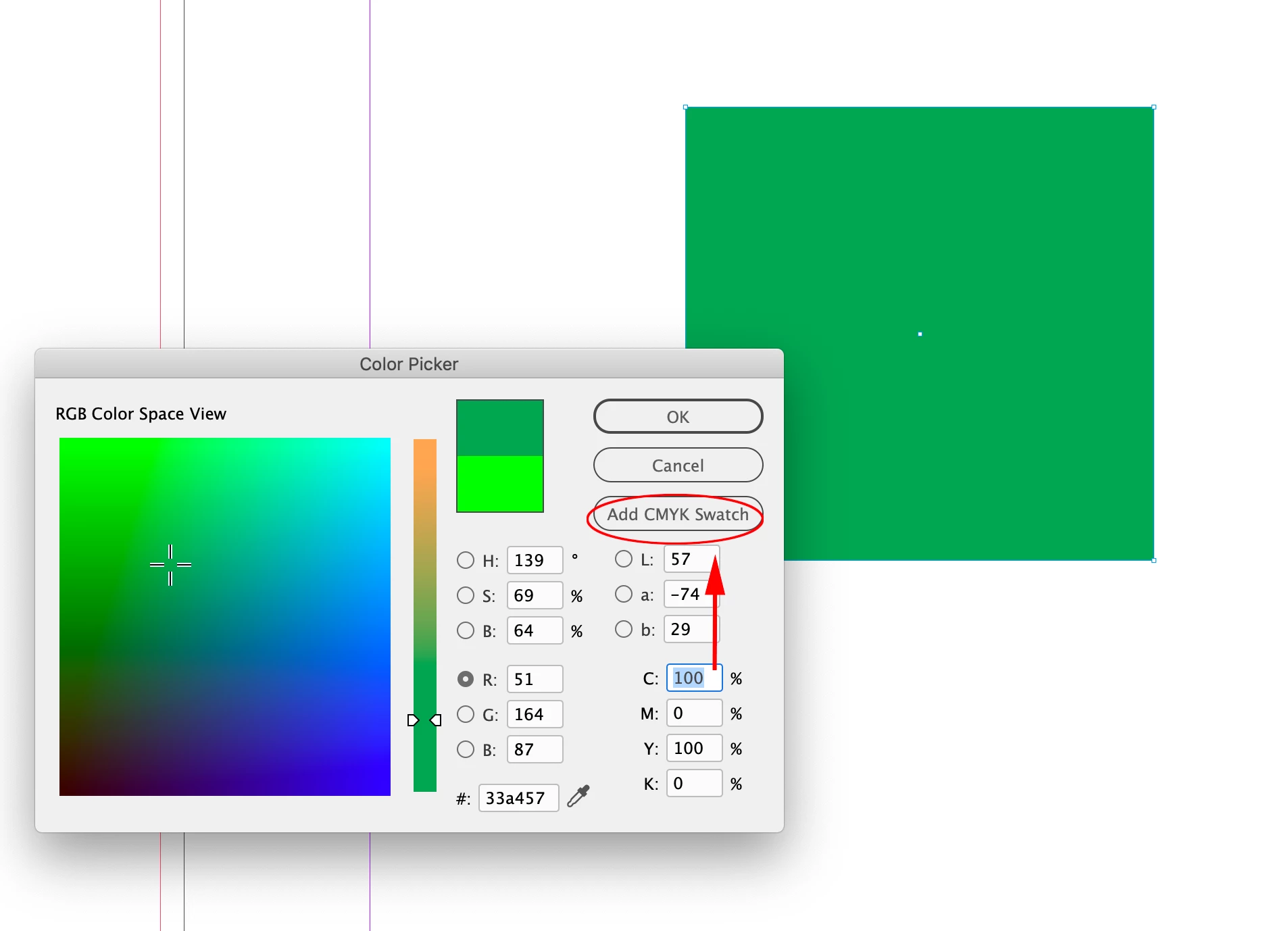
Hi @MiandaPhotography , InDesign lets you mix CMYK, RGB, and Lab colors in the same document. The Color Picker is context sensitive, so your screen capture is showing the conversion of the chosen RGB color to CMYK because your cursor is in one of the C,M,Y,K value fields:


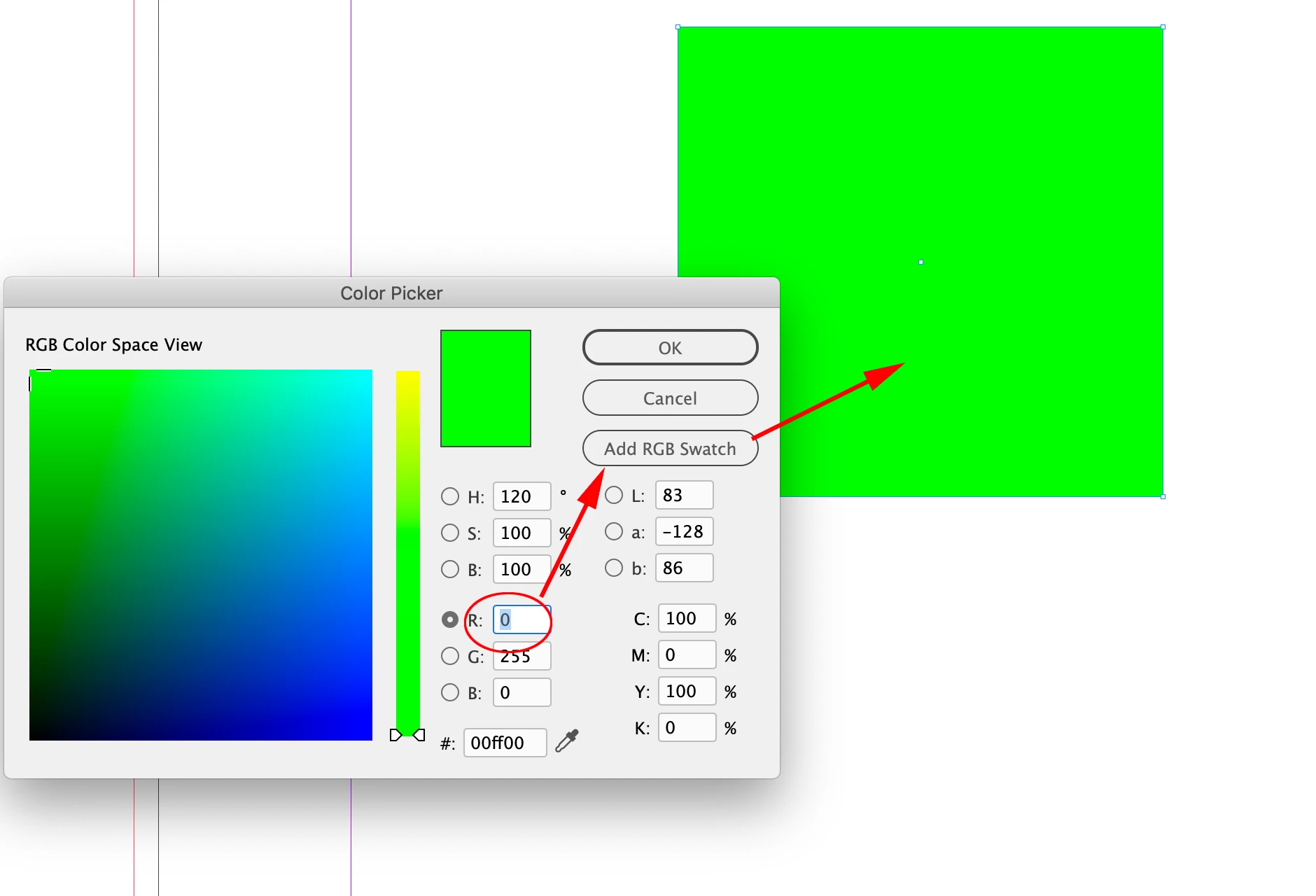
If you select one of the R,G, or B value fields, the Add Swatch button will change to Add RGB Swatch and you will be able to use the RGB color for a color fill:


Also, InDesign does not have a document color space the way Photoshop and Illustrator do, but it does have a Transparency Blend Space, which affects the preview when there is any transparent object on the spread.

1 reply

jmlevy
Community Expert
June 13, 2023

C'est parce que les couleurs que tu choisis sont converties en CMJN.

Si tu veux conserver les valeurs RVB, il faut choisir ce mode de couleur dans la palette couleur. 

Ensuite, tu pourras conserver en RVB les couleurs choisies.

Mais quel est la finalité de ce document ? S'il est destiné à être imprimé, il sera de toute manière converti en CMJN.

New Participant
June 13, 2023

Hello,

Un tout grand merci!


C'est pour une étiquette de bière. Donc en effet, pour impression.


Cela dit, je ne parviens toujours pas à afficher la couleur "réelle". Cad, même en faisant cela, la couleur qui apparait à l'écran reste fade (moins vive qu'elle ne devrait l'être).


Par exemple, après la manipulation dont vous parlez:


Je vais au plus loin dans le spectre pour avoir une couleur vive (j'exagère pour l'exemple),

J'obtiens une couleur moins vive que celle sélectionnée:

Un grand merci d'avance pour votre aide.

rob day
rob dayCorrect answer
Community Expert
June 13, 2023

Je m'en doute mais au cas où, je préfère demander 🙏


Hi @MiandaPhotography , InDesign lets you mix CMYK, RGB, and Lab colors in the same document. The Color Picker is context sensitive, so your screen capture is showing the conversion of the chosen RGB color to CMYK because your cursor is in one of the C,M,Y,K value fields:


If you select one of the R,G, or B value fields, the Add Swatch button will change to Add RGB Swatch and you will be able to use the RGB color for a color fill:


Also, InDesign does not have a document color space the way Photoshop and Illustrator do, but it does have a Transparency Blend Space, which affects the preview when there is any transparent object on the spread.