Participating Frequently
April 23, 2019
Answered

Inconsistent spaces between words

  • April 23, 2019
  • 2 replies
  • 5646 views

I’m currently designing a book cover and the spacing between the words are inconsistent. Some spaces are big, others are smaller. The paragraph justification is left aligned and I’m not quite sure how to fix this. Please can someone advise?

    This topic has been closed for replies.
    Correct answer Grant H

    i just changed it to 'left align' (see screeshot below) and whilst the spacing is fine, i dont want everything to be pushed onto the left. How can i keep the spacing below without everything being left aligned?

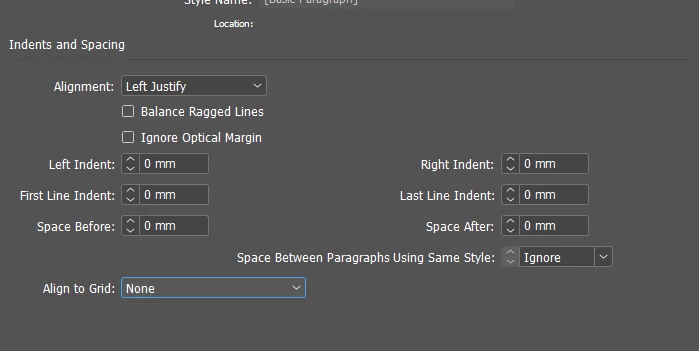
    i checked my indents and spacing settings and it is on left (see screenshot)


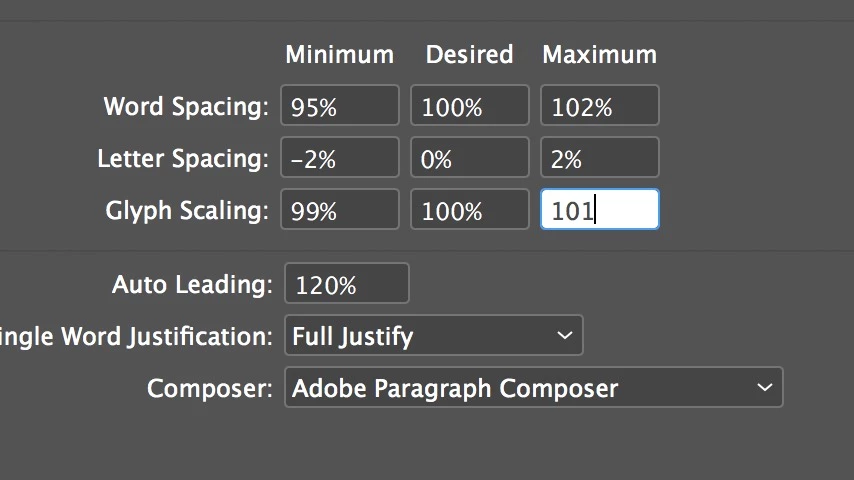
    you need to adjust your justification settings:

    for eg

    until it looks good.

    2 replies

    Willi Adelberger
    Inspiring
    April 23, 2019

    SHow us a screenshot from the paragraph settings in the section Justification.

    reneg1926Author
    Participating Frequently
    April 23, 2019

    Please see the screenshots of the actual issue and the paragraph setting

    Jongware
    Braniac
    April 23, 2019

    That is not "left aligned", that is fully justified -- more likely, "Left Justify" in your Paragraph Style definition; all lines are justified except for the last, which is left. That's why there also are options named "Centre Justify" and "Right Justify". The Control Panel shows more proper descriptions in the tooltips for the various options: "Justify with last line aligned left" for what you probably have now, vs. "Align left" for what you describe you want.

    It has nothing to do with the Justification settings and this problem will disappear if you use plain "Left" as alignment in the Indents .& Spacing part of your style, or if you did not use styles, click the correct button in your Control panel:

    Bill Silbert
    Braniac
    April 23, 2019

    Can you post a screen shot showing exactly what is happening?

    reneg1926Author
    Participating Frequently
    April 23, 2019

    Hi Bill,

    Please see a screenshot of the issue