Inspiring
July 26, 2019
Answered

Inconsistent thickness of table cells in InDesign 2019 on macOS Sierra

  • July 26, 2019
  • 4 replies
  • 1783 views

Anyone have any idea why I am getting strange, inconsistent thickness rules at the top edge of a table? All the specs seem to be correct. Sorry, I don't know how to attach an image to show what I mean. Thanks in advance.

{Renamed by MOD}
    This topic has been closed for replies.
    Correct answer Barb Binder

    Hi Studio Z Design:

    We need to check the text settings so would you mind reposting with live text (not outlines)?

    ~Barb


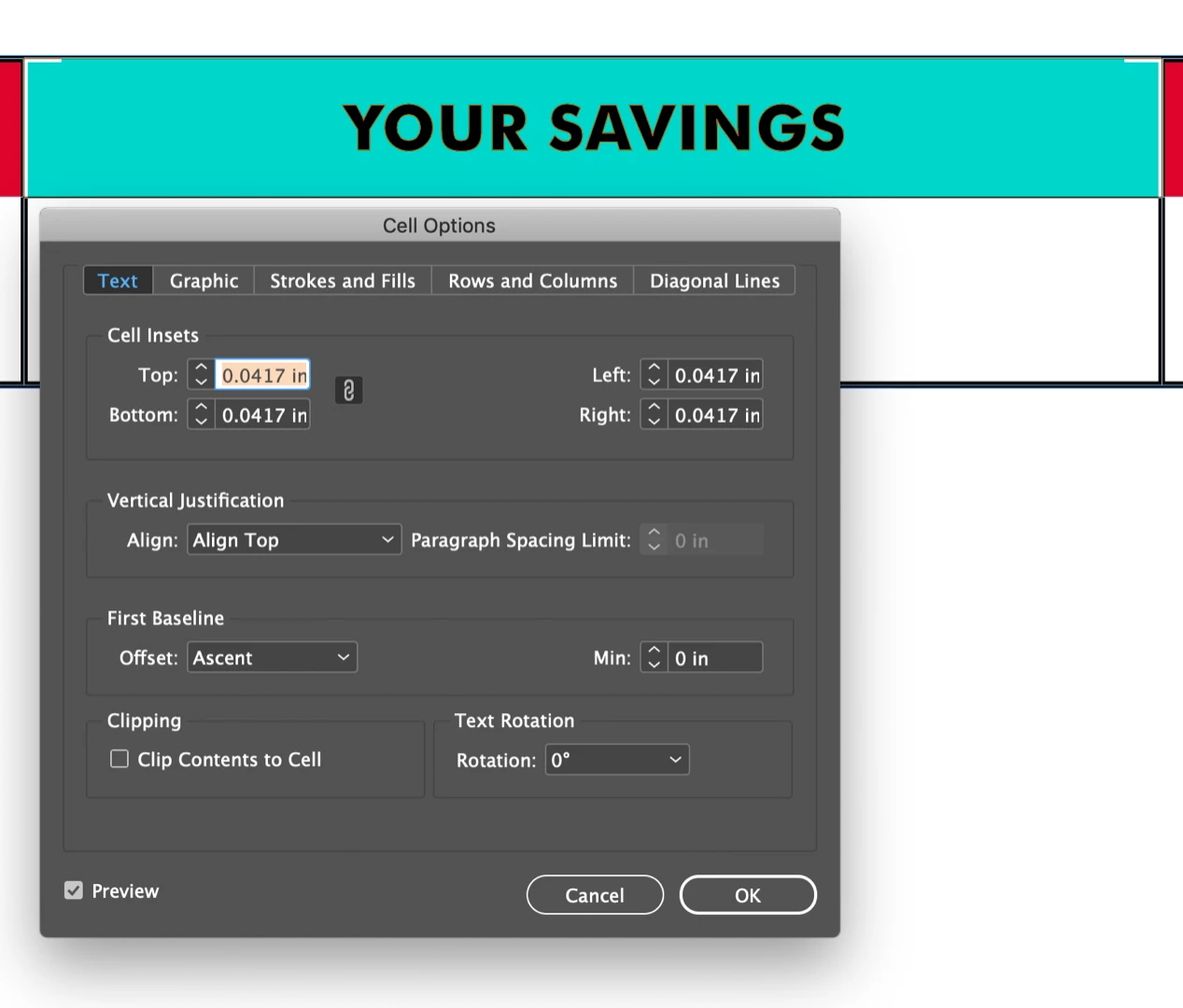
    Nevermind, it was the cell settings. Select Clip Contents to Cell.

    ~Barb

    4 replies

    davidc69929907
    Inspiring
    July 26, 2019

    Have you tried printing it? Sometimes I'll get weird on screen bugs like this that print just fine.

    Barb Binder
    Community Expert
    Community Expert
    July 26, 2019

    Hi Studio Z Design:

    That is very odd. Are you comfortable sharing the table? You can put it on dropbox and post a link here (public) or hover over my name above and message me directly (private).

    ~Barb

    ~Barb at Rocky Mountain Training
    Inspiring
    July 27, 2019

    Here is a Google Drive link. I hope that you can access the file this way. I have converted the text to outlines so as not to confuse the issue. Thanks once again.

    https://drive.google.com/open?id=1EgOowHitMOgovbwity_O5i86pQkM2qIu

    Barb Binder
    Community Expert
    Barb BinderCommunity ExpertCorrect answer
    Community Expert
    July 27, 2019

    Hi Studio Z Design:

    We need to check the text settings so would you mind reposting with live text (not outlines)?

    ~Barb


    Nevermind, it was the cell settings. Select Clip Contents to Cell.

    ~Barb

    ~Barb at Rocky Mountain Training
    Srishti Bali
    Community Manager
    Community Manager
    July 26, 2019

    Hi there,

    Thanks for reaching out. In addition to screenshots requested by John, I would request if you can share a few more details like:

    • OS and version of InDesign
    • Is the issue related to a specific document? If yes, could you please share the document with us? You can upload it to the creative cloud and share the download link.

    Regards,

    Srishti

    Inspiring
    July 26, 2019

    OS 10.12.3

    InDesign 14.0.2.324

    Here's a screen shot showing the thick and thin rules. All are specified as .5 Points. Thanks once again.

    Inspiring
    July 26, 2019

    Neat. Like noted above, try printing. Have you tried different zoom levels? Maybe it's just a display error. Is this from InDesign or a PDF export?

    If it's legit and not just a display glitch, then take a look at your paragraph style for whatever you're using on that cell text. The fact that you have corner strokes showing suggests it may be some overlapping. Someone mentioned strokes or underlines earlier. Check your paragraph style to see if you have any weird underline settings using the same color red as your table cell. Or it could be a weird Paragraph Shading setting you have in there.

    I was able to recreate a similar effect as your sample by making a crazy Paragraph Shading style effect. The corners show the margins of the cell, but the overlap (in my case, at least) is from the Top Edge set to Leading. See the screen shot and compare to your paragraph style.

    If you're not using paragraph styles, then just open the Paragraph window from under Windows/Type and Table/Paragraph. In the Paragraph window, click the context menu icon top-right and choose Paragraph Borders and Shading... from the list.

    Maybe?

    John Mensinger
    Community Expert
    Community Expert
    July 26, 2019

    A table lives in/as a paragraph, so it could be that paragraph has a Paragraph Rule (Above) applied. Check into it. Aside from that, truly understanding the table stroke proxy can be a trip hazard for many users, so push yourself through all the possibilities there too.

    Screenshots always help. Often you can just paste it right into the body of your post in the forum's post editor, or, use the Insert Image feature on the editor's toolbar:

    Inspiring
    July 26, 2019

    Here's a screen shot of the problem. It occurs at the top of each cell in the table.Note the thick and thin rules. All are specified at .5 Points. Thanks once again.

    John Mensinger
    Community Expert
    Community Expert
    July 26, 2019

    https://forums.adobe.com/people/Studio+Z+Design  wrote

    Well damn, I don't think I've ever seen that before.

    It occurs at the top of each cell in the table.

    Well, not the one on the left of your screenshot . . . (?)

    Also, I have to question why the entire cell isn't red-filled. Is there possibly a Paragraph Rule or Underline applied to the text in the cell?