Exit
  • Global community
    • Language:
      • Deutsch
      • English
      • Español
      • Français
      • Português
  • 日本語コミュニティ
  • 한국 커뮤니티
0

Indesign (17.1) not loading Illustratror (26.1) effects

Community Beginner ,
Mar 29, 2022 Mar 29, 2022

Whenever I create extra lines or fills in Illustrator to enhance texts, at some point they stop being imported into my Indesign project.

I would really like it if my Indesign represents my files as I create them. How can I achieve this functionality?


Illustrator file: with white borderlines
Illustrator file with lines.png


Indesign import: without white borderlines.

Indesign import with out white lines.png

TOPICS
Bug , Import and export , Print
544
Translate
Report
Community guidelines
Be kind and respectful, give credit to the original source of content, and search for duplicates before posting. Learn more
community guidelines

correct answers 1 Correct answer

Community Beginner , Mar 29, 2022 Mar 29, 2022

We're getting warm...
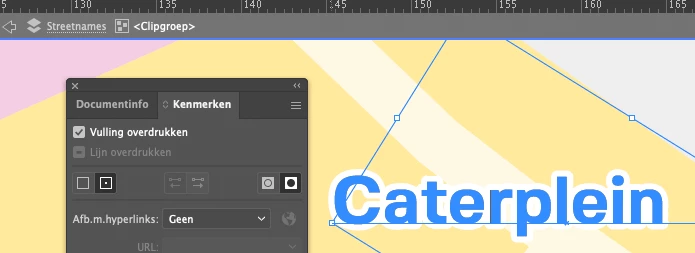
First, I made a solution by saving the Illustrator file as .pdf, then there are no overprint (overdrukken) errors.

The .ai has an overprint on the fill and on the line but how it receives its overprint setting is to be a mystery.

Schermafbeelding 2022-03-29 om 17.30.42.png

I can remove the overprint from the fill but not from the line, how and why I don't know but now that I've found a workaround by creating a .pdf from the .ai file. I'm going to stop searching.

Strangely enough, the .pdf doesn't have any overprint in it

...
Translate
Community Beginner ,
Mar 29, 2022 Mar 29, 2022

Thus far I tried:

  • removing the file from the Indesign project and re-importing it
  • creating new Indesign file


Translate
Report
Community guidelines
Be kind and respectful, give credit to the original source of content, and search for duplicates before posting. Learn more
community guidelines
Community Expert ,
Mar 29, 2022 Mar 29, 2022

My guess:

Somehow the white strokes are overprinting and you have turned on Overprint Preview in Adobe InDesign.

Will the white strokes show up in InDesign if you turn off Overprint Preview?


FWIW: Even if they show up after doing that, it's an issue you should correct in Illustrator.


Regards,
Uwe Laubender

( ACP )

Translate
Report
Community guidelines
Be kind and respectful, give credit to the original source of content, and search for duplicates before posting. Learn more
community guidelines
Community Beginner ,
Mar 29, 2022 Mar 29, 2022

We're getting warm...
First, I made a solution by saving the Illustrator file as .pdf, then there are no overprint (overdrukken) errors.

The .ai has an overprint on the fill and on the line but how it receives its overprint setting is to be a mystery.

Schermafbeelding 2022-03-29 om 17.30.42.png

I can remove the overprint from the fill but not from the line, how and why I don't know but now that I've found a workaround by creating a .pdf from the .ai file. I'm going to stop searching.

Strangely enough, the .pdf doesn't have any overprint in it.


When changing my Indesign setting to view overprint it doesn't change anything.

For me this problem is solved.


Translate
Report
Community guidelines
Be kind and respectful, give credit to the original source of content, and search for duplicates before posting. Learn more
community guidelines
Community Expert ,
Mar 29, 2022 Mar 29, 2022

Hi Joost,

alright, your issue is resolved. Somehow…

I'm curious, though. Could you share an Illustrator sample file with just that one word "Caterplein"?

Maybe we still see a bug with InDesign and the PDF layer of information with saved AI files?

In opposite to saved PDF files from Illustrator.


Thanks,
Uwe Laubender

( ACP )

Translate
Report
Community guidelines
Be kind and respectful, give credit to the original source of content, and search for duplicates before posting. Learn more
community guidelines
Community Expert ,
Mar 29, 2022 Mar 29, 2022

Did a little bit of testing with Illustrator and InDesign.


Guess what, I now can see the exact opposite issue.

Set up a white stroke that I intentionally is set to overprint in Illustrator. Also the fill color is set to overprint:

0-AI-OverprintPreview-OFF.PNG


If I turn on Overprint Preview in Illustrator the stroke does not show, the fill will overprint like that:


0-AI-OverprintPreview-ON.PNG


But I cannot save or export the AI file with that overprint attributes of the white stroke and the cyan fill.

If I place the AI file in InDesign the white stroke is always there, the fill does not overprint.

If I save to PDF/X-4 without any color conversion it's all the same:


1-Placed-AI-and-PDF-in-INDD-OverprintPreview.PNG


Illustrator 2022 and InDesign 2022 on Windows 10.


The strange thing; In my Windows 10 file system's Explorer I can see the overprinting effects on the AI file's preview:

3-Preview-of-AI-file-in-Windows-Explorer.PNG

Regards,
Uwe Laubender

( ACP )

Translate
Report
Community guidelines
Be kind and respectful, give credit to the original source of content, and search for duplicates before posting. Learn more
community guidelines
Community Beginner ,
Mar 30, 2022 Mar 30, 2022

Goodmorning Uwe,

Erh... I thought I just posted here, but my message seems to be disappeared.
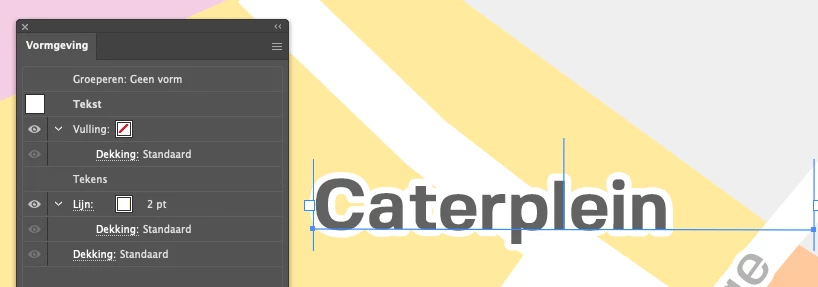
Anyway's here is my "Caterplein" .ai file, I included its clipping group it might be useful.

Also included are two screenshots one from my mac os preview and another of how it looks like in Illustrator.


Maybe this can all be helpful.


Kind regards,

Translate
Report
Community guidelines
Be kind and respectful, give credit to the original source of content, and search for duplicates before posting. Learn more
community guidelines
Community Beginner ,
Mar 30, 2022 Mar 30, 2022
Translate
Report
Community guidelines
Be kind and respectful, give credit to the original source of content, and search for duplicates before posting. Learn more
community guidelines
Community Expert ,
Mar 30, 2022 Mar 30, 2022

Hi Joost,

thank you very much for the files.

Had a look into your AI file, but couldn't find something strange.

So right now I cannot tell what happened to you in the first place.


Will do some additional tests later, because I think I found a bug with Illustrator regarding overprint.

Could also be that this behavior is intentionally; well, we see. I'll discuss this in the Illustrator user forum and let you know about it.


Regards,
Uwe Laubender

( ACP )

Translate
Report
Community guidelines
Be kind and respectful, give credit to the original source of content, and search for duplicates before posting. Learn more
community guidelines
Community Beginner ,
Mar 30, 2022 Mar 30, 2022
LATEST

Hello Uwe,


Thanks for looking into this, well the issues appear when I use additional strokes and fills created in the appearance tab. it could be intentional to get a hierarchy of the additional fills and strokes in order. Alas, my knowledge doesn't go that far.


kind regards,

Translate
Report
Community guidelines
Be kind and respectful, give credit to the original source of content, and search for duplicates before posting. Learn more
community guidelines