
inkling23
Participant
July 9, 2020
Answered

InDesign 2020 (15.1.1) stuck while "activating font" on macOS Catalina

  • July 9, 2020
  • 23 replies
  • 110952 views


CC reports a font could not be activated due to a conflict, yet the "Activating Font" task is stuck until I quit InDesign. When I try to export a PDF, it is stuck behind these never-ending tasks in the queue, thus preventing me from exporting it. Bug?

(MacOS Catalina 10.15.4, Indesign 15.1.1)
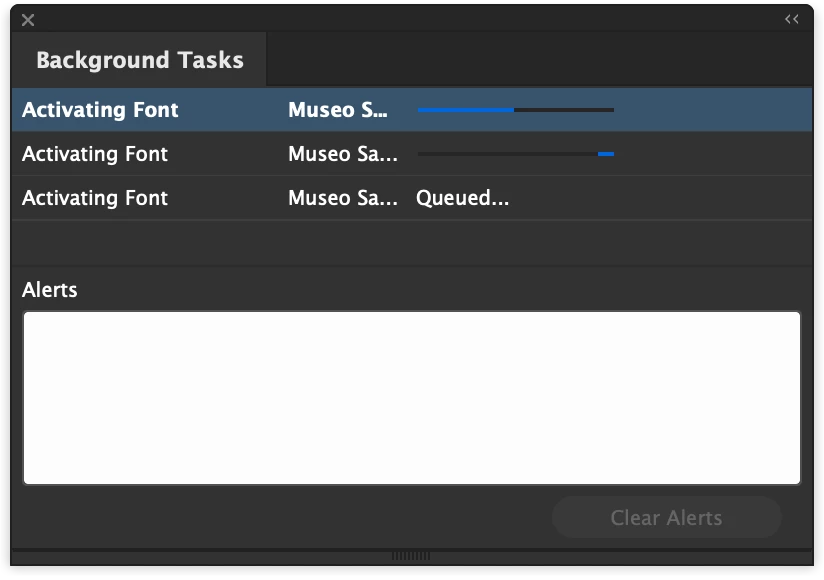


{Renamed by MOD}


Correct answer paulb6672322

I was also stuck in an endless loop of "activating font" - in this case default Minion Pro.


My workaround:

Ctrl + Alt + Delete > End Task

Update Creative Cloud

Update InDesign to 16.0.1


Solved! 

23 replies

Participant
April 1, 2022

I'm now having this issue on InDesign v 17.2.  None of the previous suggestions work.


Participant
February 23, 2022

For your information: There is a third reason, or "correct answer" to this problem. Adobe was having downtime. I tried to re-install and did lots of testing without luck. Then I visited https://status.adobe.com/ and could see the whole font-repository was offline


Participant
February 24, 2022

Wish I saw this 3 hours ago before I uninstalled everything 7 times over.

Participant
February 2, 2022

What an incredible embarrasment for Adobe. Let's leave alone the fact that this font was a basic common font available on the install of my home office but somehow not already set up at my work office - one two brand new vanilla machines with no fonts installed! Let's leave alone that shouldn't even be a problem.

Lets just look at the fact that I can't export while this bug is in play - lets just look at the fact that this ran in the background for days without a resolution or time out. Let's look at the ever increasing fees we pay for this software and the GOT YOU NOW terms and conditions that bind us!


Lazy, Poor, Hopelessly imcompetant programing. There is simply no excuse.

Steve Traynor
Participating Frequently
February 17, 2022

I've been frantically trying to solve this same problem this morning. I've tried all the previous suggestions and now I'm stuck in a Reactivating/Deactivating loop.

I honestly don't know what to do at this point, aside from using fonts that are not Adobe. 

Creative Cloud 5.6.5.58
Indesign v. 17.0

BobLevine
Community Expert
Community Expert
February 17, 2022
martinb
Participant
September 10, 2021

For me, this worked:
– Deactivate Adobe Fonts
– Reboot InDesign and delete preferences (Restart InDesign while pressing Shift+Option+Command+Control. Click 'Yes' when asked if you want to delete preference files.)

Participant
July 5, 2024

Thanks, bruv. This helped.

Participant
August 26, 2021

I've tried all this multiple times in different combinations and still get the fonts stuck in an activation loop in the background task window. Also, I can't access the fonts in CC desktop. The page is blank and I get a perpetual wait wheel. This is the issue on my new Macbook Pro 13" M1. Not sure if this helps. On my desktop I've got no issues. Not great if I want to work while away from my home. 


In terms of workflow, I'm accessing ID files over a remote server. Not sure if that matters. I thought maybe the CC desktop app issue is linked to the fonts not activating in ID.      

Participant
August 26, 2021

Thinking maybe it was a file migration issue -- I transferred all files over from another mac -- I also repaired CC desktop app. That didn't work. I tired signing out of CC on my desktop. Nothing. 

Participant
August 26, 2021

I did a fresh reinstall using the M1 installer and that did the trick. 

Participant
July 6, 2021

Had the same issue; couldn't export to PDF because font activations were running as background tasks. I just got off the Adobe support line, they gave me a fast solution that WORKED:  

In InDesign, click on the Preferences > File handling > in the bottom of this window there is a option of Fonts , under that you will see "auto-activate adobe fonts", please check if that is enabled. If it is enabled, DISABLE IT. Then quit/close out of InDesign, and then reopen.  Then the issue should be resolved...

christianf72638907
Participant
August 19, 2021

This worked great, thank you!

Participant
June 23, 2021

Thank goodness I had saved my work and the problem started when I tried to export a PDF. I could not resve the file because of ongoing background tasks having to do with syncing fonts. I was able to quit InDesign and when I restarted, the fonts were synced and the PDF was exported without any problems. So try the usual quit, maybe forece quit, maybe restart your computer and reload the fonts you need, then restart InDesign and reopen the file. I didn't have to go through all those steps, but that's the sort of cleaning process I would have gone through. Thank you for pointing me to the background tasks panel.

paulb6672322
paulb6672322Correct answer
Participant
January 28, 2021

I was also stuck in an endless loop of "activating font" - in this case default Minion Pro.


My workaround:

Ctrl + Alt + Delete > End Task

Update Creative Cloud

Update InDesign to 16.0.1


Solved! 

Participating Frequently
August 19, 2021

Hi, are you on windows? 

Participant
November 13, 2020

I signed into adobe fonts deactivated and reactivated the activating font in question which fixed the issue before I could export anything!

Known Participant
September 29, 2020

what an absolute fcking joke this is.

Known Participant
September 29, 2020

I can't even quit out of indesign because these stalled process prevent qutting. this is embarassing. shame on you adobe. 

mbuiles
Participant
November 18, 2020

I absolutetly understand your frustation, im exporting a job at 1:24 am and this happens, its even syncing fonts that arent in the document.

My work around:

1-De-activate the font THAT YOU ARE USING in adobe cloud.

2. in IDD in preferences/file handling de-activate "sync font automatically" (this will change your font for a while)

3. Re activate the font in Adoble cloud

4. Re-activate "sync font automatically"


Hope it helps, awful bug though