


Participant
June 24, 2020
Question

InDesign 2020 User Interface Too Small

  • June 24, 2020
  • 11 replies
  • 7183 views

I have been unable to increase the size of the User Interface in InDesign. I am using a Lenovo Yoga laptop with 64 bit Windows 10. Illustrator and Photoshop are scaled up (too big but at least I can read them without squinting) and InDesign is not. Below is an image of the comparison between the two.
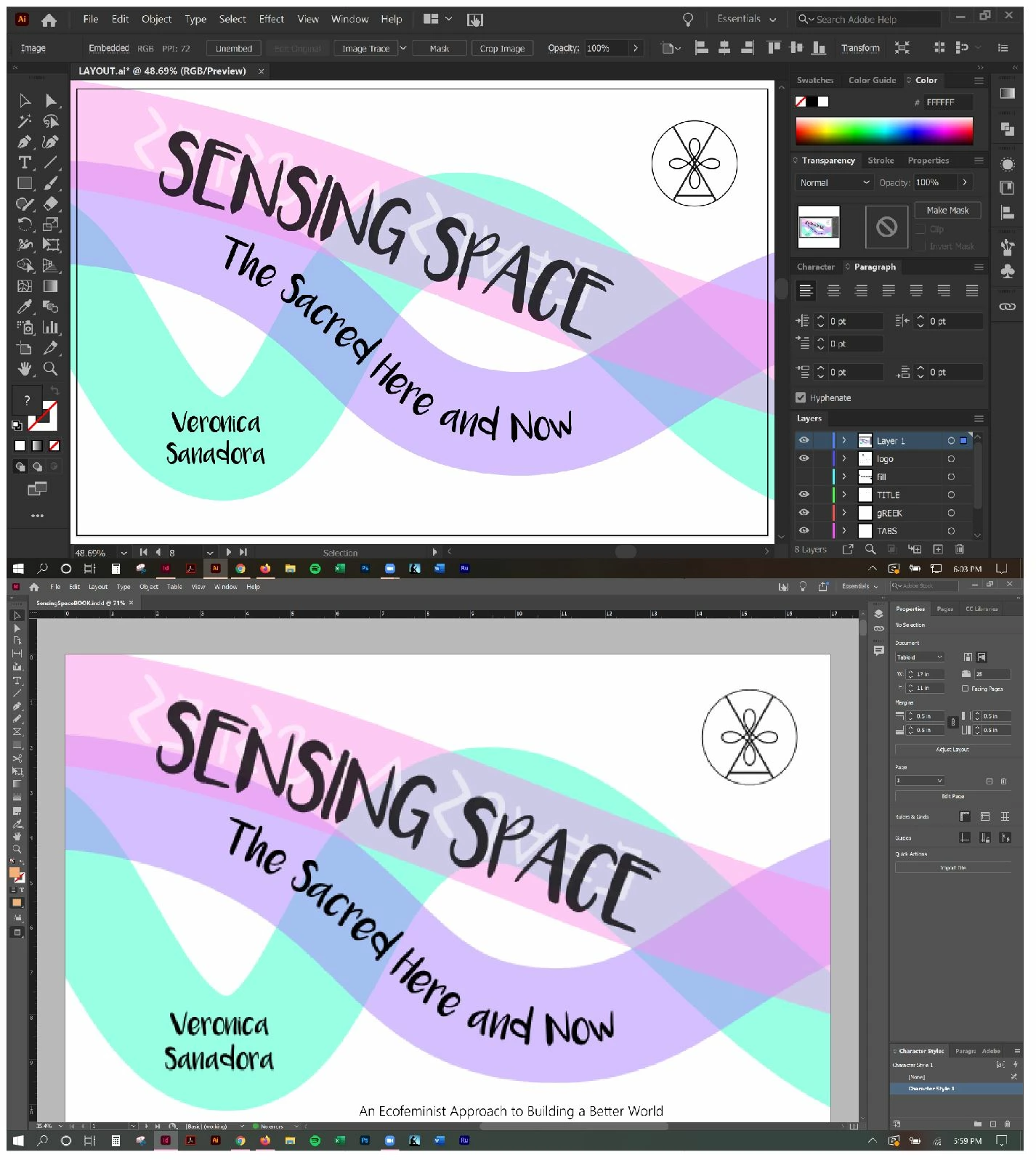
 

The settings under Preferences > UI Scaling only make the application appear smaller.


Thank you for your advice and support...

This topic has been closed for replies.

11 replies

Dave Creamer of IDEAS
Community Expert
Community Expert
February 17, 2021

I have an XPS-15--here are screen shots at the Windows Display 200% setting and the 250% setting for both InDesign and Illustrator. The images are uploaded at the same medium setting, so they are relative to each other. As you can see, both programs change.

David Creamer: Community Expert (ACI and ACE 1995-2023)
Participant
March 17, 2021

Creamer Training - I have an XPS 15 as well, but I don't have any options of adjusting the setting of the UI scaling in InDesign. How did you adjust?


Dave Creamer of IDEAS
Community Expert
Community Expert
March 17, 2021

It wasn't done in the programs, it was done in the Windows display setting.

Start menu > Settings > System > Display > Scale and Layout

David Creamer: Community Expert (ACI and ACE 1995-2023)
Bevi Chagnon - PubCom.com
Legend
December 10, 2020

Update for 2021:

I've successfully increased the GUI size in Windows 64 in InDesign 2021. 

But it's still a bit dicey when you view some dialogue boxes, especially larger ones that can get clipped off, like the Paragraph Styles definition dialogue.


These 3 screen caps are from a high-res laptop (primary screen 2736 x 1824 resolution) with an external monitor 1920 x 1200 resolution.


Below: Laptop at its recommended resolution and scaling gives a passable GUI size.


External Monitor at its recommended resolution and scaling is unuseable.


External Monitor increased to 150% scaling gives a usable GUI size. Any higher and dialogue boxes are clipped.


I'm going to test this 3rd setting for the next couple of weeks to see:

  1. How stable it is. Previouis scalings have made InDesign crash and perform irratically.
  2. If any dialogue boxes are clipped.


|    Bevi Chagnon   |  Designer, Trainer, & Technologist for Accessible Documents ||    PubCom |    Classes & Books for Accessible InDesign, PDFs & MS Office |
Bevi Chagnon - PubCom.com
Legend
February 12, 2021

The last setting for the external monitor is working well, even in  online training sessions.

But I'm getting some wonky stuff when Acrobat is on the 1st example of the laptop: the top portion of the Acrobat application window is both cut off and overlayed on top of the main screen. Crazy, never have seen this before.

When it happens again, I'll take a screen capture and post it here.


|    Bevi Chagnon   |  Designer, Trainer, & Technologist for Accessible Documents ||    PubCom |    Classes & Books for Accessible InDesign, PDFs & MS Office |
Geоrge
Legend
December 7, 2020

Don't forget to add your voice here - https://indesign.uservoice.com/forums/601021-adobe-indesign-feature-requests/suggestions/32003341-indesign-2018-user-interface-still-too-small - it may be won't fixed by years as now, but all that we can do - add our voice and wait.

Remember, never say you can't do something in InDesign, it's always just a question of finding the right workaround to get the job done. © David Blatner
BobLevine
Community Expert
Community Expert
December 7, 2020

They don't care. I've been complaining for years!


Adobe employees don't even comment (you know...those silly "we're sorry you're experiencing this..." kind of responses) on these complaints the way they do on every other one.

Geоrge
Legend
December 7, 2020

Yes, you are right. But this is only one thing that we can do and they will see this. 


>> I've been complaining for years!

I do ask this - https://indesign.uservoice.com/forums/601021-adobe-indesign-feature-requests more than 10 years through beta feature requests and then trough uservoice. We see that this request is top#1 and they ignore this! We can only ask it and add our voices. 


Remember, never say you can't do something in InDesign, it's always just a question of finding the right workaround to get the job done. © David Blatner
Participant
November 20, 2020

For those who are on windows 10. Try this, helped me. Just turn off High DPI scaling override.


vitaminnn
Known Participant
December 7, 2020

I don't see the "compatability" tab?


Participant
October 29, 2020

I thought Adobe had dealt with this issue and then I get a new laptop (Dell XPS 15 9500) and have the exact same issue as you. So frusterating!


Adobe...please allow greater UI scaling control or fix the issues. All the other CC apps I've used on the new system look great.


I feel like Adobe is abandoning InDesign to develop endless iPhone apps. Please maintain your core applications. I can't find a work around and like terzap have vision issues that make InDesign unusable on my screen.

Participant
October 25, 2020

Agreed. This needs to be fixed. I'm becoming sight-impaired and it's super difficult to work in apps that don't allow me to custom scale items in the interface. 

vitaminnn
Known Participant
September 3, 2020

Well hell.  I was all excited to start learning InDesign this morning and this was the first issue ... the UI super small.

Sounds like it's known and at this point, there's nothing that can be done?  Do I have that right?

jmsobbe
Participant
September 3, 2020

I'm with you. I would like to see an offical response from Adobe on this. This is affecting my usage of the program on my laptop. I have the HP Zbook X2, which is a product that debuted at Adobe Max in 2017. It's over 3 years later and the issue is still a problem. 

https://www.techrepublic.com/article/hp-unveils-worlds-first-detachable-pc-workstation-the-zbook-x2/

eddiepostpones
Participant
September 27, 2020

Exactly the same problem for me. Zbook X2 was developed with adobe software in mind why can't Adobe sort this out?!

Participant
August 25, 2020

I'm seeing this same issue posted beginning in 2018... 2 years and no resolution whatsoever

BobLevine
Community Expert
Community Expert
August 25, 2020

Adobe doesn't care about this.

It's remarkable that they won't even provide an explanation.

Bevi Chagnon - PubCom.com
Legend
July 24, 2020

Also finding that when I use two monitors on a Windows system, the entire InDesign window can go haywire, enlarge beyond the screen. Royal PITA to get back to anything that's usable.


And if the screen's pixel resolution settings are changed, several InDesign dialogue boxes are clipped off.


Can't believe we're having this basic problem at this stage of the programming industry.


|    Bevi Chagnon   |  Designer, Trainer, & Technologist for Accessible Documents ||    PubCom |    Classes & Books for Accessible InDesign, PDFs & MS Office |
BobLevine
Community Expert
Community Expert
July 24, 2020
Totally agree.

The UI scaling tech in InDesign dates back to Windows Vista. It should be an embarrassment and what ticks me off even more is I can't even get anyone to acknowledge it.
jmsobbe
Participant
July 24, 2020

I concur. This is the still an issue with InDesign 2020 15.1.1 x64. I have a HP Zbook X2 with a 4k display built in. The interface settings do not improve the scaling enough to make the program fully usable. The default scale for this device is the 300%.  I do not have thise issue with Illustrator or PS. 
I did not have this issue with my Macbook Pro when running on OS X. 

BobLevine
Community Expert
Community Expert
July 24, 2020
Right. It is only InDesign.

For the life of me I don't get it.