


Inspiring
November 13, 2022
Answered

InDesign 2023 Gradient Panel empty

  • November 13, 2022
  • 3 replies
  • 3978 views

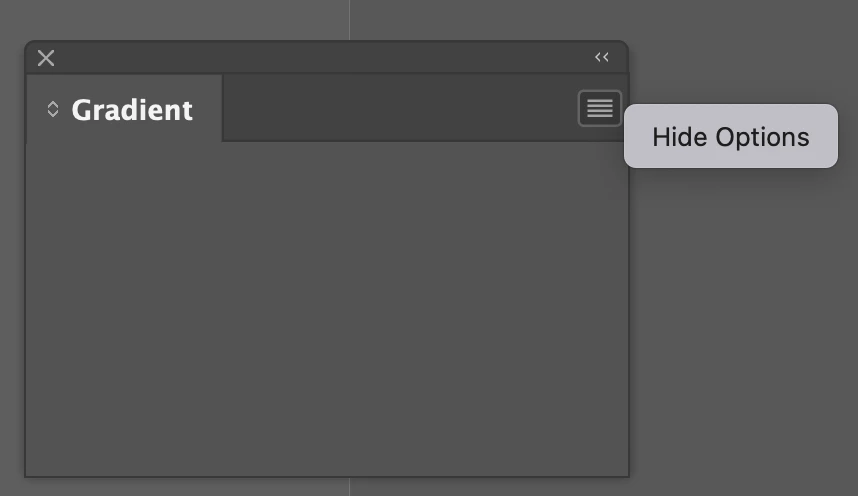
With the last update, my gradient panel in InDesign just shows up empty. Even with a gradient swatch selected, the panel never shows any info, and the menu in the upper right only says "hide options" (see screenshot). Anyone else encounter this or have any suggestions?
Correct answer jerrypennington

I uninstalled InDesign and reinstalled and that seemed to fix the problem...thanks.

3 replies

New Participant
February 13, 2024

I'm having the same issues with the gradient panel. I restarted InDesign which then enabled me to see the gradient box but now I'm not able to change the gradient angle. It won't let me type in the box. I will reinstall but it's a bit annoying to have to keep doing this. Please fix!


jenniferp56247351
Known Participant
March 13, 2024

I'm also having the same issue with the Gradient Panel. Yes it's VERY ANNOYING.

And yes PLEASE FIX THIS!!!!!!!!!!!!

rob day
Adobe Expert
March 13, 2024

And yes PLEASE FIX THIS!!!!!!!!!!!!


Hi @jenniferp56247351 , Did you delete your Caches folder? UI problems like empty panels almost always are Cache related. When it happens delete your Caches before trying to reset your Preferences.


On MacOS delete this folder:

~username ▸ ⁨Library⁩ ▸ ⁨Caches⁩ ▸ ⁨Adobe InDesign⁩ ▸ ⁨Version X.0⁩

HARSHIKA_VERMA
Community Manager
Community Manager
November 18, 2022

Hi @jerrypennington,


Hope you're doing well!


We would like to follow up on your issue. Are you able to resolve the issue by following our expert advice? Please feel free to update the discussion if you need further assistance from us.


We would be happy to help.


Thanks,

Harshika

jerrypenningtonAuthorCorrect answer
Inspiring
November 18, 2022

I uninstalled InDesign and reinstalled and that seemed to fix the problem...thanks.

HARSHIKA_VERMA
Community Manager
Community Manager
November 18, 2022

Glad to hear you are able to resolve the issue and thanks for sharing the solution that worked for you. Please feel free to reach out to us in the future for any query in future.


We would be happy to help.


Thanks,

Harshika

Adobe Expert
November 13, 2022

Hi @jerrypennington:


Rebuild your preference/cache:

https://www.rockymountaintraining.com/adobe-indesign-resetting-preferences-and-deleting-the-cache/


And next time, consider not importing preferences from the prevous version when you install an update. This sort of thing happens more than it should.


~Barb