


New Participant
September 20, 2024
Question

InDesign Crash: Unable to Open Cloud File After Crash

  • September 20, 2024
  • 1 reply
  • 782 views

I was working on an InDesign file saved on the cloud when suddenly it crashed. And when I try to open the file it shows this error.
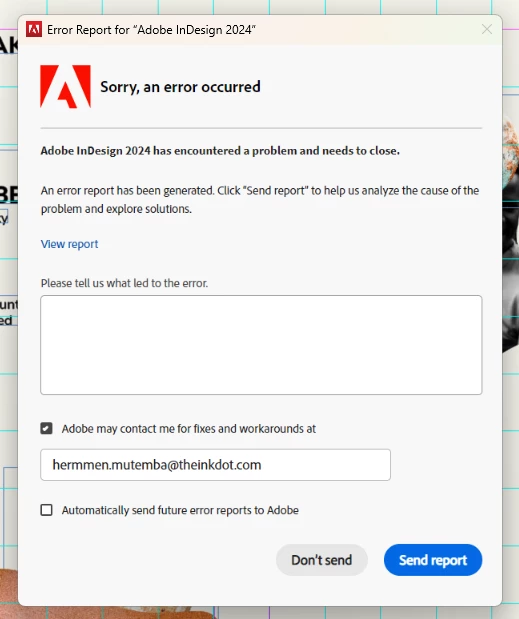
Does anyone have any idea of how I can recover the file?


<Title renamed by MOD>

This topic has been closed for replies.

1 reply

Abhishek Rao
Community Manager
Community Manager
September 20, 2024

Hi @Hermmen33579032zhwf


Sorry about the crashing! I know that's really frustrating. To assist you better, could you please share a few more details? 

- Please confirm the exact version of InDesign you're using and the details of your operating system.
- Can you provide a screenshot of the panel or the message that appears when it crashes?
- Did you try using the CC Cleaner tool to uninstall the app?
- Please submit a crash report by following the steps outlined [here](https://adobe.ly/4dVUBDl). While submitting, ensure to use the same email address you are signed in with on this community, so we can find the crash report and assist you accordingly.


Additionally, you can try the following steps to recover your file and resolve the issue:

- Try running the app in Safe Mode (Mac) or Root account (Mac) if you're on macOS.
- Close all Adobe applications and manually reset preferences by renaming the following folders:
  - '~/Library/Caches'
  - '~/Library/Preferences'
  Rename the folders "Adobe InDesign" and "com.adobe.InDesign" to "Adobe InDesign.old" and "com.adobe.InDesign.old", then relaunch InDesign from the Creative Cloud app.
- Rename the "CEP" folder to "CEP.old" from this location: '/Library/Application Support/Adobe'.
- If that doesn’t help, rename the "UXP" folder to "UXP.old" from the following location: 
  `/Library/Application Support/Adobe` 
  `~/Library/Application Support/Adobe`.

You can also refer to this article for additional help: [Fix crash issues when launching InDesign](https://adobe.ly/4cD88i8).


We’re here to help and just need a bit more information to proceed.


Thank you,  
Abhishek Rao

New Participant
September 23, 2024

Details:
- the InDesign version I am using is the 19.5 and I am using a Windows 11 Home
- find the screenshot attached
- I dont believe the CC Cleaner will help cause since the doc is in the cloud I tried to open it in other computer and the same thing happened
- I have already submitted a crash report

thank you


Abhishek Rao
Community Manager
Community Manager
September 23, 2024

I just tried it and weirdly it doesn't show the timeline icon


Hello @Hermmen33579032zhwf


Thanks for the update. Could you please share a screen recording of the workflow while opening the cloud document? Also, is the issue specific with a specific cloud files or all the could files? 


Please let us know. We will wait for your response. 


Thanks, 

Abhishek Rao