


New Participant
October 23, 2024
Answered

InDesign Crashing When Importing PDF Comments

  • October 23, 2024
  • 3 replies
  • 733 views

Hi everyone, 

I've been having issues importing PDF comments into InDesign.

Initially, I had this popup
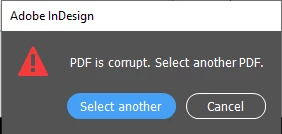
But I managed to bypass that by importing the comments in parts and some comments just don't work.  

However, now InDesign crashes every time I try to import comments.

Has anyone know of a solution or what's causing this?


Any help would be appreciated. Thanks!


<Title renamed by MOD>

Correct answer Abhishek Rao

Hi @INSTITUTO25076188l1zi,


Thank you for the details. Since the issue occurs across versions (19.3 and 20.0) and multiple files, it likely relates to specific comments.

Please try to isolate the comment causing it:

1. Import comments in smaller sets to isolate any problematic ones that may cause crashes.

2. Remove or simplify non-standard annotations in the PDF before re-importing.

3. Try re-exporting the PDF using standards like PDF/X-4.

4. You can try importing comments in a new InDesign document to rule out conflicts.

5. Please ensure your Windows 10 is up-to-date, as outdated files can affect app behavior.

Let me know if any of these help or if the issue persists.


Looking forward to your feedback!


Thanks, 

Abhishek Rao

3 replies

Fred.Lipari
New Participant
August 22, 2025

Hey folks,


since the crashes keep happening, I kept  searching for a better solution, less time consuming than exporting the PDF from the ID file which may take quite some time. I think I may have found a more viable solution, simple to do and very quick. Let's say between 30s and 1 min. Through the use of scripts it may even become quicker, but using script in Acrobat is a bit cumbersome to me.


The sequence is :

- From Adobe Acrobat, export the comments as Data File, ie .fdf (from the menu in the comments panel.)

- Delete the comments, either manually or via script (see below). I didn't find any easy way to delete them. "Select all" shortcut doesn't seem to work apparently.

- Save the PDF as PDF/X (for some reasons, I get an error if I try to save the PDF if there are still the comments in it. Therefore, comments have to be exported/ deleted before creating a new PDF/X)

- Import the .fdf Data file and save the PDF (usual way)

- Go to Indesign and import the pdf comments. There should be no crash. I had none so far.


Code for deleting the comment all at once:

syncAnnotScan();              // Force Acrobat to scan/synchronize the document's annotations
var annots = getAnnots();     // Retrieve all annotations from the active PDF
var i; 
for (i = (annots.length - 1); i > -1; i -= 1) {
    annots[i].destroy();      // Delete each annotation (one by one, starting from the end)
}


Hope it will help someone at some point ^^

Fred

Fred.L
Inspiring
July 3, 2025

Hey there,

I'm jumping in to share my expericence about it.


I had this issue many (like, a great many) times. Going for PDF/X-4 doesn't work very well for me. However going for PDF/X-3 does solve it most of the time.

Which means, practically speaking:

- Export the ID file using PDF/X-3

- Export .fdf from old PDF

- Import .fdf in the new PDF/X-3 generated

- Import PDF comments of the new PDF in ID


I understand that importing comments in smaller sets may help as well, but it's a no go when you have hundreds of comments in a pdf. It would very time consuming. I wish we could also import a .fdf file in ID, rather than just a PDF. That would help as well.


We are a company that makes books for the game industry and the use of PDF comments is extensively used. I would say I'm dealing with about 300 commented pdf per year. Some of the pdf may have as much as 400+ comments in them.

Being able to import comments in an ID file is a HUGE help for saving time. 

Thank you for having this feature in Indesign. It's gold!

New Participant
July 30, 2025

I also work with book production, and it really is a feature that helps save a lot of time when it works properly.
At first, I was also exporting to PDF/X-3 and had the same issues, in the specific case mentioned above, PDF/X-4 worked.

But it's still a feature that doesn’t always work. Sometimes I make the PDF changes manually.
I’ve tested with larger and smaller PDFs, or by segmenting the comments. I even changed part of the process to ensure there’s no version conflict between the PDF and the InDesign file.
I still can’t be sure what the source of the conflict is.

Abhishek Rao
Community Manager
Community Manager
October 23, 2024

Hi @INSTITUTO25076188l1zi,


I’m sorry to hear that you’re experiencing issues with importing PDF comments into InDesign. To help troubleshoot, could you please share the following details?

  1. Version of InDesign you’re currently using.
  2. Operating System (OS) details.
  3. Is this issue occurring with a specific PDF file, or are you experiencing it with multiple files?

Additionally, it would be helpful if you could share a screen recording that demonstrates the entire workflow leading up to the crash. This will give us a clearer picture of what might be causing the problem.

For now, here are a few steps that might help resolve the issue:

1. Sometimes, certain PDF comments can cause issues. You can try importing the comments in smaller batches to identify if any specific comment is causing the crash.

2. Try resetting preferences of InDesign. To do this, hold down Ctrl+Alt+Shift (Windows) or Cmd+Option+Shift (Mac) while launching InDesign. Reference: https://adobe.ly/40hOqWY

3. If the issue persists with a specific file, try recreating the PDF or saving it with a different PDF version (e.g., PDF/X-1a) and then attempt the import again.

Let me know if any of these solutions work or if the issue continues. Looking forward to your response!


Best,

Abhishek Rao

New Participant
October 23, 2024

Hi Abhishek Rao,

1. I'm currently using version 19.3 but experienced the same issue on version 20.0.

2. Running on Windows 10.

3. The problem occurred with multiple files.


I attempted to re-export the PDF and import the comments using an FDF file, but it didn't resolve the issue. I suspect a specific comment might be causing the problem, as importing in smaller batches worked for some files (It doesn't seem to be related to the number of comments or the file size). 

Abhishek Rao
Community Manager
Abhishek RaoCommunity ManagerCorrect answer
Community Manager
October 23, 2024

Hi @INSTITUTO25076188l1zi,


Thank you for the details. Since the issue occurs across versions (19.3 and 20.0) and multiple files, it likely relates to specific comments.

Please try to isolate the comment causing it:

1. Import comments in smaller sets to isolate any problematic ones that may cause crashes.

2. Remove or simplify non-standard annotations in the PDF before re-importing.

3. Try re-exporting the PDF using standards like PDF/X-4.

4. You can try importing comments in a new InDesign document to rule out conflicts.

5. Please ensure your Windows 10 is up-to-date, as outdated files can affect app behavior.

Let me know if any of these help or if the issue persists.


Looking forward to your feedback!


Thanks, 

Abhishek Rao