


saqibm7575
Participating Frequently
January 29, 2019
Answered

Indesign created a new URL link to the same file...

  • January 29, 2019
  • 2 replies
  • 1443 views

Hello Everyone!

I created and published my portfolio through Adobe InDesign and I never had this issue before... For some odd reason my InDesign created a new link to my portfolio (New Url) even though while "Update Existing Document" was selected during the exporting. Normally this is not a issue for me, but I recently sent out my portfolio link on job applications, and noticed a major error that needed to be fixed... sadly when I republished It, it created a new link. Now my job applications have the old link to my unrevised portfolio... So my question is... is there a way to replace or merge the links so people trying to view my portfolio are directed to my new portfolio rather then my old one using the URL I have given them??? I hope someone can help me out ASAP... Thank you.

This topic has been closed for replies.
Correct answer Jeffrey_Smith

Thank you Jeffrey!

At the moment, I do have two documents of the same name in my Publish Online Dashboard, 1 new and 1 old. I am really OK with having two documents with the same content, however, I do not know how I can update the old document when my InDesign Document is only effecting the the new document.


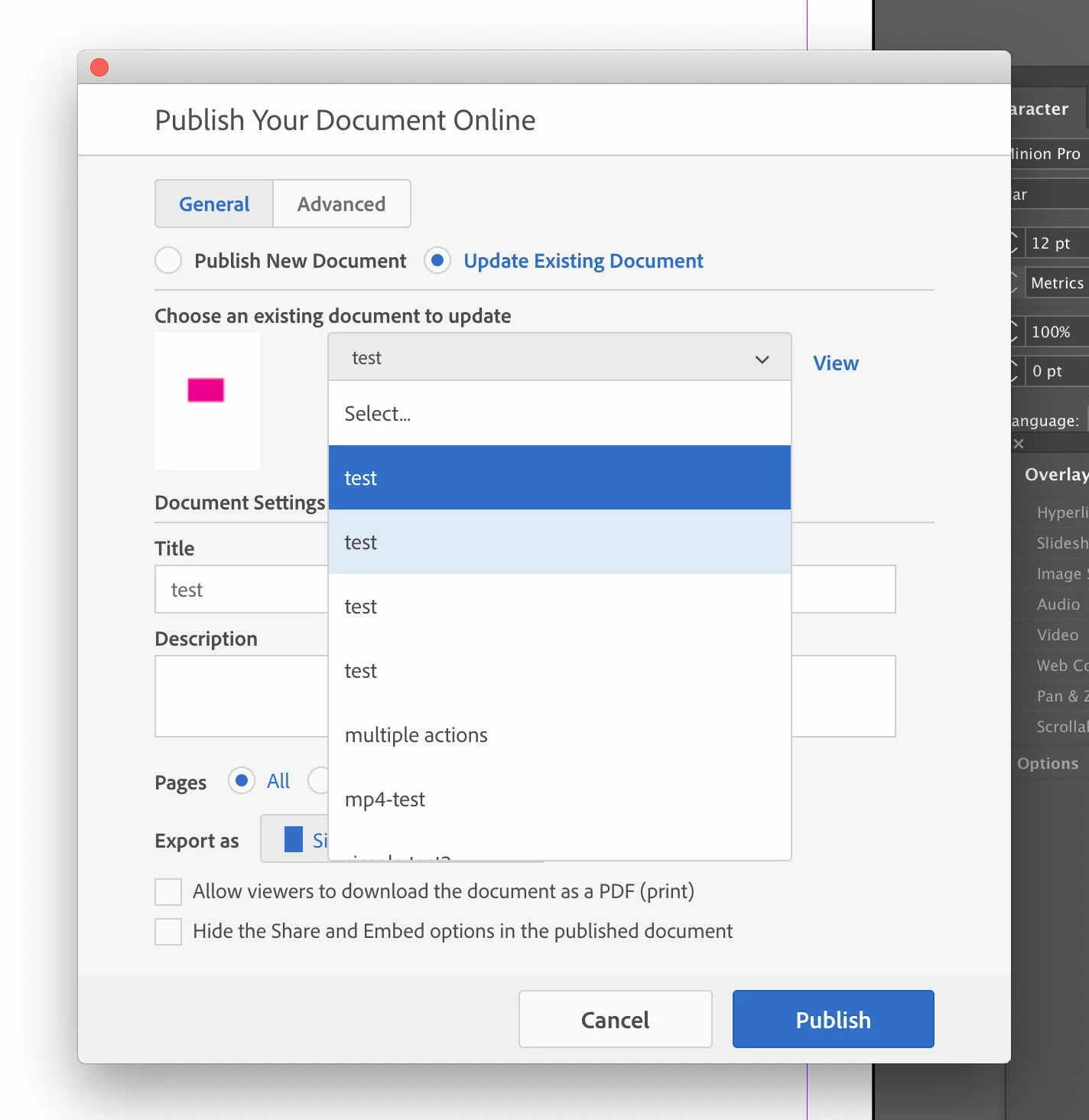
Use the drop down to view all Publish Online Documents and select to replace. The newest document is at the top of the list. In my example, I have 4 test documents that can be updated.

2 replies

Community Expert
January 29, 2019

I don't think there is any way to change the URL of a Publish Online document.

A workaround: publish the new content to both new and old document. When you update existing, use the drop down to select and choose each document to update. You will have 2 Publish Online documents, but they both can have the same content.

saqibm7575
Participating Frequently
January 29, 2019

Sadly, there is only one document... that i have already edited and re-published, which caused it to created a separate URL link rather then updating the existing one. During the time i was publishing it, i ensured that i had the "Update existing Document" selected. Thank you for reply, i really do appreciate it!

Jeffrey_SmithCommunity ExpertCorrect answer
Community Expert
January 29, 2019

Thank you Jeffrey!

At the moment, I do have two documents of the same name in my Publish Online Dashboard, 1 new and 1 old. I am really OK with having two documents with the same content, however, I do not know how I can update the old document when my InDesign Document is only effecting the the new document.


Use the drop down to view all Publish Online Documents and select to replace. The newest document is at the top of the list. In my example, I have 4 test documents that can be updated.

JonathanArias
Legend
January 29, 2019

are you talking about publish online?

saqibm7575
Participating Frequently
January 29, 2019

Yes, sorry for unclarity.

JonathanArias
Legend
January 29, 2019

it should not change the link if you are editing it. that is the whole point of that feature. report this bug. do you know how to do that?