New Participant
August 3, 2022
Answered

Indesign + Dropbox Linking

  • August 3, 2022
  • 7 replies
  • 1821 views

Hi,

We are a small company working across the globe. We would like to create an InDesign template for item picing, using the 'import from excel' option to import the Excel PriceLists into the document.

Any changes made to Excel would be seen in Indesign. 

Many people make changes to excel and we would like this one file (on dropbox) to link into my indesign files. Is that possible?

I know InDesign can link to files on my dropbox APP but then, if my colleague in Australia were to make changes to the Excel document save it and reupload it to DropBox with the sam file-name, would InDesign automatically take the updates from the Excel document?

Thanks for your help!
This topic has been closed for replies.
Correct answer rob day

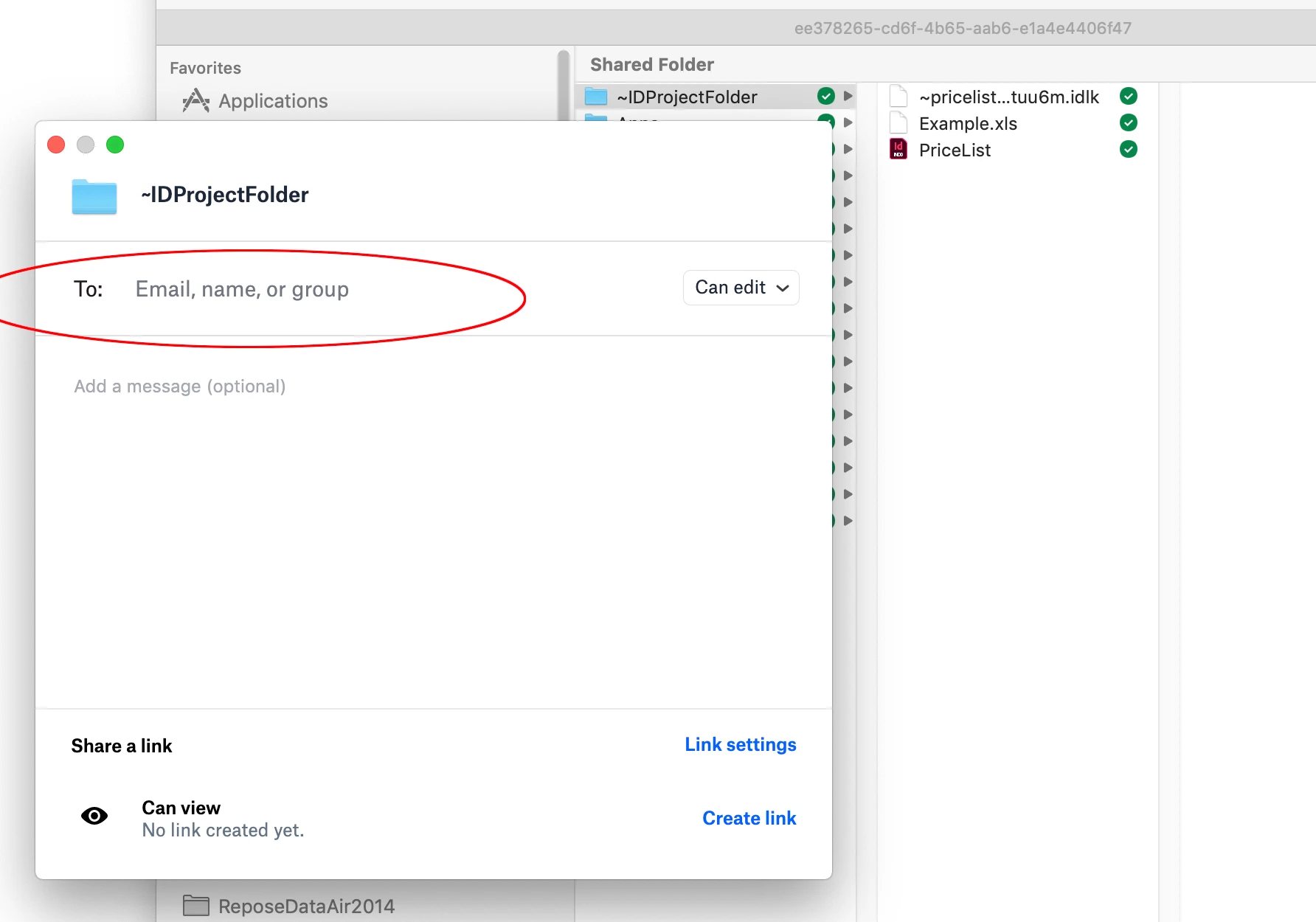
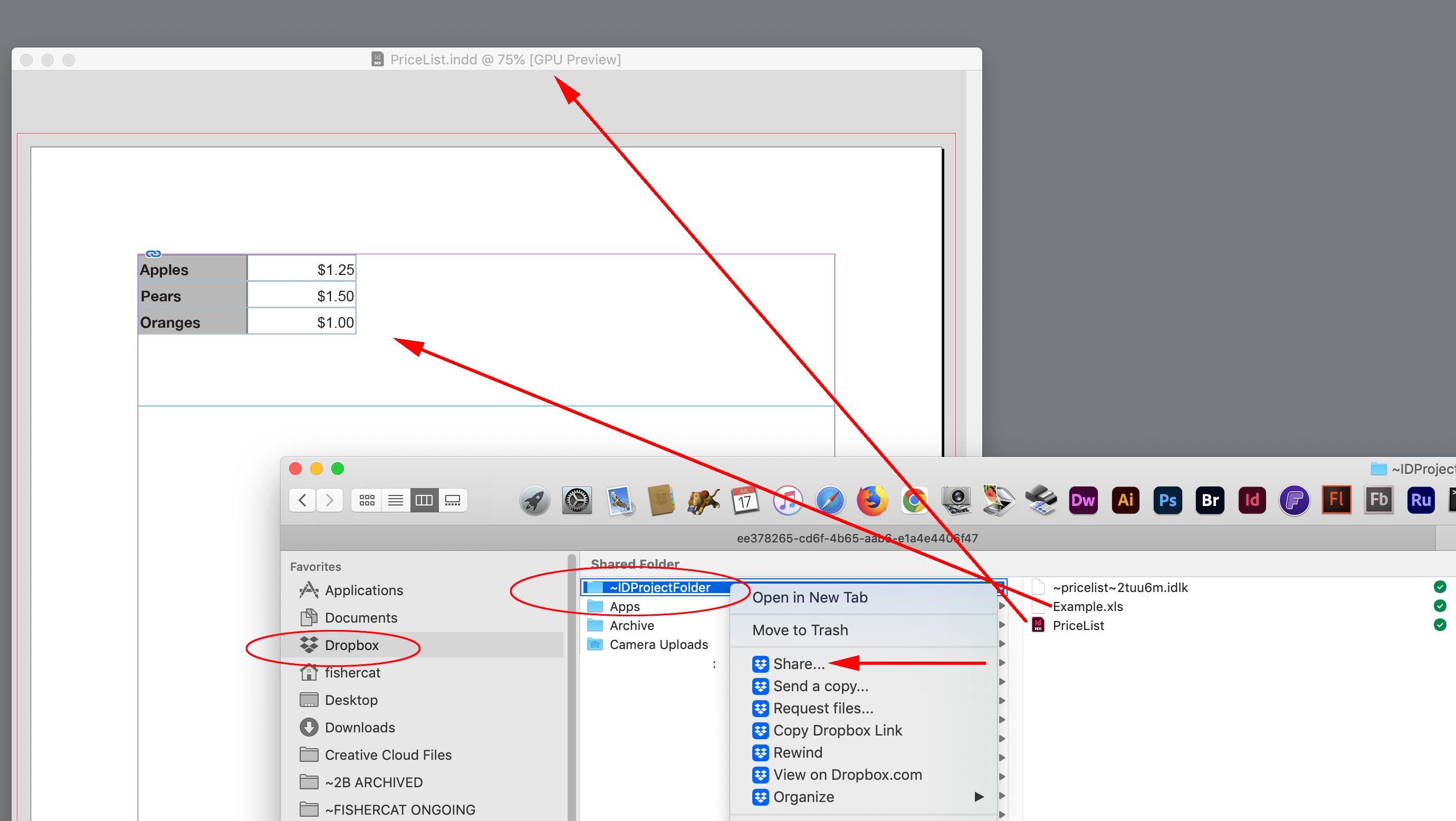
Hi @Gittel25342669k6vn , Setup a project folder that contains the InDesign file and any placed assets inside of your user>Dropbox folder. Right-click the project folder, and choose Share.... You will get a dialog, which lets you invite other dropbox users to sync to the project folder. When the invited users accept the invitation, the project folder will sync to their local Dropbox folder. When either of you make edits, the affected files will be updated on both computers. The email you enter has to be the email associated with the user’s Dropbox account:


7 replies

New Participant
August 10, 2022

thanks all these suggestions worked and it is now syncing across Dropbox

rob day
rob dayCorrect answer
Adobe Expert
August 3, 2022

Hi @Gittel25342669k6vn , Setup a project folder that contains the InDesign file and any placed assets inside of your user>Dropbox folder. Right-click the project folder, and choose Share.... You will get a dialog, which lets you invite other dropbox users to sync to the project folder. When the invited users accept the invitation, the project folder will sync to their local Dropbox folder. When either of you make edits, the affected files will be updated on both computers. The email you enter has to be the email associated with the user’s Dropbox account:


New Participant
August 3, 2022

@Willi Adelberger  I don't understand how you make available offline. I tried to right click on a file in dropbox and there is no option for it.

Thanks

Willi Adelberger
Adobe Expert
August 3, 2022

You shall click in the finder or explorer on one of your Dropbox files. I think you went to the web place of dropbox, there you will not find this command.

New Participant
August 3, 2022

Thanks @BobLevine , how do I go about turning off 'smart sync' and once done, do I import the excel document from my desktop app or can I import it from the dropbox website?

Thanks for your help!

BobLevine
Adobe Expert
August 4, 2022

If properly set up, you should have a Dropbox folder in either Finder or File Explorer. 

Kasyan Servetsky
Brainiac
August 3, 2022

Warning: if many people make changes to the excel (or another) file at the same time, you will get multiple conflicting versions.

Willi Adelberger
Adobe Expert
August 3, 2022

All files you see in the dropbox on finder/exploerer select with right mouse xlick > make offline available.

BobLevine
Adobe Expert
August 3, 2022

If you share the Dropbox folder with all users and all users turn off smart sync, this should work just fine. This will keep the files properly synced to all users' local hard drives.