


Inspiring
April 20, 2020
Answered

Indesign - How do I "keep options" with different multiple tables?

  • April 20, 2020
  • 5 replies
  • 969 views

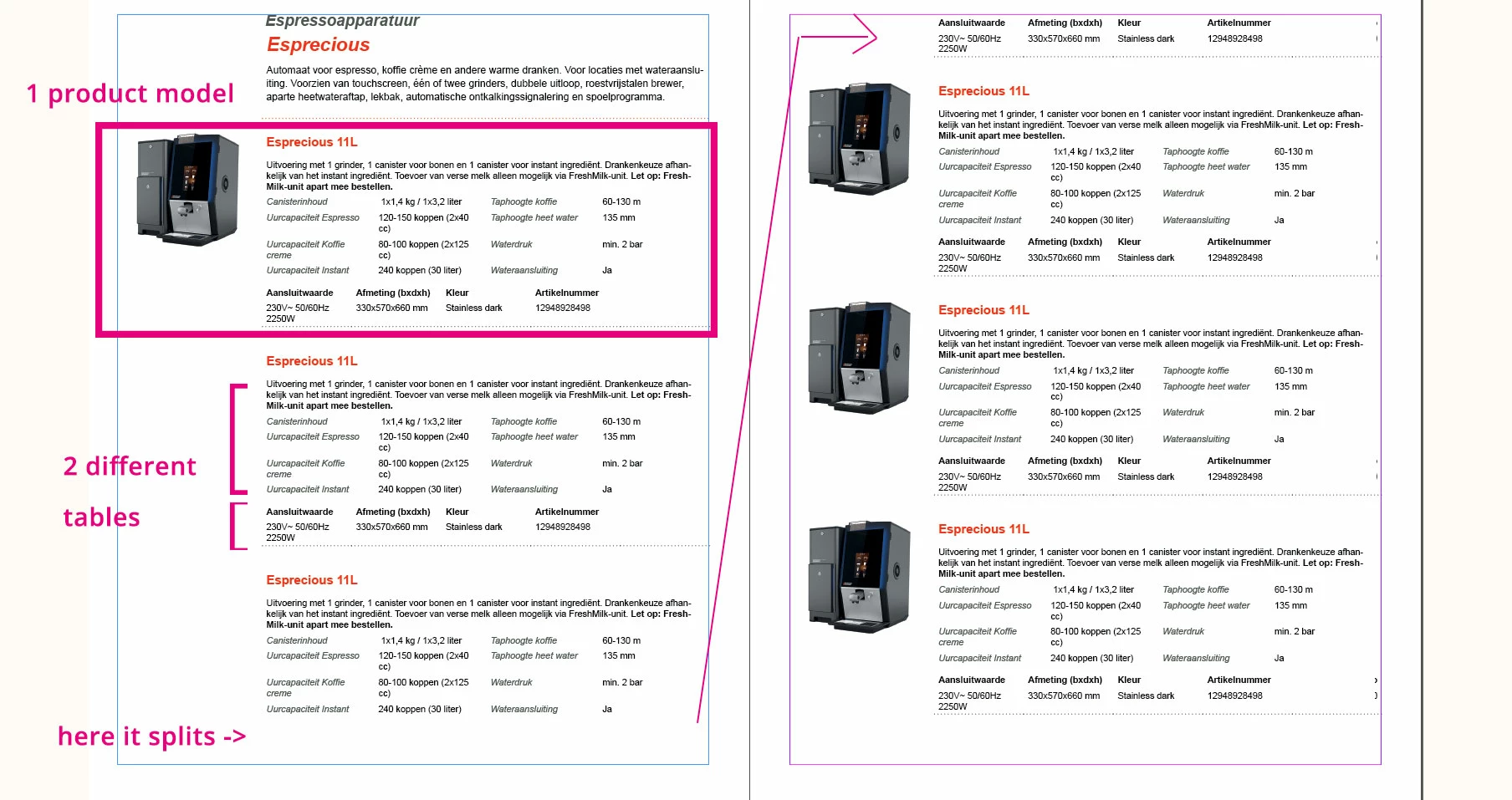
Hey there! See the screenshots for a better understanding!


I'm trying to create a dynamic XML indesign folder with products. One product model is seperated in 2 different tables on top of eachother. However when the page ends it splits exactly between those 2 tables which belong to eachother. How do I keep 2 different tables near eachother?

Wanted result:
I want: if the model doesn't fit on the page it page breaks to a new page so every information that has to do with 1 product model keeps on 1 page.

I know how one table keep options work. And that works perfectly. However I can't find anywere how i'm supposed to do that with 2 different tables on top of eachother.


Many thanks!


Screenshot:
This topic has been closed for replies.
Correct answer JustBetter

Okay i've fixed it by creating a table within a table. I've created 1 table with 2 rows and 1 column. the first table within the first row and the second table within the second row of the table. Then i've enabled: Table -> Cell options -> rows and columns -> keep options -> Keep with next row


Thank you so much for helping!

5 replies

Barb Binder
Community Expert
April 21, 2020

We are always happy to help.


~Barb

~Barb at Rocky Mountain Training
Barb Binder
Community Expert
April 21, 2020

The workflow is a little tricky—you need to make sure that you have each table on its own ¶, and I can see from your last screen shot that you aren't (or weren't yesterday) consistent. Two are missing in the screenshot below.

Once each table is set up on its own ¶,  set up two styles: the first one might be called Table1 and that paragraph is set to keep with the next paragraph. The second style might be called Table2 and that one is NOT set to keep with the next paragraph.


If your layout alternates between the two tables, then the styles will need to alternate as well. This will force two tables to stay together while allowing the next table to break.


~Barb 

~Barb at Rocky Mountain Training
Barb Binder
Community Expert
April 20, 2020

I'm not sure.


Is that definitely one table that you are showing as selected? Try selecting it with Table > Select > Table to be sure the whole table is selected, and check the row keep settings again.


~Barb

~Barb at Rocky Mountain Training
Inspiring
April 21, 2020

Hey BarbBinder,


I've been reorganizing my whole document and that fixes allot of my problems. However I can't seem to fix my original issue. (Keeping 2 different tables on 1 page).


You said: Give the tables 2 different tables a different paragraph. so when configuring the keep options indesign knows that you want to keep those 2 paragraph styles together. However when i try giving my tables a different paragraph style it keeps switching the same paragraph style for them both 😮


Could you please help me figure out what i'm doing wrong. This is the last issue that I have 😄


Kind regards,


Jordy

JustBetterAuthorCorrect answer
Inspiring
April 21, 2020

Okay i've fixed it by creating a table within a table. I've created 1 table with 2 rows and 1 column. the first table within the first row and the second table within the second row of the table. Then i've enabled: Table -> Cell options -> rows and columns -> keep options -> Keep with next row


Thank you so much for helping!

Barb Binder
Community Expert
April 20, 2020

Is there an extra return between the two tables? You will have to accomodate that, as well. And both tables should have all rows set to keep together.


~Barb

~Barb at Rocky Mountain Training
Inspiring
April 20, 2020

Hey BarbBinder,


Could you please elaborate? English isn't my mothertongue. sorry for that.


Kind regards,


Jordy

Barb Binder
Community Expert
April 20, 2020

There isn't a keep tables together option, just rows within a table. But if you put each table in its own paragraph, then you can define paragraph styles to keep the first paragraph with the second paragraph. That will take care of this for you, automatically.


~Barb

~Barb at Rocky Mountain Training
Inspiring
April 20, 2020

Hey BarbBinder,


I've followed your instructions by assigning each table to a different paragraph style. (don't mind the styling haha)
But i'm not able to reproduce what you're doing. What am I doing wrong?

See video:
Oh i can't upload a video from selecting it locally.

See screenshot :