


Known Participant
May 17, 2023
Answered

Indesign - Hyperlink / URL Help

  • May 17, 2023
  • 2 replies
  • 3988 views

I hope you are all well. I was wondering if I may ask you a question re Indesign - Hyperlink / URLs.


I've created a document with Hyperlinks/URLs. I would like to change the appearance or how they display. I’ve tried to research this online, but I am not getting any help or finding out how to do this. As per below, it seems to me that this is something that can not be changed, is this correct? Or do you know how I can do this.


https://indesign.uservoice.com/forums/601021-adobe-indesign-feature-requests/suggestions/37077574-rename-hyperlink   

https://indesign.uservoice.com/forums/601021-adobe-indesign-feature-requests/suggestions/33806383-ability-to-create-custom-url-when-publishing


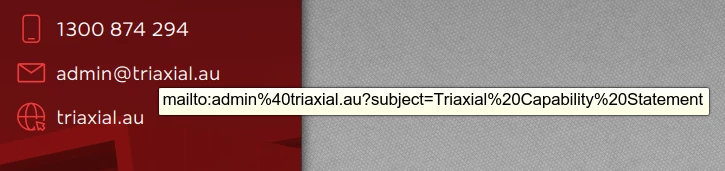
For example, the link to the email is displaying in a crazy way e.g. (mailto:admin%40triaxial.au?subject=Triaxial%20Capability%20Statement).

I want it to display as per the correct email address (admin@triaxial.au) or not at all, and it just be the hover over hand that clicks the link.


In a Word document you have the option to change the way the text is displayed but I cant seem to do that in Indesign.


Example of how it is displaying.
Thanks for your help in advance 🙂

This topic has been closed for replies.
Correct answer Robert at ID-Tasker

May I ask how people should then have/use clickable, hyperlinked email addresses in their documentation or websites etc. if you believe this is not the best way to go forward?


Maybe kind of a workaround for you - do not mark it as a hyperlink - just leave as a plain text.


If you export as an INTERACTIVE PDF - looks like at least Acrobat is automatically treating it as a clickable email.


Not sure what other readers will do...


2 replies

Bevi Chagnon - PubCom.com
Brainiac
May 18, 2023
quote

For example, the link to the email is displaying in a crazy way e.g. (mailto:admin%40triaxial.au?subject=Triaxial%20Capability%20Statement).

I want it to display as per the correct email address (admin@triaxial.au) or not at all, and it just be the hover over hand that clicks the link.

By @KC_xo


What you see when you hover over the link is the encoded version of the hyperlink, not how it will be displayed on the page of your document. You can't control this, and InDesign is doing things correctly.  The final visual version that users will see will be admin@triaxial.au.


FYI, hovers are not intended to be viewed by end users, so just ignore the "crazy" stuff you see. Your hyperlink is correct as is.


|    Bevi Chagnon   |  Designer, Trainer, & Technologist for Accessible Documents ||    PubCom |    Classes & Books for Accessible InDesign, PDFs & MS Office |
KC_xoAuthor
Known Participant
May 18, 2023

Thanks for your reply.


No that unfortunately isn't correct. What I have screen shot and posted is from the PDF, and what the client will see, as that is what they are going to be sent, the interactive PDF. When the client hovers over the email address that is what comes up, the crazy looking text, the hyperlink text, the interactive text.


This is why I am trying to fix it, as it looks ugly, and spoils all the work we have been doing.

Robert at ID-Tasker
Brainiac
May 18, 2023

But there is nothing else you can do. 


Either it will look like this - or it will be a plain text and won't be clickable. 


The only thing you can do is to drop the "subject" part - then email alone should look OK.


Robert at ID-Tasker
Brainiac
May 17, 2023

It's normal.

You can't have spaces so they need to be converted to "%20".

"%40" = "@"


https://www.w3schools.com/tags/ref_urlencode.ASP


KC_xoAuthor
Known Participant
May 17, 2023

Thanks for your reply.


Im unsure what you mean by 'normal'? Do you mean you cannot change this, there is no way to fix this, this is how it will stay and look?


I am unable to have it look as I wanted, as per my post above? There is no work around to this?

Robert at ID-Tasker
Brainiac
May 18, 2023

Link in the text - as a Text - will look OK - but working URL needs to be converted to this "crazy" format.