Known Participant
December 16, 2024
Answered

InDesign Metadata script for document title and author

  • December 16, 2024
  • 6 replies
  • 4197 views

Hi, I need to add metadata on 100+ documents for three different products. Is it a script that I can run on them instead of manually adding meta doc title and author 1 by 1?

For exmaple, the file name is TEST_document_form.pdf, title will need to be TEST document form, and author will be TEST. Basically, same file name for title but without the underscores and '.pdf.' (See screenshot). I have three product names for 'author' (i.e. TEST), I will need to be to able amend this in the script.

These documents will be updated from time to time, so I'm looking for an efficient way to maintain.


I have seen people post scripts in replies, but I'm not sure how to save it as a script file? i.e copy the code from broswer, then where do I paste to re-save and what format? Apologises if this is silly but I'm new to scripts and couldn't quite understand it from other posts.

Many thanks for any help in advance.


Correct answer Kasyan Servetsky

Hi @Kasyan Servetsky , batch processor 4.8 doesn't work for me (error log attached if intested). I think I might have figured out  the reason of the indd duplication. The InDesign files in the test folder were created some time ago, using different versions between 2022 to 2024 of InDesign. When they are re-written, an extra '.indd' appear on the filenames. However, when I re-saved the docs to the latest InDesign (2025) today, your script works perfectly, the files are overwritten with your script with no extra files .indd.indd extension in the folder.

With over 500+ docs to amend, a lot of them were last saved in previous versions of InDesign, what's the best way to go about this? Another script to convert files to the current version first? Or use 'batch rename' function in Bridge afterwards (this will mean manually moving older versions around and this action will need to be repeated in many folders/subfolders, my worry is it's more likely to have human errors if we do this)? Another thing is, my workmates may be using different versions of InDesign, and we upgrade InDesign in different times, so to restrict indd version we use in the script may be a challenge? As I expect we'll run this exercise from time to time now, and it will be done by different people.


No ESTK / VS Code installed.

No 3rd party plug-in is used.

I have attached the files for you to check/test:
- batch processor 4.8 log

- ABC_banner.indd (last saved in older InDesign version - when runs with 'batch processor 5.0' and 'add metadata', it creates a new files with .indd.indd)
- ABC regulations.indd (last saved in latest InDesign 20.0.1 -  works fine with the script and no extra file being created)

Your advice and insights will be much appreciated! Thank you very much.


You discovered a bug in the script (Thank you!), and I fixed it. Here’s a new version.

Version 5.0 ‘thought’ it was an IDML file (not saved file yet), so it added the superfluous extension. This version adds it only if it is missing and explicitly writes into the log if the file is converted from IDML/an older version.
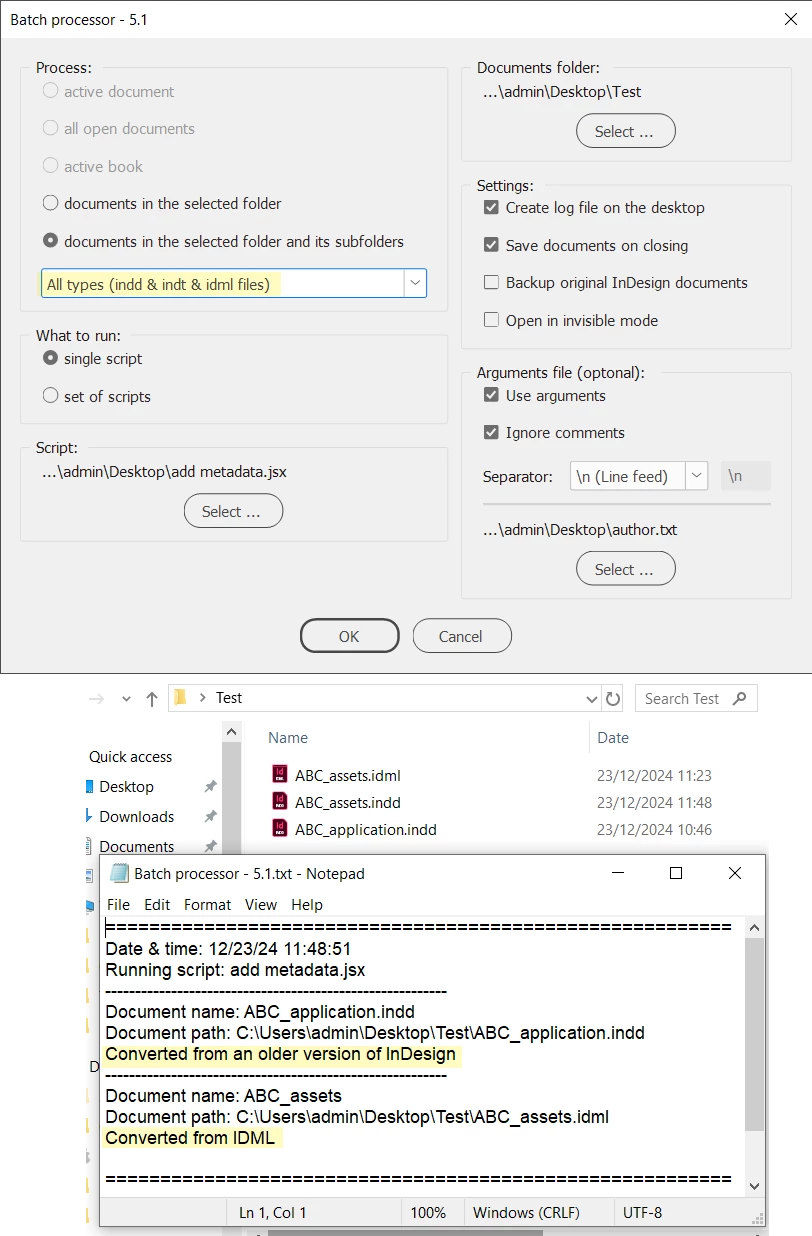
Does it work for you now properly?


6 replies

Robert at ID-Tasker
Brainiac
December 19, 2024

List of all available Metadata Preferences - of the Document but Links have the same:


metadataPreferences
metadataPreferences_Author
metadataPreferences_CopyrightInfoURL
metadataPreferences_CopyrightNotice
metadataPreferences_CopyrightStatus
metadataPreferences_CreationDate
metadataPreferences_Creator
metadataPreferences_Description
metadataPreferences_DocumentTitle
metadataPreferences_Format
metadataPreferences_JobName
metadataPreferences_Keywords
metadataPreferences_ModificationDate
metadataPreferences_Parent
metadataPreferences_ServerURL


Willi Adelberger
Community Expert
December 18, 2024

Use Adobe Bridge, select several documents to add the same meta. 

Mike Witherell
Community Expert
December 18, 2024

Do you have files selected in the Content window?

Mike Witherell
Supa_PeaAuthor
Known Participant
December 19, 2024

Ah yes, got it! Many thanks. 🙂

Mike Witherell
Community Expert
December 17, 2024

Injecting metadata into a folder of files is something Adobe Bridge does quite well. Tools > Create Metadata Template

Mike Witherell
Supa_PeaAuthor
Known Participant
December 18, 2024

Thank you. I have just tested this option, but I'm dealing 100+ InDesign document and each of their metadata filename id different so I'm not sure if this will work. Also I click on 'Append metadata' (wanting to test it on a batch of files), but the saved template is greyed out? What am I doing wrong?


Mike Witherell
Community Expert
December 18, 2024

In the same menu (Tools > Create Metadata Template), first you have to make a metadata template and name and save it. Then you can append it (Tools > Append Metadata) to many files at once.


https://helpx.adobe.com/bridge/using/metadata-adobe-bridge.html

Mike Witherell
Kasyan Servetsky
Brainiac
December 17, 2024

Something like this:

main();

function main() {
	var doc = app.activeDocument;
	var fileName = doc.name;

	var author = "";
	// get author - everything up to the 1st underscore
	if (fileName.match(/_/) != null) {
		author = fileName.split("_")[0];
	}

	fileName = fileName.replace(/\.indd$/, ""); // remove extention
	fileName = fileName.replace(/_/g, " ") // replace underscores with spaces

	var metaData = doc.metadataPreferences;
	metaData.documentTitle = fileName;
	metaData.author = author;
}

You can try it with my Batch processor to process 100+ documents.


Supa_PeaAuthor
Known Participant
December 17, 2024

Thank you so much Kasyan!!! That's fantastic! That's clever. I just tried it and it works great. 

It only works if the doc is already open, is there any way to add into the code so that I can point to to a certain folder, and the script will open each file and add metadata, save and close? Sorry, I know it's a lot to ask but it will hugely save time and improve workflow.

I have already got batch convert script installed (convert indd to pdf), I have tried to click on your batch processor link but I can't access atm (company firewall).

Thank you in advance!!

Kasyan Servetsky
Brainiac
December 20, 2024

Thank you thank you! Really appreciate your kindness and time helping me with the scripts! That new script with author.txt works like a charm. Exactly what I need. Yes you're right, I intially asked for the 'author' to be the first part of file name up to the 1st underscore. But now the client who has other products (Another 500+ docs) also wants other docs with the full names hence my last reply. However, with the 'batch processor 5.0' and 'add metadata' scripts, the re-written files still have .indd twice, it keep the original files in same names.


Re your questions:
This shouldn't and doesn't happen on my side. Could you take a screenshot of the settings you used? What is your InDesign version? Which platform: Mac/Windows?
Are you working locally or on the network? If the latter, are you able to save it manually?

Here's the screenshot (for yesterday's test):


I use PC (work laptop) to runs the test locally on desktop, with InDesign 20.0.1. I also just ran the same test on my mac, and the outcome is the same with indd x2. I'm trying work this out before I work on 500+ InDesign files on a network (from a PC).

With the new script, I followed your screenshots/instructions exactly. And .indd are appearing twice on the new files, on both pc and mac.


... and the outcome is the same with indd x2 ...

I tested it on my notebook — windows 10, InDesign 19.5 (too old for 20) — and it works properly.

Try the previous version 4.8. Does the problem occur with it?

Do you get an error message in the Batch processor 5.0.txt? If an error occurs, it is created on the desktop even when the logging is off.

Try to turn logging on. It lists file names. Do they have doubled extensions?

Could you send me a file for testing? Maybe something is wrong with the files. In my experience, it sometimes happens when a 3rd party plug-in is used.

Try to export a file to IDML and back to INDD and test the script against it.

Do you have ESTK / VS Code installed?


Robert at ID-Tasker
Brainiac
December 16, 2024

https://creativepro.com/how-to-install-scripts-in-indesign/


If you won't find a free solution then I would suggest my ID-Tasker tool (not free) - it can do that easily and way more.


Supa_PeaAuthor
Known Participant
December 17, 2024

Thank you!! That's great, I have managed to follow to instruction and save the code and import in InDesign.
