


Participating Frequently
December 9, 2024
Question

InDesign Not Syncing Online Only Files

  • December 9, 2024
  • 2 replies
  • 766 views

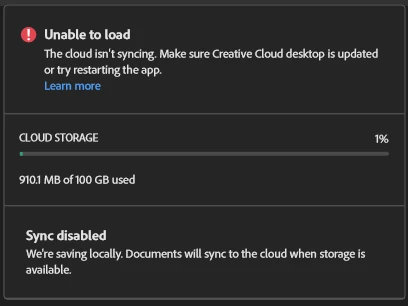
I tried restarting the app, updating the app, and restarting the device, but I can't open my file after choosing the "make available online only" option. After doing that, I couldn't open my file anymore. I also tried opening it on another computer, I tried checking it in the Creative Cloud but it's not there. I'm working on a 578-page planner and am not even a quarter through my hyperlinks. I don't think the file is that heavy yet. I just want to open it again. There's also no option to download it for offline use. Heeeelp! I'm a novice and this is my first time using InDesign. 


This topic has been closed for replies.

2 replies

kglad
Community Expert
Community Expert
December 9, 2024

in the future, to find the best place to post your message, use the list here, https://community.adobe.com/

p.s. i don't think the adobe website, and forums in particular, are easy to navigate, so don't spend a lot of time searching that forum list. do your best and we'll move the post (like this one has already been moved) if it helps you get responses.


<"moved from cc services">
goldessAuthor
Participating Frequently
December 9, 2024

Thank you!

Inspiring
December 9, 2024

Hi @goldess_1267,


Thank you for reaching out and providing details about your issue. I completely understand how critical this is, especially given the size of your planner file.

To help narrow down the problem, could you please provide the following details:

  1. What version of InDesign are you currently using?
  2. What is the operating system you're working on (Windows/macOS and the version)?
  3. Do you have other files stored on the Creative Cloud that open successfully, or is the issue happening across multiple files?
  4. Is the problem specific to this 578-page planner file only?

Additionally, could you share a screen recording demonstrating the workflow and showing the error that occurs when trying to open the file? This will help us diagnose the problem more effectively.

While waiting for your response:

  1. Double-check the Creative Cloud Desktop app is updated.
  2. Restart your system again if possible.

Let me know the details above so we can proceed further. I’m here to help you get this resolved!


Best,
Abhishek Rao

goldessAuthor
Participating Frequently
December 9, 2024

Hi.

1. Adobe InDesign 2025 Version 20.0.1
2. Windows 11
3. Yes, other files are working normally.

4. Yes. The issue is happening on the planner only. Screen recording: https://www.loom.com/share/29a1d3c9c47244b2bbdef640710a2f93?sid=e86314a6-22cc-4a8a-a367-dbc446fa5f24

I restarted everything multiple times already.

Hope you can help me. Thanks!

goldessAuthor
Participating Frequently
December 9, 2024