


InDesign Panels Popping Onto Second Monitor
I have two monitors, and I run InDesign on the left monitor. Before updating to InDesign 2022, tool panels (Paragraph, Pages, etc.) used to pop to the left of my right-side-docked toolbar (see image; I outlined in green where the panels used to pop).
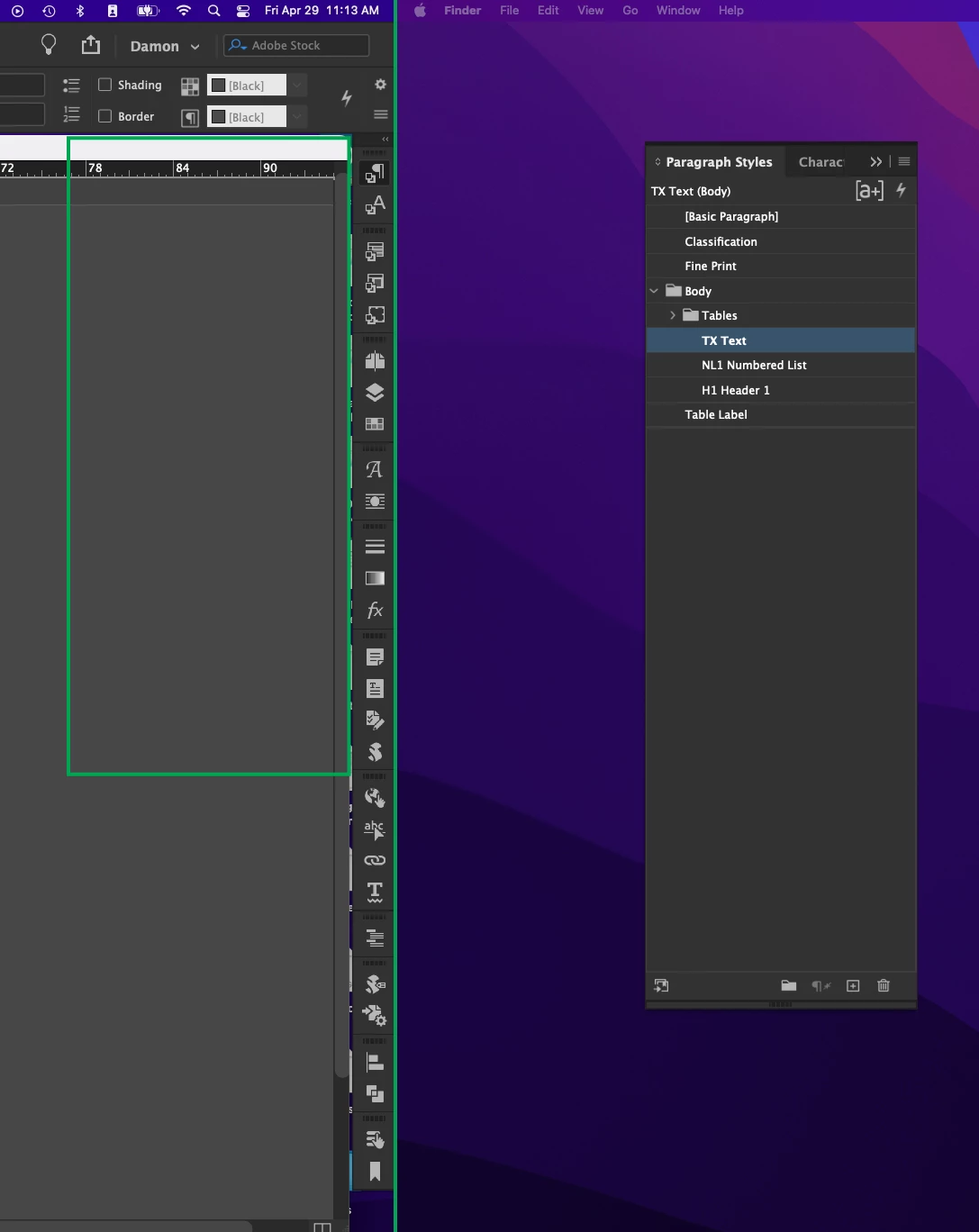
Now, they pop to the second monitor, and considerably distant from the toolbar for some reason. If I try to move the panel to the left, it removes the panel from the toolbar (what??). If I enable the application frame, it behaves as desired — except that the application frame is annoying, and I don't like it.
This happens with all of my workspaces, even the default InDesign workspaces. It used to keep all of the InDesign application UI elements on my main monitor. Now if I have a full-screen app on my right monitor, the panels can't be accessed unless I switch away from the full-screen app.
The image shows a green line that separates my two monitors as well as where the panels used to pop (green rectangle).
My InDesign version is 17.2.1 and my macOS version is 12.3.1, Apple M1 chip. (Note that I also opened InDesign with Rosetta to run it as an Intel app, and the same behavior was present.)
Further, the document header bar no longer matches the pasteboard theme (it's light, whereas the rest of the interface is dark), but that's not related to the main issue — just mentioning in case anyone else has this issue too and knows how to fix it.
 AdChoices