


Participant
January 2, 2018
Answered

Indesign screen distortions when scrolling

  • January 2, 2018
  • 2 replies
  • 1870 views

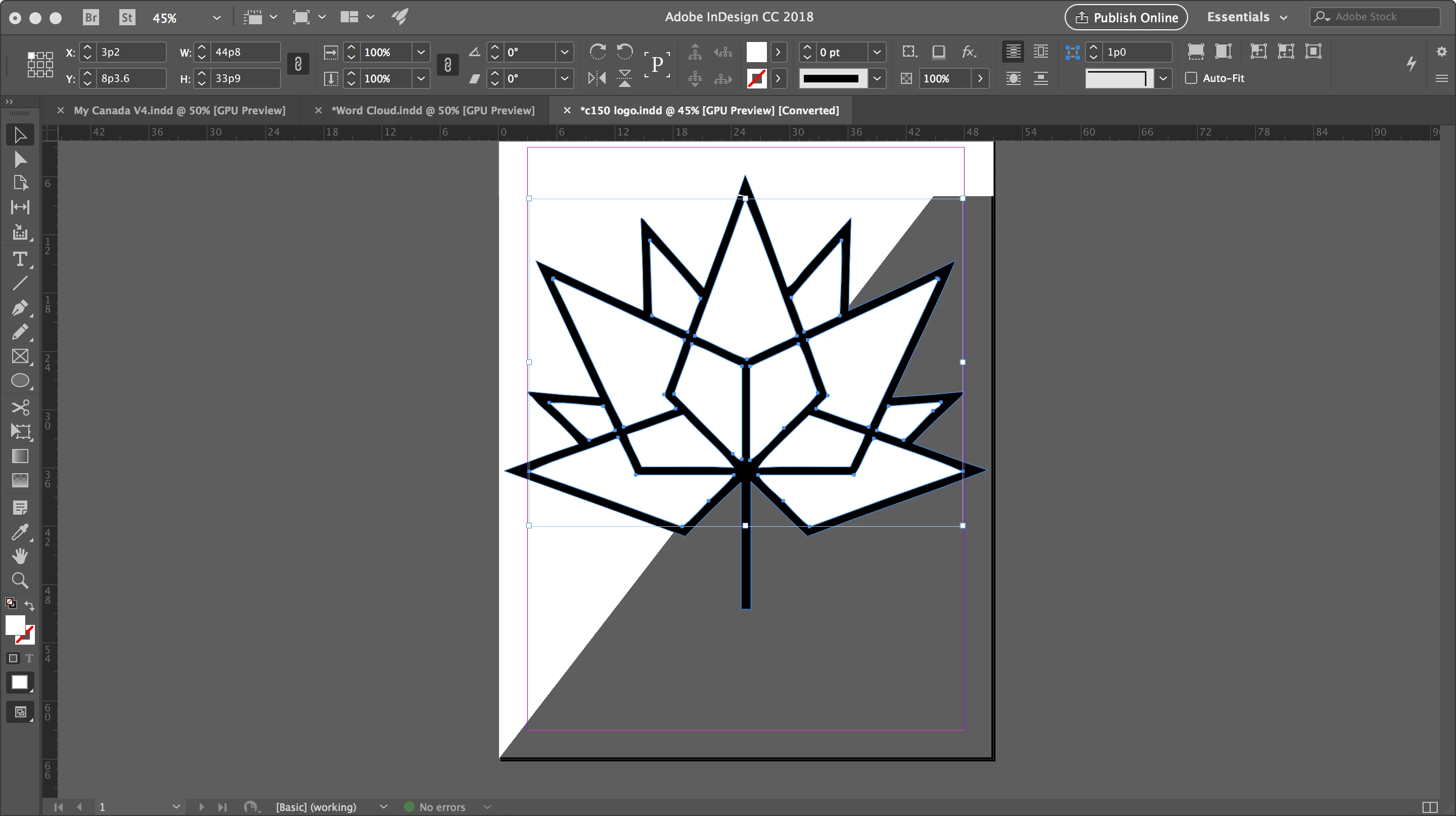
I'm using InDesign CC 2018, and as I work between pages, scroll or zoom-in/out, screen distortions appear on the page. A sample image is attached.

In this example, the grey in the bottom right-half of the document isn't supposed to be there. It appears to be an artefact from the background. Changing pages or scrolling more will typically make the issue move to a different part of the page or disappear.

Any suggestions?
Correct answer Laubender

What should help: Turn off GPU Acceleration.

Best,
Uwe

2 replies

Participating Frequently
July 23, 2025

I am also having this issue with InDesign. I can toggle off GPU Performance and Animated Zoom and it gets marginally better, but it still happens. When I scroll or move items, they distort. I have had this issue since moving to new BenQ monitors. There are a LOT of settings within these monitors, so maybe that is the issue? My machine is brand new - I'll attach the spec sheet. 

Community Manager
July 23, 2025

Hello @Krista26520851qyto,

I'm sorry to hear about your experience. Could you try to increase the refresh rate to a higher value to see if it helps? Also, try performing a clean reinstallation of the GPU(s) drivers (Intel / NVIDIA / AMD) and setting the Graphics Preference to High-Performance for Illustrator (https://adobe.ly/46XLstP) and share your observations.

Looking forward to hearing from you.

Anubhav

Participating Frequently
July 24, 2025

I can't adjust my screen refresh any higher without having to downgrade my
resolution. I literally just got this PC two days ago, so I don't think the
drivers are the problem, especially because I was having this issue on my
older PC as well. And since I'm having issues with InDesign, I don't see
why a completely separate app would be causing issues with my display in
InDesign. I'm not on a laptop, and you could see from my original post that
my graphics card is NVIDIA and not AMD.

Krista Rider
Media & Branding Manager
Sports, Inc.

[personal info removed by moderator]

LaubenderCommunity ExpertCorrect answer
Community Expert
January 2, 2018

What should help: Turn off GPU Acceleration.

Best,
Uwe

Participant
January 2, 2018

Thanks! That seemed to fix the problem.