



Simon S.
Known Participant
May 25, 2023
Question

InDesign Script - Print with specific printer preset

  • May 25, 2023
  • 3 replies
  • 2589 views

Hi everyone.


I'm trying to write a script that would print pages directly from InDesign.

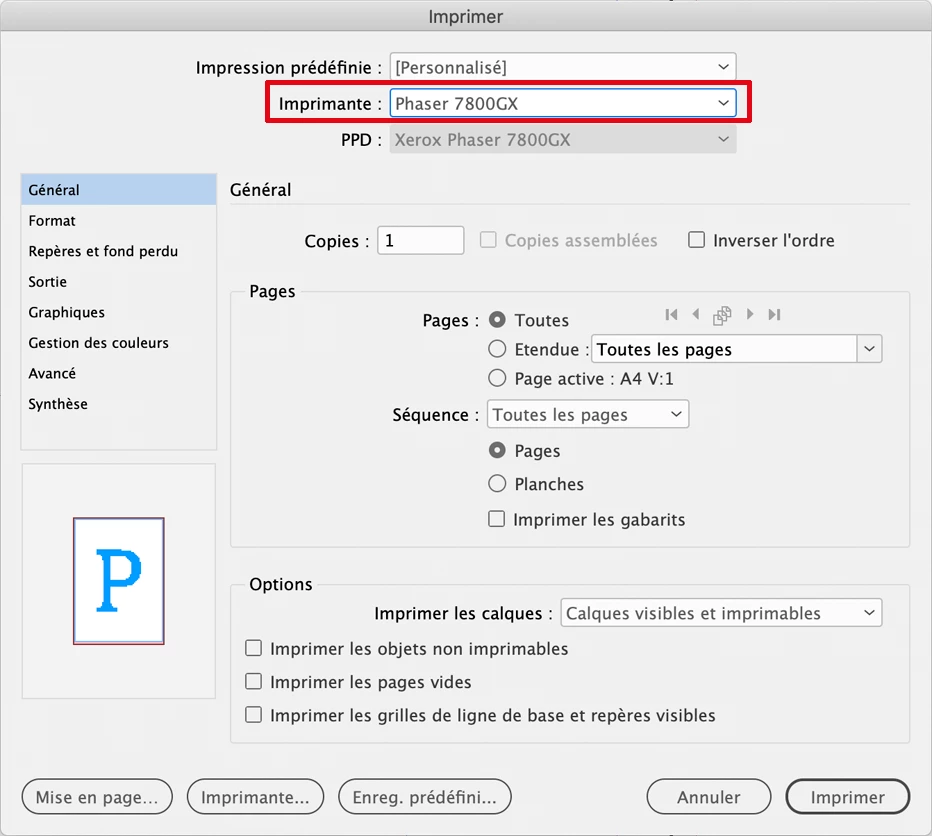
I see that can use Document.printPreferences.activePrinterPreset to select the general preset like below (sorry for the french interface):
 

But I don't find a way to select a specific printer preset that would include tray settings, paper thickness and other stuff like here:
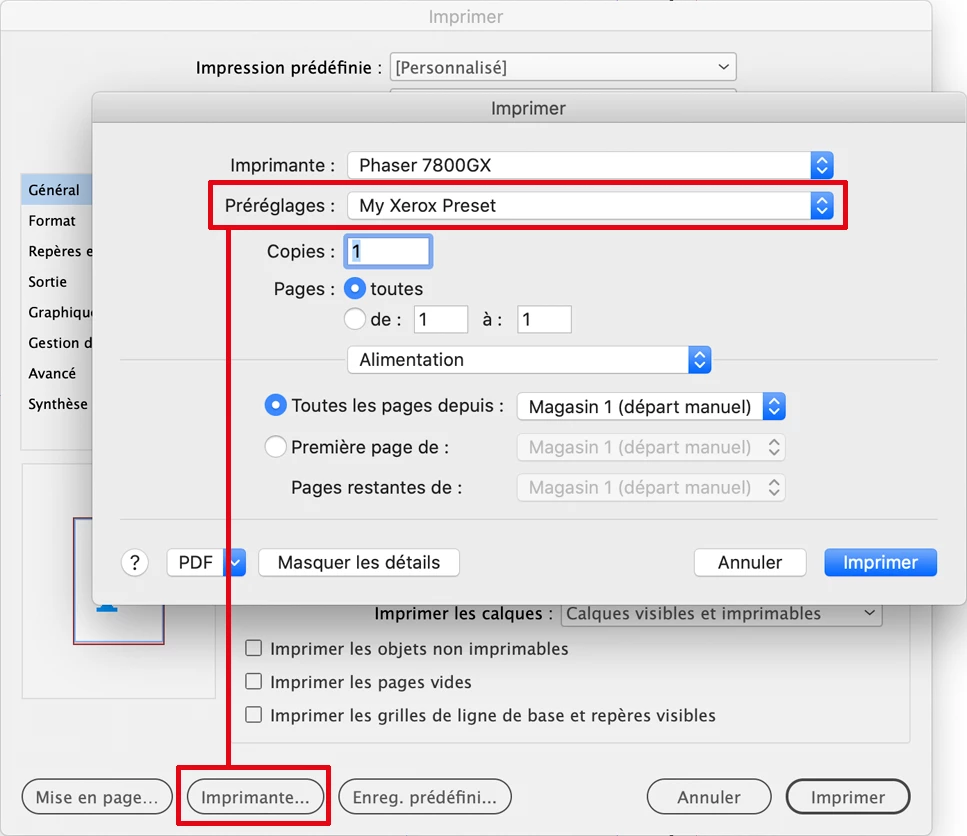
 

Is that even possible? Maybe I am missing something, but I don't understand what benefits I would get from printing with a script if I cannot set printer-specific options.


Thank you in advance for any help!

This topic has been closed for replies.

3 replies

leo.r
Braniac
May 26, 2023
quote

Is that even possible? Maybe I am missing something, but I don't understand what benefits I would get from printing with a script if I cannot set printer-specific options.


By @Simon S.


You'll need to select the desired printer-specific options when you set up your InDesign print preset. Normally, they will be saved in your InDesign preset.


There's no way to select macOS print preset via scripts (not known to me at least).


Also, I don't recommend to use macOS print presets at all when you set up your InDesign presets. Mac's print presets are a buggy poorly designed mess. Just set up your print-specific settings without selecting any preset.


On Ventura, if you select a macOS print preset when setting up your InDesign preset, this macOS preset will become selected in ALL your other InDesign presets, thus changing all printer-specific setting you have set up previously in other InDesign presets.


I know you're on a pre-Ventura system. I'm not sure if macOS presets cause the same problem with InDesign presets on your system (there were quite a few changes on Ventura). Still, like I said, I believe it's better to avoid macOS presets altogether when working with InDesign - just select the desired printer-specific settings as part of your InDesign preset. 

rob day
Braniac
May 26, 2023

just select the desired printer-specific settings as part of your InDesign preset.


The print driver settings (e.g., Resolution, Paper Type, etc.) are not included in the InDesign Print preset—here the Printer Features for my large format Epson are not included in the InDesign Print Preset:


All you can do with ExtendScript is set the printer and the PPD—none of the above are listed as properties in the API:

https://www.indesignjs.de/extendscriptAPI/indesign-latest/#PrinterPreset.html


You can get at print settings via an AppleScript shell script, but it would take some advanced scripting:


https://talk.automators.fm/t/automate-printing-with-specific-print-settings-using-hazel-shell-script/10127


https://www.cups.org/doc/options.html


leo.r
Braniac
May 27, 2023

Thank you everyone for your answers and advices.

Unfortunately I don't know AppleScript, and what I'm trying to do isn't worth the effort.


As @rob day said, I'd just like to bypass the dialog to save a few more clicks. Currently, I'm exporting the document to PDF, then I choose my printer preset, page size, and print from Acrobat.


quote

The settings you set in the standard macOS Print dialog (called via the Printer button) will be saved with your InDesign preset.


By way of example:


-Go to File > Print Presets > Define

-Double-click the desired print preset

-Click Printer

-Select a distinct option that was previously unchecked (for the test purpose).

-Click Print then OK everything to save your InDesign preset


Then re-open your InDesign preset and click Printer. You'll see that the option you've just checked remained selected. It is saved with your InDesign preset.


By @leo.r


This is what I've done before creating this post, but it didn't work for me. The only difference is that I did it from "File > Print" and not "File > Print Presets > Define", but it should be the same, right ?

From what I remember, I clicked Printer, selected tray n°5, clicked OK, and saved my preset (which automatically applies). Then I clicked Printer again, and the tray was set back to "auto".


quote


This is what I've done before creating this post, but it didn't work for me. The only difference is that I did it from "File > Print" and not "File > Print Presets > Define", but it should be the same, right ?

From what I remember, I clicked Printer, selected tray n°5, clicked OK, and saved my preset (which automatically applies). Then I clicked Printer again, and the tray was set back to "auto".


By @Simon S.


If you do everything as I described, you should be able to save the desired printer settings with InDesign preset. 


First, please try the File > Print Presets > Define routine. It's a better way to edit an existing preset.


Second, make sure you don't have any macOS preset selected when you click Printer. Like I mentioned in my first post, in the context of InDesign print automation macOS print presets are your enemies.


If you do have a macOS print preset selected, remove it (select Default Settings) then save your InDesign preset.


Then go back to the Printer dialog, ensure that no macOS print preset is selected, then define the desired printer settings. Normally, they should be saved with your InDesign preset.


If you're still unable to save them, please let me know.

Robert at ID-Tasker
Braniac
May 25, 2023

On windows you can create a copy of a printer and set all required preferences and then use it as a destination printer - maybe you can do the same on Mac? 


leo.r
Braniac
May 26, 2023
quote

On windows you can create a copy of a printer and set all required preferences and then use it as a destination printer - maybe you can do the same on Mac? 


By @Robert at ID-Tasker


Nope, we Mac users are out of luck here.

rob day
Braniac
May 25, 2023

But I don't find a way to select a specific printer preset that would include tray settings, paper thickness and other stuff


Hi @Simon S. The PrintPreference and PrinterPreset extendscript objects are limited to the InDesign specific settings, so I don’t think there is a way to get at the printer specific settings, which are handled by the print driver software and OS. It looks like you are on a Mac, so you should be able to set the printer specific settings via AppleScript’s system events (see app.doScript()), but your script would not be cross platform.


https://www.indesignjs.de/extendscriptAPI/indesign-latest/#Application.html#d1e42253__d1e45802