
Known Participant
March 6, 2024
Answered

InDesign Scripts for Changing Currency

  • March 6, 2024
  • 11 replies
  • 3421 views

Hi all, I have a catalogue of products of which I have a script to convert to other currencies.

I have prices for both RRP and TRADE.


The RRP price I need to round up to the nearest whole number.

The TRADE I need to leave with 2 decimal places.


For example:

RRP: £8.00

TRADE: £3.25


My polish conversion rate is x 5.7 which gives me:

RRP: 45.60zł  - (My script is converting to 46zł which is correct.)

TRADE: 18.53zł  - (This is correct with the decimal places.)


I add in the zł by finding and replacing the £


My question is, is there a script that will accommodate both of these price conversions?

At the moment I can only do one or the other.
 

Apologies if my explanation isn't clear


This topic has been closed for replies.
Correct answer Peter Kahrel

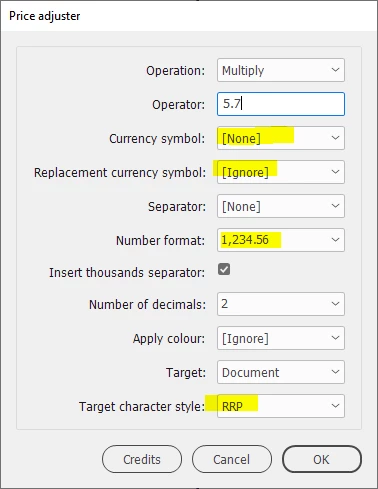
I think I know what's wrong. The pound symbol is outside the character style so you should set the currency symbol to None.


11 replies

Community Expert
March 7, 2024

You're right, Robert. I was confused by Daniel's use of 'rounding up, because what he really wants is, well, I don't think there's a standard term for it. 'Rounding up to the next integer minus 0.01' maybe. Anyway, this will andle it:

(function () {
  app.findGrepPreferences = null;
  app.findGrepPreferences.findWhat = '(?<=[£€$])?[\\d,]+\\.\\K\\d+';
  app.findGrepPreferences.appliedCharacterStyle = 
    app.documents[0].characterStyles.item('RRP');
  
  var s;
  var found = app.documents[0].findGrep();
  for (var i = found.length-1; i >= 0; i--) {
    if (parseInt(found[i].contents) > 0) {
      found[i].contents = '99';
    }
  }
}());
Community Expert
March 7, 2024

You can't do that with a GREP in the interface (it can't do calculations). You need a separate script for that (it's to be added to the script):


(function () {
  app.findGrepPreferences = null;
  app.findGrepPreferences.findWhat = '(?<=[£€$])?[\\d,.]+';
  app.findGrepPreferences.appliedCharacterStyle = 
    app.documents[0].characterStyles.item('RRP');
    
  var found = app.documents[0].findGrep();
  for (var i = found.length-1; i >= 0; i--) {
    s = Math.ceil(found[i].contents.replace(/,/g,''));
    s = String(s).replace(/(\d)(?=(\d\d\d)+\b)/g,'$1,');
    found[i].contents = s + '.00';
  }
}());
Robert at ID-Tasker
Brainiac
March 7, 2024

@Peter Kahrel 


I think this line:

found[i].contents = s + '.00';

should be:

found[i].contents = s + '.99';


Peter KahrelCorrect answer
Community Expert
March 7, 2024

I think I know what's wrong. The pound symbol is outside the character style so you should set the currency symbol to None.


Known Participant
March 7, 2024

Many thank everybody we got there in the end so many thanks for all your help!!!

Community Expert
March 7, 2024

When I go to run the price adjuster script, using htr attached settings, no conversion happens.


To troubleshoot, set a colour in the character styles so that you can see exactly where they are applied. Each style a different colour, of course.


Check that the styles were applied correctly, then try the script again.

Community Expert
March 7, 2024

Is that a requirement for your script - that ONLY digits should be styled?


Correct. Well, digits, dots, and commas.

Community Expert
March 7, 2024

Meanwhile Robert suggested more or less the same while I was posting, which is confusing.


Note that Robert's GREP expression to apply style to numbers targets all numbers, nit just RRP and Trade prices. And the GREP doesn't allow for large numbers that contain thousand separators (commas).

Robert at ID-Tasker
Brainiac
March 7, 2024
quote

Meanwhile Robert suggested more or less the same while I was posting, which is confusing.


Note that Robert's GREP expression to apply style to numbers targets all numbers, nit just RRP and Trade prices. And the GREP doesn't allow for large numbers that contain thousand separators (commas).


By @Peter Kahrel


My GREP is similar to yours - but it also styles RRP and TRADE text - your GREP is applying style ONLY to digits. But you are right - I forgot about thousand separator.


Is that a requirement for your script - that ONLY digits should be styled?


Community Expert
March 7, 2024

this is the format for the entire catalogue...


Ok, finally. Do this:


1. Create two character styles, one called Trade, the other, RRP. They need no formatting.

2. Apply the RRP style to RRP: £\K[\d,\.]+

3. Apply the Trade style to TRADE: £\K[\d,\.]+


You can apply these styles using the GREP tab of the Find/Change window.


Then you can use the price adjuster script.

Known Participant
March 7, 2024

Hi thank you for this.

So I created a characher style for each RRP and TRADE.

I then used the GREP codes to give the RRP and TRADE their own characer styles.

(attached screenshot)


These both appear to work as when I highlite a price, the character style name changes in the dialogue box.


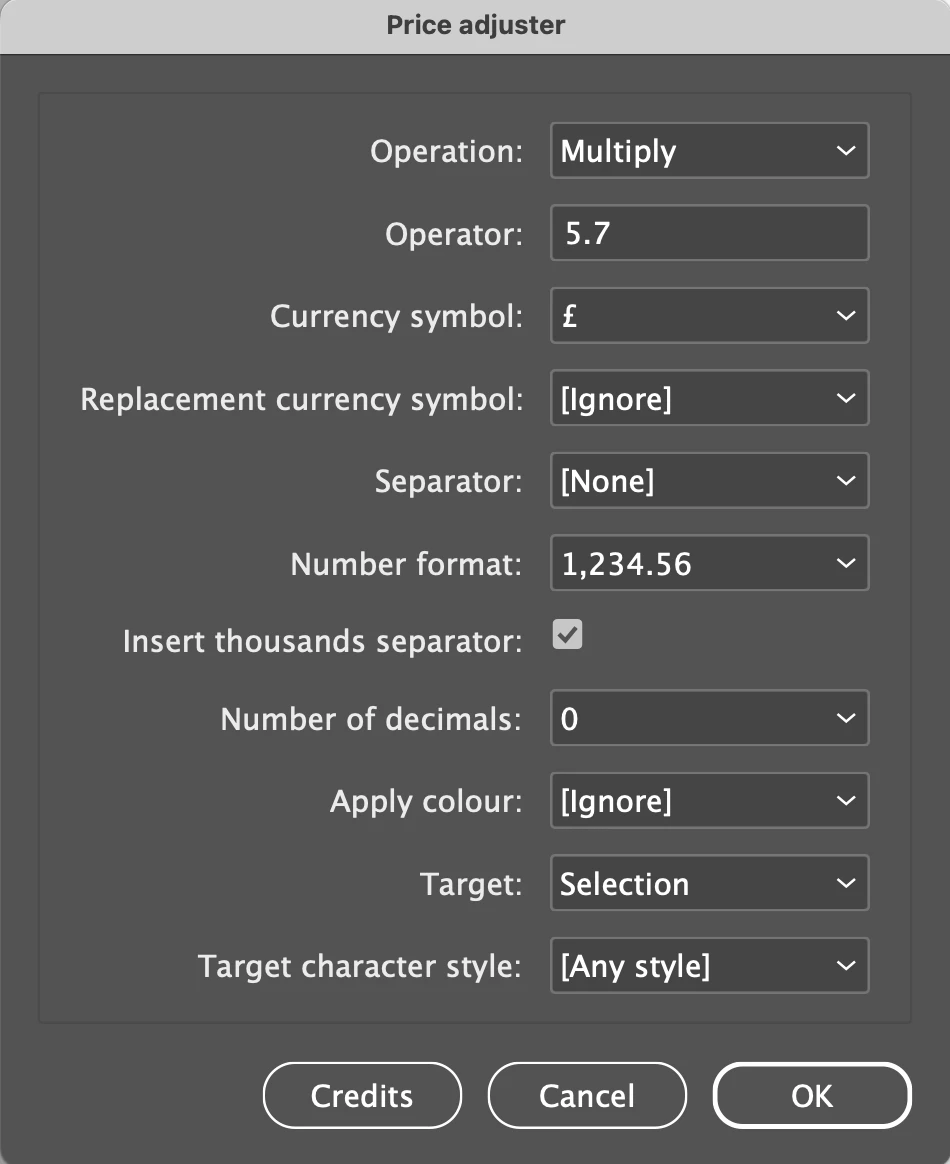
When I go to run the price adjuster script, using htr attached settings, no conversion happens.

To test I deslected Target Character Style and all prices converted which I know is wrong but can't help thinking i've missed a step....appreciate you adve and help though thank you.

(attached screnshot)

Robert at ID-Tasker
Brainiac
March 7, 2024
quote

Hi thank you for this.

So I created a characher style for each RRP and TRADE.

I then used the GREP codes to give the RRP and TRADE their own characer styles.

(attached screenshot)


These both appear to work as when I highlite a price, the character style name changes in the dialogue box.


When I go to run the price adjuster script, using htr attached settings, no conversion happens.

To test I deslected Target Character Style and all prices converted which I know is wrong but can't help thinking i've missed a step....appreciate you adve and help though thank you.

(attached screnshot)


By @DanielAustinCarat


Maybe because @Peter Kahrel's GREP is not styling £ - but you've selected it in the dialog?


Community Expert
March 7, 2024

Both RRP and TRADE have the same character styles


Ok. But the question remains: how can you tell these prices apart. Not by character style, as you say. But I need to know what distinguishes them. Paragraph style? Cell style? Anything at all?


If the prices cannot be distinguished in any way  you needn't even start worrying about GREP.

Community Expert
March 7, 2024

The first question, indeed, is how you tell apart the RRP and Trade prices.

Known Participant
March 7, 2024

Hi Peter, the RRP we want to roound up to the nearest whole number.
The TRADE prices we want to leave with the two decimal places, but both prices are using the same conversion of x5.7

m1b
Community Expert
March 7, 2024

Hi @DanielAustinCarat, Peter and Robert are asking how the script can differentiate between the RRP and Trade prices. For example, if they are each set in their own character styles, then the script will be able to target them separately, but if not... then that is the first thing to solve.

Robert at ID-Tasker
Brainiac
March 7, 2024

@DanielAustinCarat 


Do you have different CharStyles applied to RRP and TRADE prices?


Because last option - TARGET CHARACTER STYLE - will change only values styled by selected CharStyle.


OK, you need to round values.

If you are in a hurry - you could play with GREP - do conversion without decimal places, then add".00zł" - for RRP of course.


Known Participant
March 7, 2024

I don't have a great deal of experience with GREP but any expert advice would be greatly appreciated

Robert at ID-Tasker
Brainiac
March 7, 2024
quote

I don't have a great deal of experience with GREP but any expert advice would be greatly appreciated


By @DanielAustinCarat


Then it would be best if you tell us more about your document - if RRP / TRADE have different CharStyles applied.


If they are in a spearate Paragraphs, or in separate Cells?


Or can you post a screenshot? Frame Edges visible and Show Hidden Characters.