


Participating Frequently
August 10, 2023
Answered

InDesign Share button not working

  • August 10, 2023
  • 3 replies
  • 2237 views

Hi there, 


The SHARE button in InDesign has a history of not working for me. I am running it on a MacBook Pro with macOS Ventura 13.4.1. I'm on Adobe Creative Cloud 5.11.0.522.1. The usual issues I have after clicking on the share button include the wheel spinning and the window never loading, or after clicking the update link button, the wheel spins continuously with no advance. Usually, after a restart or 2, I can get the window back up and running properly. This week, however, when I click the share button - I get a completely black window. Today, after a restart, I am getting a window with "Share for review" at the top and a continuously spinning wheel.


The Share for Review feature is an awesome addition to the app. But, I'm not sure what the purpose of this feature is - if I can't depend on it to work every time I try to use it. Just looking for some consistency, and not having to hold my breathe everytime I click the Share button!


HELP!
Correct answer Ruth311592450f0q

Hello,

The fix I have found is (in this exact order):

  1. Force quit InDesign
  2. Restart computer
  3. Sign out of Adobe CC
  4. Re-open the file which prompts me to sign into Adobe CC
  5. I sign in and then inDesign crashes
  6. I reopen the same file and the share function works perfectly

    Details:
    - I'm on an organizational network and it happens with all inDesign files
    - inDesign version: 18.5 x64
    - OS:  Windows 11 Business


    Thanks!

3 replies

New Participant
November 10, 2025

2 years after that post and Adobe still does not have this "feature" working consistently. the updates do not work w/in the share. when can this get fixed?


Abhishek Rao
Community Manager
Community Manager
November 14, 2025

Hello @tab7778,


I'm truly sorry to learn that you are still experiencing difficulties with Share for Review. To investigate this properly, could you please confirm the version of InDesign you are currently using along with your operating system details? We recently had an outage that impacted Share for Review, which was resolved the same day by our product team. You can find the reference here: https://adobe.ly/47YwKSa

Please inform me if you continue to encounter persistent issues with updating or creating Share for Review links. If the problem persists, I would ask you to create a new post in the community with all the relevant details of the issue, so we can examine it more closely and investigate further for you.


I look forward to your response.

Abhishek

New Participant
September 25, 2023

Share button worked fine this morning. Then I tried to push out content changes to the link and it had the spinning wheel for nearly half an hour and never updated the link. I signed out of CC and back in; rebooted the computer; all of the things and now the share button does nothing when I click it. @INDESIGN software engineers: PLEASE ADVISE

Rishabh_Tiwari
Community Manager
Community Manager
September 28, 2023

Hi @Ruth311592450f0q,


I am so sorry for the delay in response. Could you please share a few more details like:


-The version of InDesign & OS.

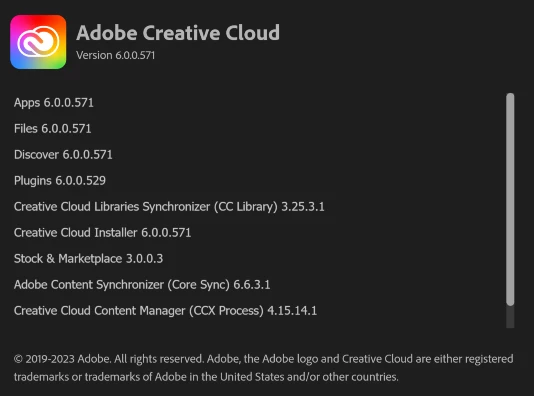
-A screenshot of the version of the Creative Cloud Desktop app.
-Is this happening with a specific file or multiple files?

-Are you connected to a private network or an organizational network?


We're here to help, just need more information.


Thanks

Rishabh

Ruth311592450f0qCorrect answer
New Participant
September 28, 2023

Hello,

The fix I have found is (in this exact order):

  1. Force quit InDesign
  2. Restart computer
  3. Sign out of Adobe CC
  4. Re-open the file which prompts me to sign into Adobe CC
  5. I sign in and then inDesign crashes
  6. I reopen the same file and the share function works perfectly

    Details:
    - I'm on an organizational network and it happens with all inDesign files
    - inDesign version: 18.5 x64
    - OS:  Windows 11 Business


    Thanks!
Steve Werner
Braniac
August 10, 2023

We need more system information: Please tell us (exactly) what InDesign version you're using.  Have you tried restoring your preferences and caches? Here's how:


https://www.rockymountaintraining.com/adobe-indesign-rebuilding-preferences-cache/

Participating Frequently
August 10, 2023

Thanks for your reply Steve. I am running Adobe InDesign 18.5.


I just quit InDesign, renamed the 2 folders and opened InDesign back up. Still getting spinning circle when I click on the "Share" for review button. 

New Participant
August 25, 2023

Hi Steve! As expected, a few days later I experienced the same problem trying to get into the SHARE window. The first time I was able to restart my computer, and reopen InDesign to get it to work again. A few days later, it happened again. I was quite busy, and when a quick restart didn't work, I just sent my colleague a PDF to review. I really can't depend on it working consistently, and if I have to rename folders and restore preferences everytime I try to use it, its just not worth it. My issues seems to be much worse lately though, maybe since the last update? Is this an issue that anyone else is having?


I'm having the same problem, just a black screen when I click share - it's driving me mad!