



Copy link to clipboard
Copied
Anyone knows a place - if there is any - that lists / filters all the menu commands, with the info, any kind of suggestion, if they require / accept extra parameters or not?
Can be even .h or .c file somewhere in the SDK.
Like Copy, Cut, Paste, (un)Group, etc. - they are just a "simple" commands, no dialogs and no extra params.
Or like icons that you can click - Align selected objects.
Checking all those 1000s of commands won't be fun... Getting all the properties for Objects and Text was tedious but this would be a nightmare...
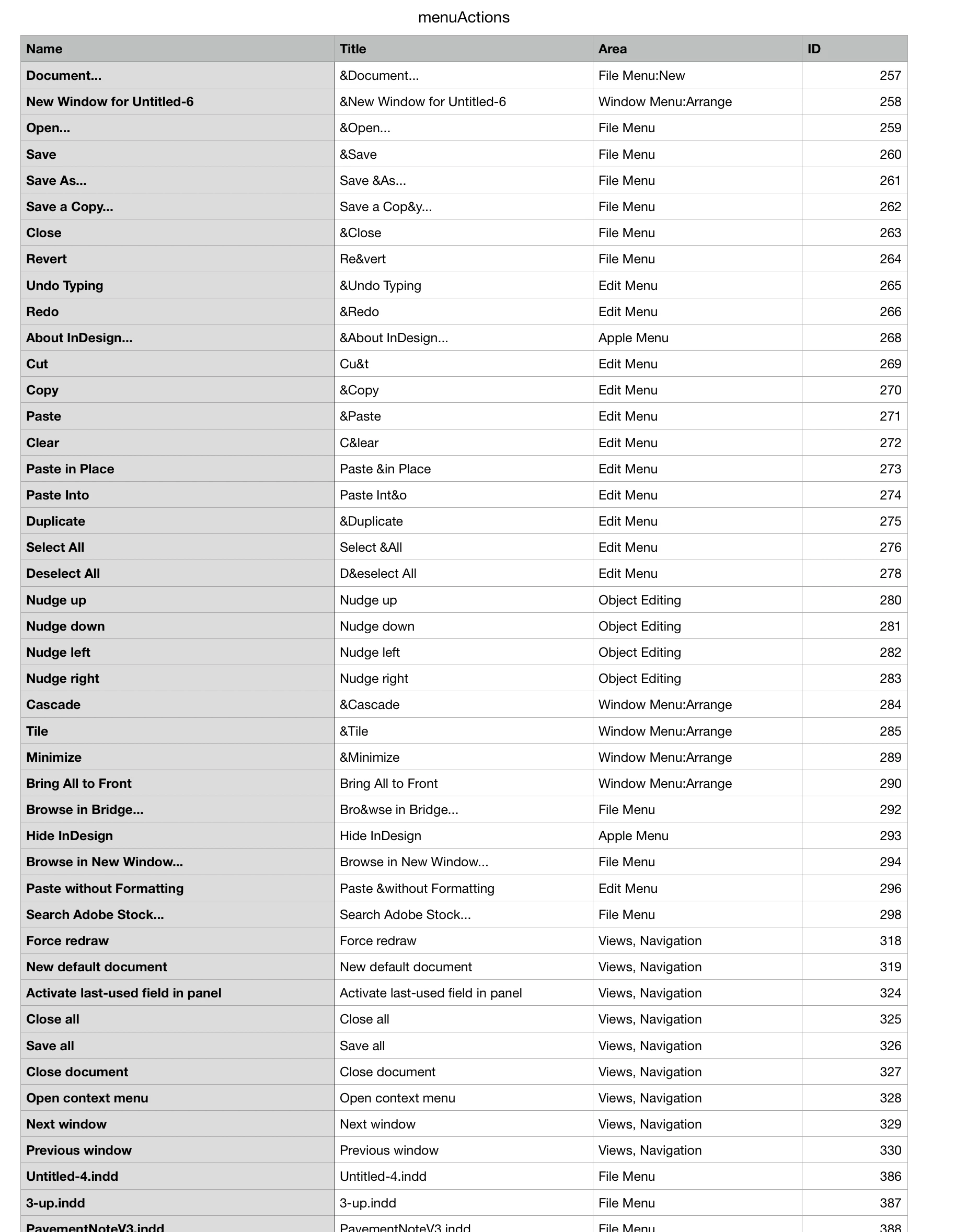
Hi Robert, You could get a list of all the menu actions (which would be different for every user). This outputs a tabbed text file with the name, title area and id properties of every menu action to the desktop:
var ma = app.menuActions.everyItem().getElements()
var s = "Name\tTitle\tArea\tID\r"
for (var i = 0; i < ma.length; i++){
s+= ma[i].name +"\t"+ma[i].title+"\t"+ma[i].area+"\t"+ma[i].id+"\r"
};
writeText(Folder.desktop + "/menuActions.txt", s)
function writeText(p,s){
var f...
Copy link to clipboard
Copied
Copy link to clipboard
Copied
Thanks, but it's not what I'm looking for.
Copy link to clipboard
Copied
Hi Robert, You could get a list of all the menu actions (which would be different for every user). This outputs a tabbed text file with the name, title area and id properties of every menu action to the desktop:
var ma = app.menuActions.everyItem().getElements()
var s = "Name\tTitle\tArea\tID\r"
for (var i = 0; i < ma.length; i++){
s+= ma[i].name +"\t"+ma[i].title+"\t"+ma[i].area+"\t"+ma[i].id+"\r"
};
writeText(Folder.desktop + "/menuActions.txt", s)
function writeText(p,s){
var file = new File(p);
file.encoding = 'UTF-8';
file.open('w');
file.write(s);
file.close();
}
My install outputs 4045 items
Copy link to clipboard
Copied
Thanks @rob day, I know that I can get this list - but I was looking for something that will tell me which ones are "simple" and which one are "complex".
...
Or... I could filter the results by "..." after the name - which suggests that there would be a dialog?
Copy link to clipboard
Copied
I have only 3266 rows...
OK, looks like it includes things like Scripts.
And a lot of blanks - like 84 rows for "Text and Tables" Area
Sorting it in Excel by different columns - reveals a lot of interesting stuff...
Copy link to clipboard
Copied
I have only 3266 rows...
Right, everyone’s installation would be different—every script, font, open document would get a menuAction. I think you would have to be careful assuming a particular .invoke() would always work. I only use it when there is no way to get at something via the API.
Copy link to clipboard
Copied
Yes, of course, I wasn't planning to add them all.
Almost 1200 left after removing all the things you've mentioned and "...".
But i think I'll add all those "..." anyway - as an option to display specific dialog when user will need to make a decision that can't be scripted.
Copy link to clipboard
Copied
After removing fonts and duplicates and some other trash - there are 1194 "useful" commands to invoke... and it looks really promising... so I should be able to let user do A LOT of things ... even control what and how InDesign will display things in the UI...
Window Menu:Arrange -> 2-up Horizontal -> 13731
Which panels should be visible:
Window Menu -> Links -> 132609
but probably not the exact location...
View Menu:Screen Mode -> Presentation -> 11886
Panel Menus:Layer -> Delete Unused Layers -> 1844
All the Align options - Horizontal and Vertical:
Most of the things won't even need to be scripted - just invoked...
Copy link to clipboard
Copied
Which panels should be visible:
Window Menu -> Links -> 132609
but probably not the exact location...
Location is in plain text file - so it is possible to control even that - but requires restarting InDesign.
Copy link to clipboard
Copied
For the SDK side, the actions are listed in the ID.h files - of course missing those added by third party plug-ins and where Adobe does not provide the ID.h file. A plug-in can also examine and eventually modify all of them with an IMenuFilter (for the menu items) and an IActionFilter (guess ...). These include menus and actions hidden from the KBSC editor.
You should also have a look at the IActionComponent interface whose various instances are backing the ActionIDs - responsible for enabling, optional check marks, and the invoke(). Those action components sometimes receive an "IPMUnknown" context to dynamically adjust the action name or refer to more information. When you click on a node in a style palette panel, you'd receive the node widget so the contextual menu has a chance to adjust accordingly, or pick up the panel selection from the given panel, or what-do-you-know. When your script peeks at, or even invokes such actions that information will be missing to the action component so you have to hope it is prepared for that.
Copy link to clipboard
Copied
Thanks for the tip with ID.h files.
I think the rest of your comment is when creating real plugin, right?
Copy link to clipboard
Copied
Below is an example of the duplicates - can I leave ones with lowest ID or rather those with "&" if available?
[update]
After removing all fonts and scripts and duplicates:
- "single action" commands - like switches and icons - 1627
- commands with "..." that will open a dialog - 373
Exactly 2000 - most likely a coincidence.
I was also thinking to not prepare "static" names, but use IDs to get current names of the commands from the InDesign - what do you think?
This should - as a bonus - return translated versions, right?
Copy link to clipboard
Copied
That "Double Left Quotation Marks" has a path of either "FindMetaCharPopupMenu:Quotation Marks" or the matching Change - so they would insert the escaped form within the Find Change dialog. Others from Find-Grep tab.
The ampersand sounds like the Windows specific feature where the following character is underlined in the UI and gets another matching local shortcut.
Copy link to clipboard
Copied
So I can't use either of the IDs - each one is specific for the situation, right?
But, you've got me thinking... I'm not sure, but for some time, after some early 18.x update, I've noticed, that my tool won't crash after a dialog is open but will continue to work - like Print - where before, opening some dialogs would crash it, so maybe I could show a dialog and then try and enter some extra information... From VB I can send / simulate keystrokes, and I'm pretty sure, each dialog will always open with a specific part of it active "by default" so sending "tabs" would let me "go" where I want... or rather user.
Yes, "&" is Windows specific - my tool is Windows only - and there won't be a Mac version.
I'm just looking for a way to filter out IDs that are more "important" than others - presence of "&" means that this particular ID is directly accessible from the menus after using Alt.
Find more inspiration, events, and resources on the new Adobe Community
Explore Now