



_AWID_
Inspiring
February 11, 2025
Question

Indexing by own list

  • February 11, 2025
  • 4 replies
  • 2256 views

Hi.

In the first step I try to load a text-based list to create an index with certain topics. The loading is not the problem:


var myDoc = app.activeDocument;

app.doScript(main, ScriptLanguage.JAVASCRIPT, undefined, UndoModes.ENTIRE_SCRIPT, "Funktionsprozess");

function main() {
	var myList = File.openDialog ("Indexliste laden"); 
	if (!myList) exit(); 

			myList.open ('r', undefined, undefined); 
			var theText = myList.read();//+'\n'; 
			theText = theText.replace(/ +\n/g, '\n').replace(/\n+/g, '\n'); 
			var words = theText //.replace(/\s+/g, '\n');  
	
			var words = theText.split("\n"); 
			listLength = words.length;

			myList.close(); 

	function makeMyList() { 
		app.documents.everyItem().indexes.everyItem().topics.everyItem().remove()

		newIndex = myDoc.indexes.add()
	
		for (var i = 0; i<listLength; i++){  
			myWord = words[i];			
			if (myWord != "") {

				newTopic = myDoc.indexes[0].topics.add (myWord);
				myDoc.indexes[0].topics.add(myWord);


				myDoc.indexes[0].update(); 
			}
		} 
	}
	makeMyList();
		
}​


I had to change the script because making a mistake (wanted to use a string instead an array for the enties)🙂Now it works but I also need the page numbers. This is how it looks like:
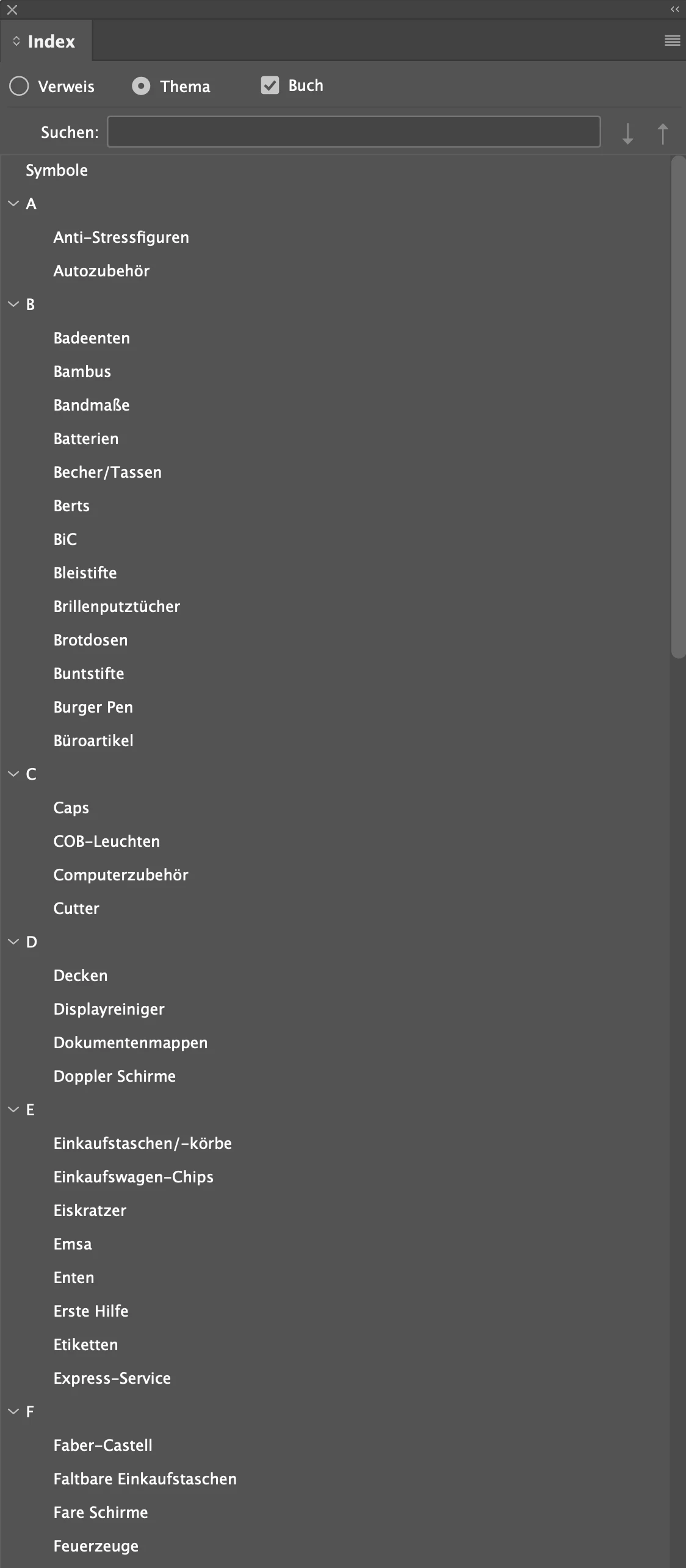


But I´m afraid, the imported topics needs to be at the references (Verweise) instead of the theme (Thema) to get the page numbers, isn´t it?


4 replies

_AWID_
_AWID_Author
Inspiring
February 26, 2025

Thank you Peter, Robert.


The difficulty for me is that I can follow the code for a while, but then I lose focus :). Unfortunately, it is not so easy for me to establish the logical connection between functions in more complex codes. I think that for experts like you, this is a piece of cake and can be written between two cigarettes. 🙂  But it takes me weeks to understand it, and even longer to implement it, in between during working hours .

For exemple:

if (Math.abs(p_ref.sourceText.index - ip)


or when one set as the value of a variable a funftion with parameters:

var indexEntries = findTextInDocument(thisDoc, words);


@Peter Kahrel

I know what "count" means, but the double underline confused me.

With your code snippet I will try to keep it simple and to solve the issue

@Robert at ID-Tasker 

I will look for the references again, it might take some time

Community Expert
February 26, 2025

I know what "count" means, but the double underline confused me.


It's just part of the script language's formalism.

Community Expert
February 21, 2025
> duplicates: forget about this for now.
 
> __count__: this returns the number of items in an object. It's comparable to an array's .length. Forget about it for now.
 
> determine the page number of the words found
 
This is where you go wrong: you don't determine a term's page number, instead you just create a page reference on the page.
 
The basic steps are the following:
 
1. Open your documents
2. Open the word list and get each item
3. Take an item, say 'amber', then in each document
   a. create a topic 'amber'
   b. look for all occurrences of 'amber' in a document and
   c. at each occurrence of 'amber' create a PageReference
 
Your earlier script got as far as 3a: it created topics. You should then look for instances of that topic and create page references. That can be done by something like the following code -- it's in the script, but pared down to only the necessary steps:
topicName = ...; // reference to a topic name, e.g. 'amber'
app.findTextPreferences = null;
app.findTextPreferences.findWhat = topicName;
found = thisDoc.findText();
if (found.length > 0) {
  topic = thisDoc.indexes[0].topics.add (topicName);
  for (i = found.length-1; i >= 0; i--) {
    topic.pageReferences.add (found[i], PageReferenceType.CURRENT_PAGE);
  }
}​
_AWID_
_AWID_Author
Inspiring
February 26, 2025

Now I have a working script! 🙂

var myDoc = app.activeDocument;
var allOpenDocs = app.documents.everyItem().getElements();
var allOpenDocsLength = app.documents.length;
var allTopics = [];

app.doScript(scriptTimer, ScriptLanguage.JAVASCRIPT, undefined, UndoModes.ENTIRE_SCRIPT, "Funktionsprozess");

function scriptTimer(){
    var timeDiff = {
    setStartTime:function (){d = new Date(); time  = d.getTime();},
    getDiff:function (){d = new Date(); t = d.getTime() - time; time = d.getTime(); return t;}
};

// Start timer
timeDiff.setStartTime();
 
// Start Main Funktion
main();
 
// get result
alert("Dauer der Ausführung: " + timeDiff.getDiff() / 1000 + " Sekunden", "IndiSnip /// Scipt execution time");
    }

function main() {
	var myList = File.openDialog ("Indexliste laden"); 
	if (!myList) exit(); 

			myList.open ('r', undefined, undefined); 
			var theText = myList.read();//+'\n'; 

            theText = theText.replace(/^$/g, ''); 
            theText = theText.replace(/ +\n/g, '\n'); 
            theText = theText.replace(/\n+/g, '\n'); 
	
			var words = theText.split("\n"); 
			listLength = words.length;
			myList.close(); 
            thatsMyDoc();
		
    function thatsMyDoc(){
        for(d = 0; d < allOpenDocsLength; d++){
            thisDoc = allOpenDocs[d];
            showActiveDoc(); 
            if(thisDoc.indexes > 0) {thisDoc.indexes.everyItem().topics.everyItem().remove();}
            newIndex = thisDoc.indexes.add();
			serch4Topics();
            thisDoc.indexes[0].update(); 
        }

    }

    // snippet by Adobe Community-Member Laubender
    function showActiveDoc(){
        var dlog = new Window("palette");
        dlog.size = [400,50];
        dlog.add("statictext", undefined , "Suche nach Schlagworten im Dokument: "+ thisDoc.name );
        dlog.show();
        // Have a nap:
        $.sleep(50);
        // Closing the dialog:
        dlog.close();
    }

    function serch4Topics(){
        for(var j = 0; j<listLength; j++){
            topicName = words[j]; // iterating through the list, topics one by one
            app.findTextPreferences = null;
            app.findTextPreferences.findWhat = topicName;
            found = thisDoc.findText();
            if (found.length > 0) {
                topic = thisDoc.indexes[0].topics.add (topicName);
                for (i = found.length-1; i >= 0; i--) {
                    topic.pageReferences.add (found[i], PageReferenceType.currentPage);
                }
            }
        }
    }
}

To run it over nearby 300 Pages, based on a list with over 200 terms it takes round about 20 Minutes. But that ist not a problem.

I would like to eliminate duplicates.

@Peter Kahrel  In your script index_topic_list.jsx there are some lines like (I do not understand):

...
duplicates[search_item] 
	? duplicates[search_item].push (word_list[j]) 
	: duplicates[search_item] = [word_list[j]];
...

...and other references to "duplicates" in other functions.

Is there another, more simple way to avoid duplicates?

Community Expert
February 27, 2025
quote

It looks for 'Smith' in the text and notices that there are more Smiths. So these are special cases.


If you're worried about a full entry occurring twice or more, e.g.  'border collie', then don't worry. There's no need to check for duplicates because InDesign checks for them internally (one of the very few clever features of InDesign's index).


By @Peter Kahrel

That´s nice! 🙂

But: mea culpa, I explained it wrong. The list of sources is hand-made and none of the terms are duplicated. The duplicates I get are the page numbers. Some of the terms appear more than once on a page. So in the index list I`ll generate, I need the page reference for each term only once...


Duplicate page numbers are not a problem, each page number is printed only once. In fact, you want to keep those 'duplicates' because if an item occurs twice on a page, after some changes in the text they may be on different pages.


You see all instances of 'duplicate' pages in the Index panel, but when you generate the index they're filtered out.

Robert at ID-Tasker
Brainiac
February 11, 2025

@_AWID_ 


Your second line here:

				newTopic = myDoc.indexes[0].topics.add (myWord);
				myDoc.indexes[0].topics.add(myWord);

is a duplicate of the one above - so you can remove it.


_AWID_
_AWID_Author
Inspiring
February 12, 2025

Oh yes, you´re right 🙂 Thanks!

I wanted to shorten it, and forgot to remove....

Community Expert
February 11, 2025

You next step would be to look for those entries in all documents and create page references at each instance.


There are various scripts around that do that. One example is

https://creativepro.com/files/kahrel/indesign/index_from_wordlist.html

_AWID_
_AWID_Author
Inspiring
February 12, 2025

thanks Peter. Now I try to understand your script 🙂

First I want to take advantage of it by completing mine.

Robert at ID-Tasker
Brainiac
February 12, 2025

@_AWID_


In short - you need to do your own search, then add each found instance to the index using pageRefetences.add().


https://www.indesignjs.de/extendscriptAPI/indesign-latest/#PageReferences.html#d1e127099__d1e127148