



inline table to span in two columns in a page
Hello
I wish to get a table in two columns as it flows inline with text.
Now I am able to create a text-frame and using the 'Object -> Text Frame Options' select the number of columns as 2, and then place the MS Word table in the InDesign document.
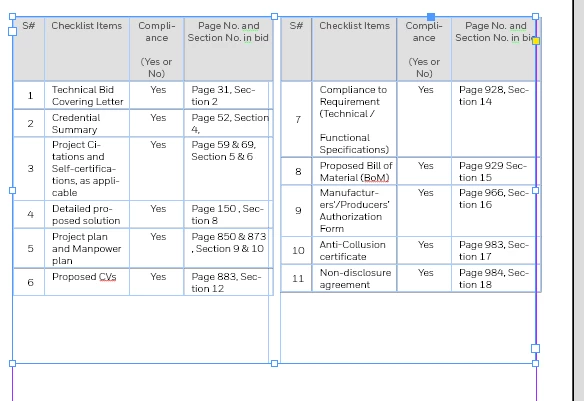
However, the way I wish to have it is as follows all in one text frame:
Text (spans the entire page)
Table (inline with text and spans two columns)
Text (spans the entire page)
So my workflow to accomplish this is as follows:
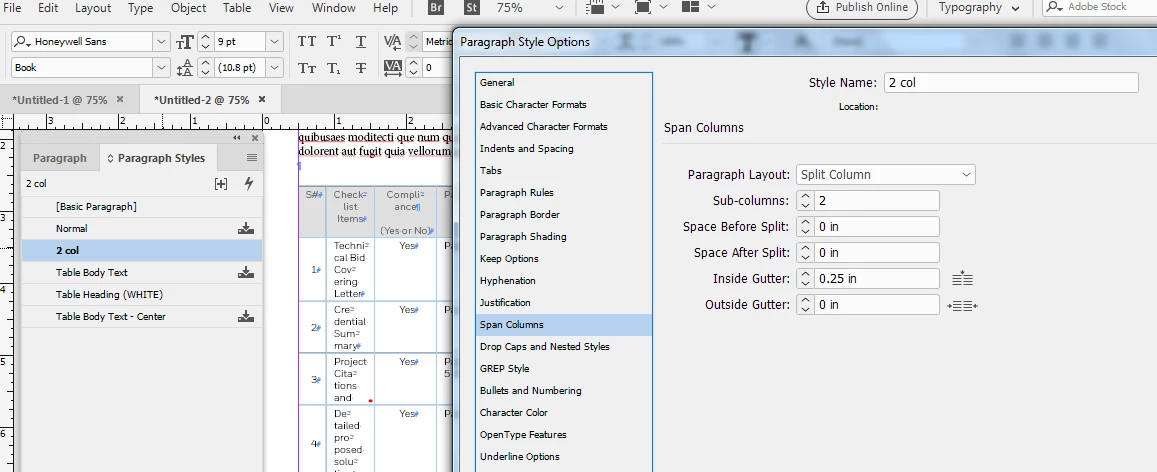
I place the MS Word table at the desired location between two blocks of text. And then I take my cursor to the Serial Number field and press the left arrow key which sets the cursor flashing. I create a new para style, splitting the column into 2, and apply it to the table.
I get the foll result, which is abt close to what I was seeking, but I'm not completely satisfied. The table header rows are not aligned to each other. Also, I am not sure if this is the most prudent approach to go abt accomplishing this.
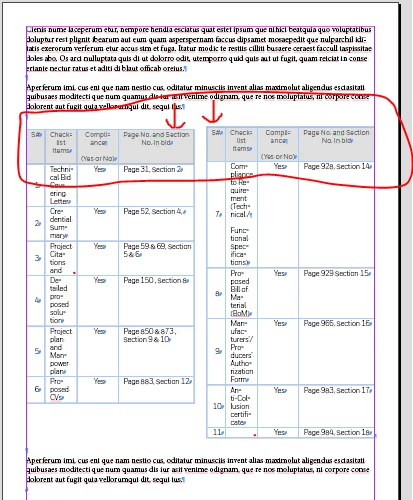
I'd really appreciate if someone can guide me on how to fixe the alignment issues, and also, if my approach to having an inline table span two columns is OK.
Thanks
 AdChoices