


mihkelk92850352
New Participant
October 3, 2017
Answered

Insert a circle in certain table cells

  • October 3, 2017
  • 4 replies
  • 4871 views

I am creating a calendar in InDesign and want to style the holidays with a filled circle behind the date. How can i Do that through cell styles? One possibility would be to make the cell border corners round (if the round corners are big enough, they make a full circle. But this round corner option only works for the whole table, not cells (as far as I know). Any other ideas?

This topic has been closed for replies.
Correct answer vinny38

Not bad...

but...


Haha... La torture mentale...

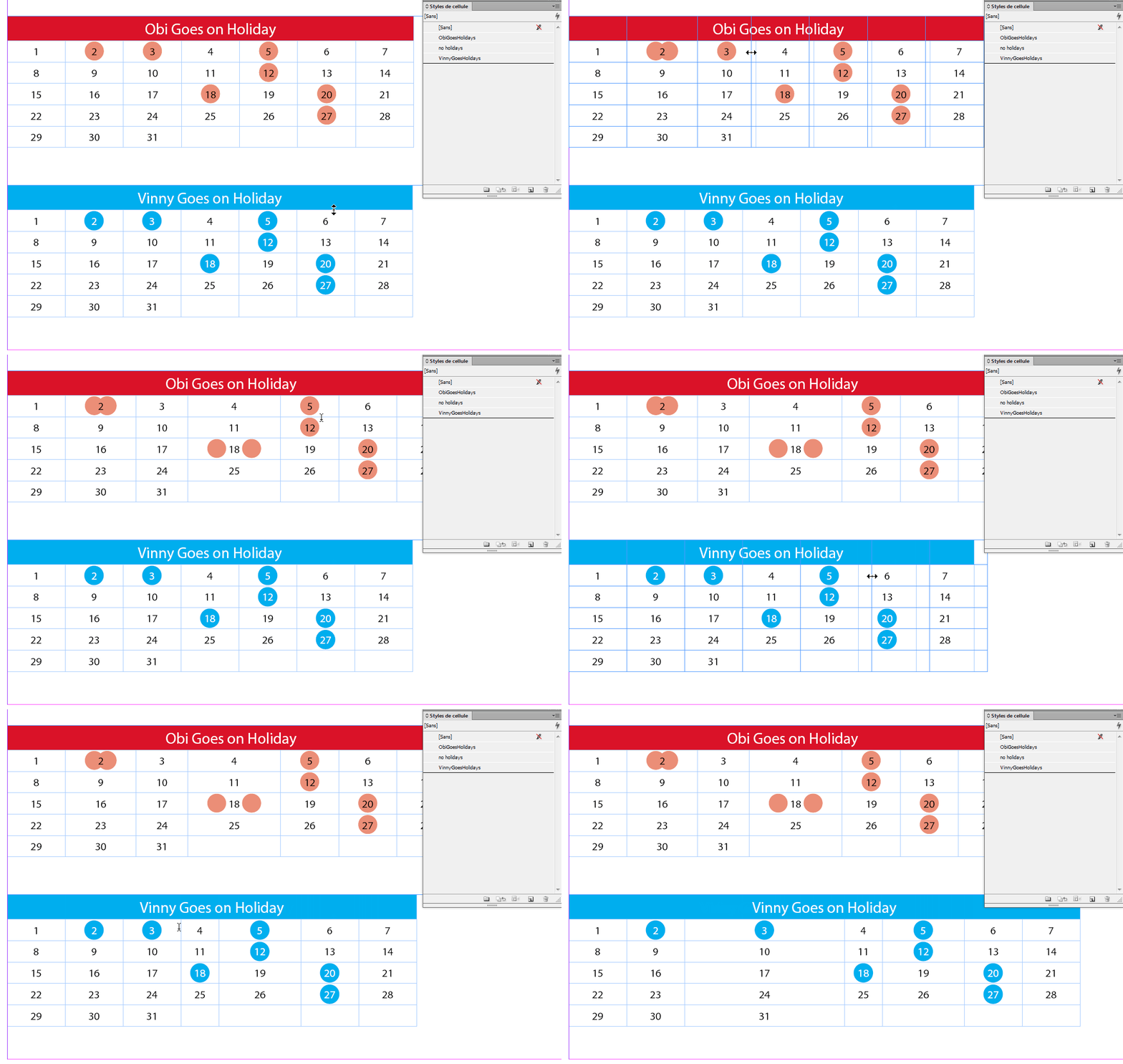
So, basically i use the very same technic than you. The only difference is that I didn't "stick" the 2 extremities of the rule in the middle. I used large negative left and right indents to throw them way out of the column. The visible circle is the mid-one...

Of course don't forget to set cell style with Clipping contents to cell.

:-)

4 replies

Brainiac
October 3, 2017

Hi mihkelk92850352, it looks like Obi-wan Kenobi, has a good solution for you. We can mark it as correct once you confirm.

If you get stuck on the French-language screen shots, just come back and let us know. The starting point is Window > Stroke > Stroke Panel menu > Stroke Styles and then click on New. From there, it's fairly easy to follow along. If you don't work in mm, just type in Obi's numbers followed by mm, they will convert to whatever unit of measure you are using once you press the Tab key. From there, it's easy to increase/decrease the values to get exactly what you want.

~Barb

Obi-wan Kenobi
Brainiac
October 3, 2017

Hi,

Screenshot please!

(^/)

mihkelk92850352
New Participant
October 3, 2017

Cells 23 and 24 for example have black backgrounds at the moment, but I would like to have the background be a black circle. Font with circle would be an option, but I would like to be able to edit the size of the circle...

Brainiac
October 3, 2017

Have you considered using a font that has a circle around the number itself? Try a search for circled numbers font.

Eric Dumas
Brainiac
October 3, 2017

Hi,

font with circle would be my first choice. Otherwise you could try to create an excel file, with an image's url as a reference for the holidays and use the data merge function to create your calendar, very complicated but easier updates from year on year. 31 days for every month... headache actually.

Obi-wan Kenobi
Brainiac
October 3, 2017

You are accusing Vinny of "la torture mentale"? He's learned from the master.


Aha! … I could do it with a simple regex but not auto!

… So, I'm curious and interested! …    I wanna learn something today! 

(^/)

@mj
Brainiac
October 3, 2017

Hi,

You'd be able to get the circle into the cell as an in-line graphic. Which can be copy/pasted where needed.

As a cell style, I'm doubtful.

HTH