Known Participant
October 19, 2023
Answered

Insert words from a list into specific parts of the text

  • October 19, 2023
  • 3 replies
  • 2003 views

Hello all,


I have a list of words and I would like to insert each word in a specific part of the text. It could be after a specific formatting or after a specific style.


Is there a way to do that using InDesign tools or only using a script?


Thank you

Danilo

This topic has been closed for replies.
Correct answer Anantha Prabu G

Hi Anantha,

Yes, the part in CSV file for "myChange"

Thank you


Hi @Danilo243268172lwz 


Final output Script:

#target indesign

if(app.documents.length == 0)
{
alert("Hi User!! Please open the InDesign Document")
exit();
}

var myFile = File.openDialog("Choose a Remap csv file:");
if (!myFile)
{
exit();
}
myFile.open('r');
var myCounter = 0;
while (myFile.eof==false)
{
myCounter++
line=myFile.readln();
line = line.split(",");
//~ line = line.split("\t");
if(myCounter == 1)
{
continue;
}
myFind = line[0];
//alert("findWhat: " + myFind)
myChange = line[1];
//alert("myChange: " + myChange)

var myDoc = app.activeDocument;
app.findGrepPreferences = app.changeGrepPreferences =null;
app.findGrepPreferences.findWhat = myFind;
app.changeGrepPreferences.changeTo=myFind + " *" + myChange;
app.documents.item(0).changeGrep();
app.findGrepPreferences = app.changeGrepPreferences = null;
app.findGrepPreferences.findWhat = "\\*(.+)$";
app.changeGrepPreferences.changeTo="$1";
app.changeGrepPreferences.appliedCharacterStyle= myDoc.characterStyles.item("A"); // change your Character style name
app.documents.item(0).changeGrep();
}
myFile.close();

Thanks @nicosh for your amazing trick.


Thanks,

Prabu G

3 replies

Anantha Prabu G
Legend
October 20, 2023

Please create .csv for insert words like below and run the script.


#target indesign

if(app.documents.length == 0)
{
alert("Hi User!! Please open the InDesign Document")
exit();
}

var myFile = File.openDialog("Choose a Remap csv file:");
if (!myFile)
{
exit();
}
myFile.open('r');
var myCounter = 0;
while (myFile.eof==false)
{
myCounter++
line=myFile.readln();
line = line.split(",");
//~ line = line.split("\t");
if(myCounter == 1)
{
continue;
}
myFind = line[0];
//alert("findWhat: " + myFind)
myChange = line[1];
//alert("myChange: " + myChange)

var myDoc = app.activeDocument;
app.findGrepPreferences = app.changeGrepPreferences =null;
app.findGrepPreferences.findWhat = myFind;
app.changeGrepPreferences.changeTo=myFind + " " + myChange;
app.documents.item(0).changeGrep();
app.findGrepPreferences = app.changeGrepPreferences = null;
}
myFile.close();

Thanks,PrabuDesign smarter, faster, and bolder with InDesign scripting.
Known Participant
October 20, 2023

Hi Anantha,

It works perfectly! Thank you.

Just one question: Is it possible to insert the text with a specific character style?

Thank you!

Anantha Prabu G
Legend
October 20, 2023

Hi @Danilo243268172lwz


Working on this.

You want apply character style spanish words only. Is it correct?


Thanks,

Prabu

Thanks,PrabuDesign smarter, faster, and bolder with InDesign scripting.
James Gifford—NitroPress
Legend
October 19, 2023

Unless the actual implementation is simpler and more rigid than your example, I can't see a way to do this without human (or AI, I guess) judgment.

Community Expert
October 19, 2023

Hey


Sounds like it might be doable - but we'd need an exact example of what you're doing to be 100% sure.

Known Participant
October 19, 2023

Hi Eugene,

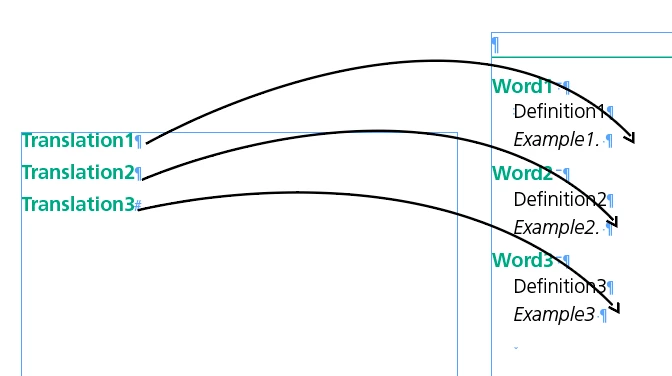
We have a list of Spanish translated words and the translation should follow on the same line where is writte "Example1".

Like this:

We pages and pages with many words and it will take me a long time to paste each translation at the end of the paragraph.


Thank you

Danilo

James Gifford—NitroPress
Legend
October 19, 2023

It's possible a simple script or macro could perform an "insert selected word from Doc A at cursor in Doc B," but again, this would seem to require human judgment unless the number of translated words to insert precisely matches the number and order of existing entries.


It would be trivial between two Word docs; all you would have to do is position the cursor in Doc B, verify that the next word in the Doc A list was the correct one, hit the defined macro's action key (and probably allow the macro to delete the word from Doc A and select the next one), repeat. I think that could be done in ID, but I'm weak on scripting.


That is, much of the process could be automated — entering any new text such as "Translation: " and copying the term from one doc to the next, searching for the next insert location if there's a standard search key that would work, etc. It would be a matter of just "check word for correct location, key; check next word for next location, key" until it was done. But I can't think of any way to automate the matching of the Spanish term to the existing entries except for 'wetware.'