


Participating Frequently
April 15, 2025
Question

Interactive PDF: Issue with Correct Answer Checkbox Behavior in InDesign

  • April 15, 2025
  • 4 replies
  • 1420 views

Hi,
I'm doing an interactive pdf with InDesign,
there is a question with one correct answer between multiple answers.
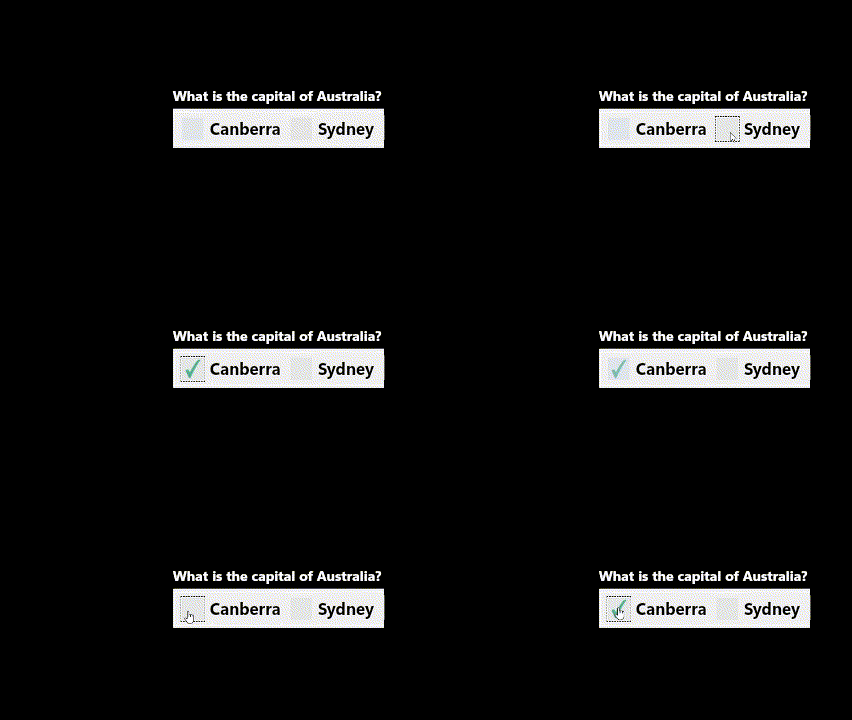
when the user click the checkbox of the correct answer it shows the tick mark and can also be unchecked, and if the user click on the wrong answer's checkbox nothing happens.
here is an example gif:


I couldn't figure out how to do all that.

I tried using object state & go to state, but when I open the pdf, all the checkboxes are checked.
I tried a different way, when I click on the wrong answer's checkbox nothing happens which is ok but if I then click on another answer, then that wrong one shows the tick even though I've deleted it from [Normal On].


<Title renamed by MOD>

4 replies

Dave Creamer of IDEAS
Community Expert
April 15, 2025

What exactly are you trying to do? 

Obviously, have nothing selected when opened, but beyone that I'm not sure.

A radio button would only allow one answer to be selected. Isn't that what you are looking for?

You can make checkboxes so they only allow one answer similar to radio buttons if you feel you need checkboxes for some reason. I've attached a PDF demonstrating your various options.


David Creamer: Community Expert (ACI and ACE 1995-2023)
sora20Author
Participating Frequently
April 15, 2025

I'm trying to achieve the same result as the gif I provided in the post. the tick mark is shown only on the correct answer if the user click it,
for example, the question is what's the capital of Australia?
[]- Canberra.
[]- Sydney.
if the user clicks on the first check box it shows a tick (bc it's the right answer), if he/she clicks on the second checkbox nothing happens.

BobLevine
Community Expert
April 15, 2025

You are fighting a losing battle here. Even if, by some chance, you get this working in Acrobat, the chances of it working in most 3rd party readers or browsers is nearly zero.

Robert at ID-Tasker
Brainiac
April 15, 2025

@sora20 


You would've to rather do it using Buttons - and show / hide.


sora20Author
Participating Frequently
April 15, 2025

I tried it, if I hide check box 2, the grey backround is removed after clicking but I want it to stay.


Robert at ID-Tasker
Brainiac
April 15, 2025
quote

I tried it, if I hide check box 2, the grey backround is removed after clicking but I want it to stay.


By @sora20


Because you need to hide one - and show another in the same place. 


You need to have a "visible" and "hidden" versions of the same button / checkbox. 


BobLevine
Community Expert
April 15, 2025

MSOs are not supported in PDF.

sora20Author
Participating Frequently
April 15, 2025

I'm sorry but what does MSO mean?

Robert at ID-Tasker
Brainiac
April 15, 2025
quote

I'm sorry but what does MSO mean?


By @sora20


Multi State Object. 


Community Expert
April 15, 2025

Is the element applied a "radio button"?

sora20Author
Participating Frequently
April 15, 2025

No, "Check Box".