TwitchOSX
Participating Frequently
February 18, 2011
Answered

Is it possible to print multiple InDesign pages on one sheet?

  • February 18, 2011
  • 6 replies
  • 153133 views

Say I have a 10 page InDesign document. Each page is fairly small. When I go to print out those proofs, can I print all 10 pages on one sheet of paper? Or do I have to copy each layout separately onto a new document to group them? Just to save paper really.

ID CS3

Correct answer Laubender

Laubender  wrote

just place the InDesign document(s) of the business cards on a page.

Do I need to manually lay out every page manually in the new document using this method?

Real world problem: 32 name cards to be inserted in plastic lanyard pockets. Client wants to print these on their own A4 printer, which they don't know how to use very well.

How can I (with Adobe CC and late model Mac) simply produce a 4 page PDF with the name cards laid out 8up on each A4 sheet?

I can't seem to do it in Acrobat. And following this thread would tend to suggest I need to:

  1. make a second ID document
  2. place 8 correctly sized frames on a Master Page
  3. create 4 new pages
  4. manually place the original file 32 times, selecting the appropriate page each time

Is that what people are suggesting? Surely there's a better way???


puffmoike  wrote

Laubender   wrote

just place the InDesign document(s) of the business cards on a page.

Do I need to manually lay out every page manually in the new document using this method?

Real world problem: 32 name cards to be inserted in plastic lanyard pockets. Client wants to print these on their own A4 printer, which they don't know how to use very well.

How can I (with Adobe CC and late model Mac) simply produce a 4 page PDF with the name cards laid out 8up on each A4 sheet?

I can't seem to do it in Acrobat. And following this thread would tend to suggest I need to:

  1. make a second ID document
  2. place 8 correctly sized frames on a Master Page
  3. create 4 new pages
  4. manually place the original file 32 times, selecting the appropriate page each time

Is that what people are suggesting? Surely there's a better way???

Hi puffmoike ,

are all the 32 cards in one PDF file?

Then you could place them also with one single placing action. One click for every card. 32 clicks in all.

Here is how:

1. Do a new InDesign document with 4 pages

2. Add 8 correctly sized frames on a Master

3. Maybe do frame fitting options to Fill Frame Proportionally:
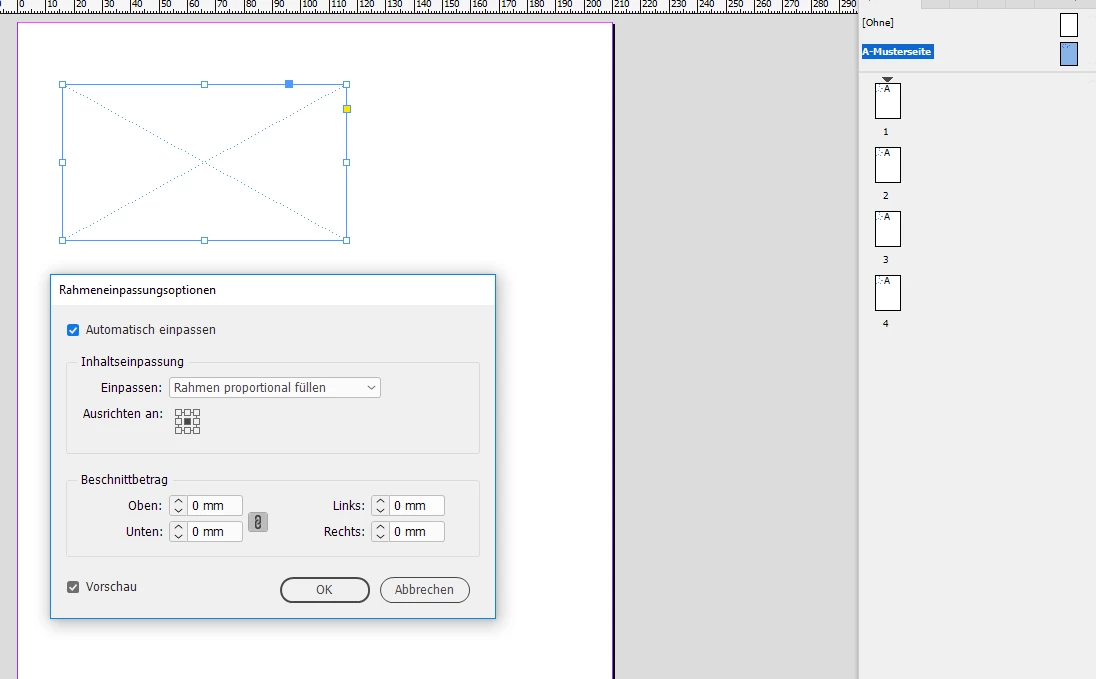
Now load the PDF to your place gun. Do All Pages in the Placing Options:
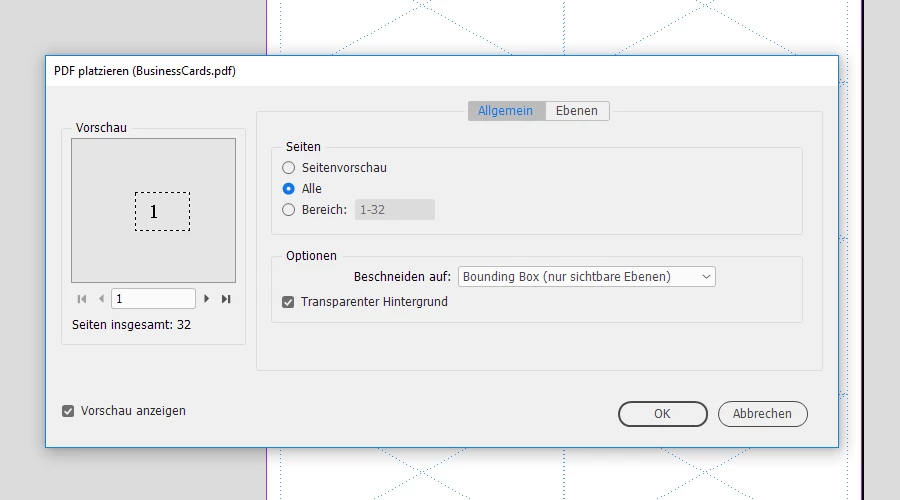
That would load all PDF pages as single assets to the place gun.

Hover above a prepared frame on a document page. Do one click to place the PDF page. One after another. Just 32 clicks.

Regards,
Uwe

6 replies

minnesota youths24149755
Participant
February 24, 2022

This post is a bit old, but this might help someone else trying to figure this out later, so here ya' go:


One way I've been able to print multiple InDesign pages on one sheet of paper is to export the InDesign file as a .PDF, open the file in Adobe Acrobat/Reader, and use that print dialog box instead of InDesign's. It's pretty easy and doesn't involve creating more than one new document (the .PDF) or copy/pasting until you cry.


In the print dialog box, under 'Page Size & Handling' go to 'Pages per Sheet', 'Custom'. Then, choose how many pages you'd like across and how many you'd like up/down. Then print. If your pages in InDesign are two big to stack without scaling them, you might want to reduce the document size in InDesign and export again.


I haven't found a *perfect* solution for this, but this works pretty well if your pages are sized correctly for stacking in InDesign. Hope this helps!

rob day
Community Expert
Community Expert
February 24, 2022

I wrote a cross platform JavaScript version of the AppleScript I posted earlier in this thread (from 2016). If you want to give it a try download it here:


https://shared-assets.adobe.com/link/588c3640-0b0d-47fc-68f2-f56e5d4dd188


There are two versions, one scales the thumbnails to your deafult page the other lets you set page dimensions:


Bevi Chagnon - PubCom.com
Legend
May 23, 2018

Here's a method that might work, but it will require a PostScript driver for your printer. (Maybe non-PS drivers/printers will allow this, too.)

From InDesign:

  1. Select File/Print.  Select a PostScript printer and PS driver. You can also select Acrobat PDF Printer, too, and this will create a PDF with the multiple items per page, too.
  2. From the lower left, select the Setup button
  3. From the next screen, select the Preferences button.
  4. In the Layout tab, choose the number of Pages per Sheet.
  5. Of course, select the correct paper sheet size throughout the printer settings.

Hope this helps!

|    Bevi Chagnon   |  Designer, Trainer, & Technologist for Accessible Documents ||    PubCom |    Classes & Books for Accessible InDesign, PDFs & MS Office |
Inspiring
May 23, 2018

https://forums.adobe.com/people/Bevi+Chagnon+%7C+PubCom  wrote

Here's a method that might work, but it will require a PostScript driver for your printer. (Maybe non-PS drivers/printers will allow this, too.)

From InDesign:

  1. Select File/Print.  Select a PostScript printer and PS driver. You can also select Acrobat PDF Printer, too, and this will create a PDF with the multiple items per page, too.

Thanks for the suggestion, but I don't actually own a printer (I've always had a paperless office) and there's something peculiar to MacOS that won't let you use File > Print to create a PDF.

I looked into this about a month ago (when I last tried to do something like this) but can't remember now exactly what the technical reason was. The upshot was that Mac users on this forum and others were suggested saving a PDF and then using Apple's own Preview app to print N-up, but my experience is that, at least for N-up imposition, that app is seriously lacking/buggy.

Bevi Chagnon - PubCom.com
Legend
May 23, 2018

I'm ambidextrous, use both Macs and Windows systems.

And yes, Windows does give more printing options.

But IIRC, it is possible to print to the virual Adobe Acrobat Printer on a Mac. Just can't remember how right now, but I'll be on my Mac tomorrow and will check back then.

|    Bevi Chagnon   |  Designer, Trainer, & Technologist for Accessible Documents ||    PubCom |    Classes & Books for Accessible InDesign, PDFs & MS Office |
Participant
September 6, 2017

Its an extra step but I found the best solution is to export to pdf and print with the multiple option. I believe it maintains proportions and even includes cutmarks etc that you my have put in your pdf.

I think most users would like the functionality of Acrobat's print Multiple within Indesign. Just a suggestion to Adobe.

Participant
October 15, 2019
The problem with that is that it doesnt maintanin the proportions.
Participating Frequently
February 19, 2011

TwitchOSX wrote:

Say I have a 10 page InDesign document. Each page is fairly small. When I go to print out those proofs, can I print all 10 pages on one sheet of paper? Or do I have to copy each layout separately onto a new document to group them? Just to save paper really.

ID CS3

Export to PDF and in Acrobat choose print multiple pages per sheet?

HTH

Regards,

Peter

_______________________

Peter Gold

KnowHow ProServices

Participant
February 19, 2011

Nobody (except Daniel) ever reads post #3.

Sorry, just had to say that.

Scott Falkner
Community Expert
Community Expert
February 18, 2011

File > Print. Click on Setup, click Thumbnails, select size.

Participant
February 18, 2011

I sure wish there was a way to get rid of the drop shadow on the thumbnails. For me, it can spoil the presentation of full bleed pages. I end up having to make a PDF, and print multiple pages on one sheet in Acrobat.

I'd also like to be able to include the slug.

Daniel Flavin
Inspiring
February 18, 2011

I agree. That's not gonna happen even with Feature Request...everybody loves drop shadow...

Daniel Flavin
Inspiring
February 18, 2011

File > Print

Setup Tab, thumbnails...come on Twitch, give us something tough here...

Participating Frequently
February 13, 2014

What if you want to print multiple pages onto one piece of paper, but at 100%, not at the preset Thumbnail size? For example, 6 different business card designs at 3.5" x 2". Any way to do that within InDesign? Thanks!

Peter Spier
Community Expert
Community Expert
February 13, 2014

Make a new file and place your pages.

