


Inspiring
December 5, 2017
Answered

Is there a way to have symbols in a text variable running head scale as superscript?

  • December 5, 2017
  • 4 replies
  • 6806 views

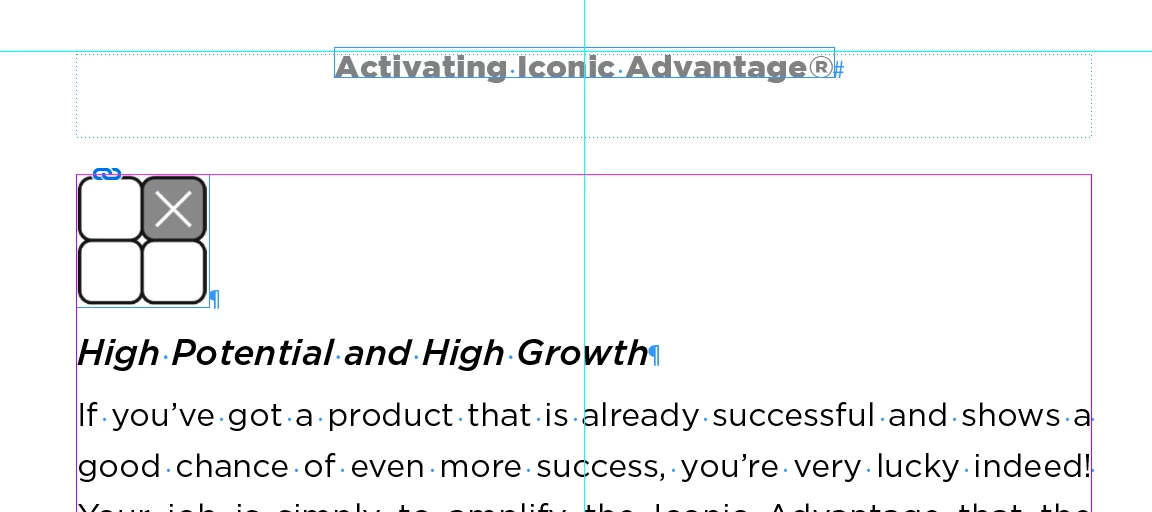
I have a book that has running heads with an automated text variable that picks up the chapter title on every righthand page. The chapter titles have an ® that does not translate as a superscript in the running head. Is there a GREP style or something I can add that will correct the symbol size and positioning in the running header? See example below. Thanks for any and all help.
    This topic has been closed for replies.
    Correct answer Obi-wan Kenobi

    Although I share Obi-wan's aversion to the soft-return, it has nothing to do with the issue that you're trying to address here. Your screen shot clearly shows a space before the trademark symbol so it's coming from somewhere. Try changing the title text to something else. Just a single word with the tm behind it. Apply the character style to only the title text and the other character style to only the trademark symbol and see how the variable text looks. We're sleuthing now. Just need to find where it's coming from!


    Hi Chad!

    Simply from the soft-return! 

    Hercule Poirot

    4 replies

    hammer0909
    Community Expert
    Community Expert
    December 6, 2017

    Crazy!

    Obi-wan Kenobi
    Legend
    December 6, 2017

    To avoid when you have a TOC to be generated behind! ...

    (^/)

    hammer0909
    Community Expert
    Community Expert
    December 6, 2017

    One of many reasons!

    Barb Binder
    Community Expert
    Community Expert
    December 5, 2017

    No, not quite.

    Create two paragraph styles: i.e., Chapter Title and Running Head. I think you have these.

    On the 1st ChapterTitle: create two character styles that don't have any formatting attributes. I called mine 1 and 2 for brevity.

    Create two Running Header (Character Styles). I also called these 1 and 2. 1 uses the Character Style called 1, 2 uses the Character Style called 2.

    On the master page, insert Variable 1, followed directly by Variable 2.

    On the master page, assign Superscript to 2.

    Body page:

    I run the Denver Adobe CC User Group and we have a big meeting tonight: Adobe Evangelist Paul Trani is presenting so I have to head down now! I'll check back in with you tomorrow and someone else will step in if you need help before then.

    ~Barb

    ~Barb at Rocky Mountain Training
    Inspiring
    December 6, 2017

    Thanks Barb. It's still not working. I have the chapter titles styled twice: first as a para, then as a character. I need to have offsets above and below for the title, hence the para style. ® is still full size even with correct use of symbol, plus there's a space between the title and ®. Not sure why this doesn't work. Frustrating.

    Obi-wan Kenobi
    Legend
    December 6, 2017

    IT WAS THE SOFT RETURN! I've had this issue before with a soft return adding an extra space [sometimes] in the header, but never at the end, always where the return occurs. After trying ALL of your suggestions (ad infinitum), this last one worked. (Unfortunately, this job is on deadline and I had to manually paste in ALL of the problematic headers last night. This book has multiple paging templates, so I took the fail-safe route to keep on schedule.)

    Thanks to all who tried to help with this! It's one for the books. I'm not new at this kind of problem solving, so even for me it was very frustrating. Obi-wan, Chad, Barb—thanks for sticking it out.


    So, DON’T USE IT!!! 

    (^/)

    Barb Binder
    Community Expert
    Community Expert
    December 5, 2017

    Very easy but...I started to grab screen shots to for you, and when I was setting it up, it worked automatically because that's how the ® symbol looks in the two fonts I inadvertently selected (Minion and Myriad)

    But if you like your font and don't want to switch to one that has a small, raised registration symbol:

    1. Create a character style to change the position to superscript. (I'm using the font called Charter to get a baseline registration symbol like yours).
    2. Edit the running head style and add a GREP style that apply your superscript character style to that one character.

    ~Barb at Rocky Mountain Training
    Obi-wan Kenobi
    Legend
    December 5, 2017

    Hi,

    Do we talk about a « variable »?

    (^/)

    TomSchenck
    Inspiring
    December 5, 2017

    Hi,

    Thanks for reminding me about GREP styles. However, if you create a variable using the contents of the paragraph style the GREP character style does not get applied. I also added the GREP style to the paragraph style on the variable and it didn't work either.

    Michael Riordan
    Inspiring
    December 5, 2017

    Yes, you can set up a character style for superscript then create a paragraph Style for your running header with a GREP style that applies the superscript character style to any registration symbol

    Inspiring
    December 5, 2017

    I'm familiar with what GREP does, but never actually created one. Can you give me an example of how this would work or point me in the direction of creating one? I am very familiar with Para and Char styles, but not the Grep. Thanks!

    Michael Riordan
    Inspiring
    December 5, 2017

    Sure, this one is very simple, really doesn't need any knowledge of GREP at all. As I posted earlier, create a superscript Character style.

    Then create or edit your Variable Header Paragraph style and on the left choose the GREP style option.

    Then simply choose your new superscript character style from the drop down list and type a registration mark in the To TEXT: field.

    The style will constantly be looking for registration marks within any text that has your variable header style applied and superscripting them.

    Hope that helps