dublove
Brainiac
October 26, 2020
Answered

Is there an indesign script to arrange multiple objects in a matrix?

  • October 26, 2020
  • 5 replies
  • 3947 views

can control the spacing and size.
The size can be controlled by calling the object style.
For example, I want to arrange 6 plates into: 2 columns and 3 rows.
The horizontal spacing is 4mm, and the vertical spacing is 8mm.

This topic has been closed for replies.
Correct answer rob day

@rob day 

The following script can realize what I said, and there is no need to manage the coordinates.

Unfortunately, it has no dialog box.

I don't know how to do it.


#target indesign

app.activeDocument.viewPreferences.horizontalMeasurementUnits = MeasurementUnits.MILLIMETERS;
app.activeDocument.viewPreferences.verticalMeasurementUnits = MeasurementUnits.MILLIMETERS;

var s = app.activeDocument.selection;

//列数(Number of columns)
var col = 2; 

//行数(Number of rows)
var row = 3;


//列间距(Column spacing)mm
var xgut = 2;

//行间距(Row spacing))mm
var ygut = 2;

var colw = getPos(s)[0];
var colh = getPos(s)[1];
var xoff = getPos(s)[2];
var yoff = getPos(s)[3] - (colh + ygut);
var startX = xoff;

//使用取模使矩阵设置列(Use modulo to make the matrix set columns)
for (var i = 0; i < s.length; i++){
    if (i % col > 0) {
        xoff = xoff + colw + xgut;
    }else{
        xoff = startX;
        yoff = yoff + colh + ygut;
    }
    s[i].move( [xoff, yoff] );
};   


/**
* Get matrix tile position 
* @Param the selection to arrange 
* @Return an array with colwidth, rowheight, x, and y 
* 
*/
function getPos(sel){
    var x = sel[0].geometricBounds[1];
    var y = sel[0].geometricBounds[0];
    
    var w = 0;
    var h = 0;
    var a = []
    for (var i = 0; i < sel.length; i++){
        var b = sel[i].geometricBounds;
        if (b[1] < x) {
            x = b[1]
        } 
        if (b[0] < y) {
            y = b[0]
        } 
        if (b[3]-b[1] > w) {
            w = b[3]-b[1]
        } 
        if (b[2]-b[0] > h) {
            h = b[2]-b[0]
        }
    };
    a=[w, h, x, y];
    return a
}


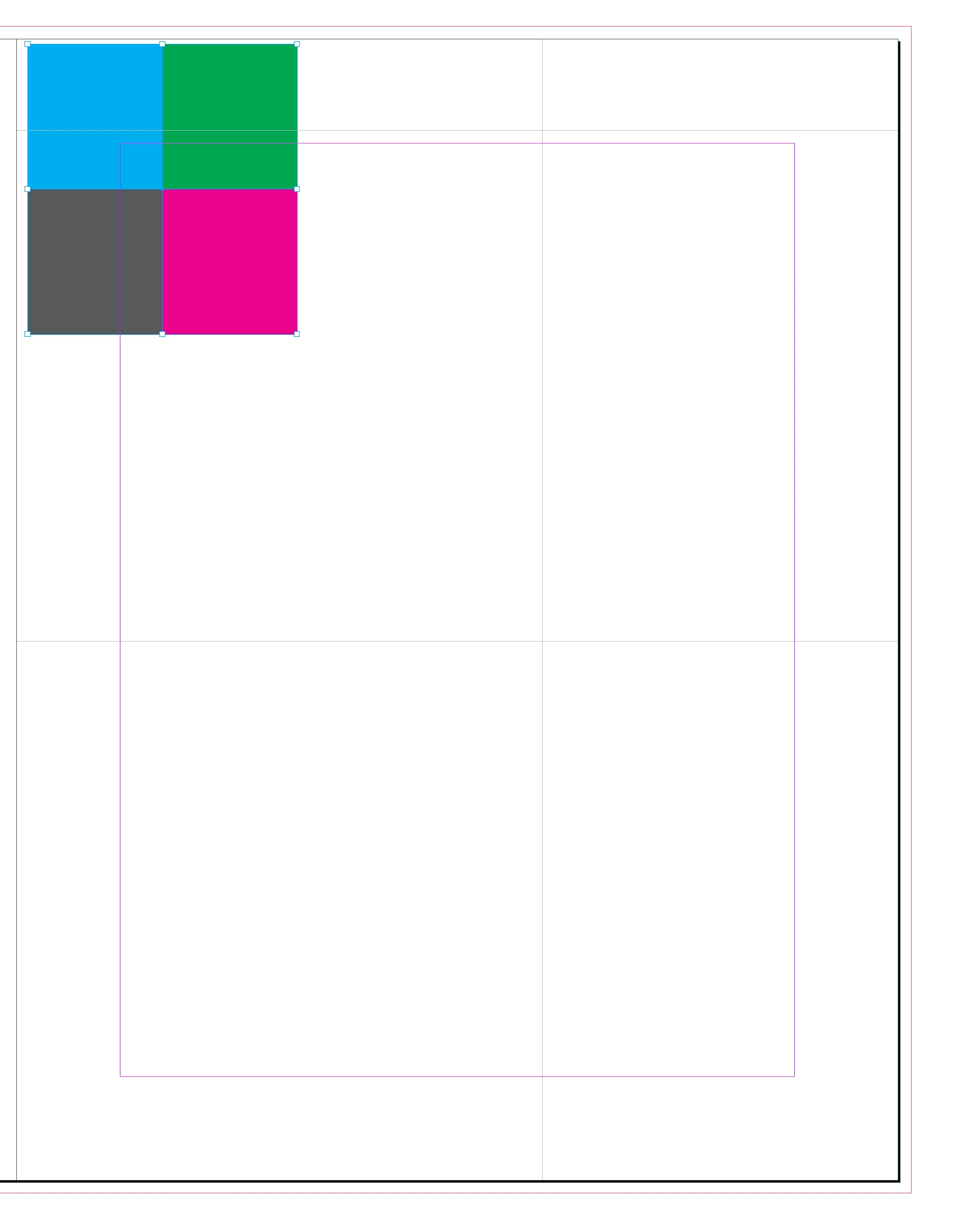
It’s easy enough to remove the X, Y preference from the dialog, but the grid is keyed off of the upper left corner of the selection and not its center. So in this example the new arrangment would not be centered on the original selection:
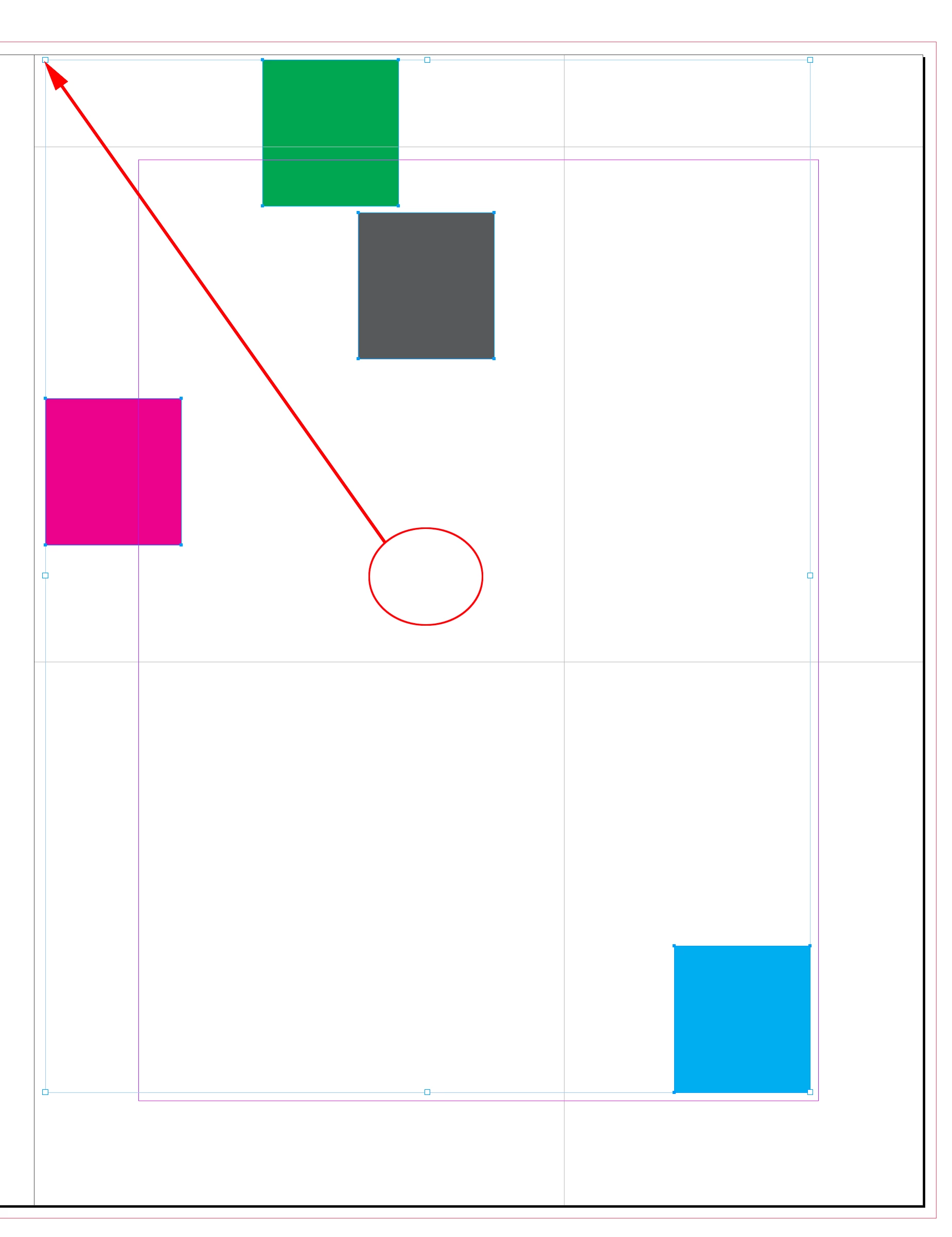
 

The grid will start from the upper left of the original selection


/*
* Arranges a selection of objects into a grid starting from the selection’s upper left
* Version 1.5
* Rob Day 2020-2021
*/


//check for a selection
var s = app.activeDocument.selection;
if (s.length > 1) {
    makeDialog();
} else {alert("Please Select Some Objects.")}

//result variables
var xoff, syoff, col, row, xgut, ygut; 

/**
* Make the export settings dialog 
*  
* 
*/
function makeDialog(){
    var mw = 90;

    //the dialog name
    var theDialog = app.dialogs.add({name:"Arrange Matrix", canCancel:true});
    with(theDialog){
        with(dialogColumns.add()){
            with(borderPanels.add()){
                with(dialogColumns.add()){
                    staticTexts.add({staticLabel:"Columns:"});
                    staticTexts.add({staticLabel:"Rows:"});
                    staticTexts.add({staticLabel:"Column Gutter:"});
                    staticTexts.add({staticLabel:"Row Gutter:"});
                }
                with(dialogColumns.add()){
                    var nCol = integerEditboxes.add({editValue:2, minWidth:mw});
                    var nRow = integerEditboxes.add({editValue:2, minWidth:mw});
                    var colGutter = measurementEditboxes.add({editUnits:MeasurementUnits.MILLIMETERS, editValue:0, minWidth:mw});
                    var rowGutter = measurementEditboxes.add({editUnits:MeasurementUnits.MILLIMETERS, editValue:0, minWidth:mw});
                }
            }
        }
    }
	
    var dResult = theDialog.show();
    if(dResult == true){
        col = nCol.editValue;
        row = nRow.editValue;
        xgut = colGutter.editValue;
        ygut = rowGutter.editValue
        theDialog.destroy();
        makeMatrix();
	}else{
		theDialog.destroy();
	}
}

/**
* Arrange the selected items in a grid 
*  void 
*/
function makeMatrix(){
    var sp = app.scriptPreferences.measurementUnit;
    app.scriptPreferences.measurementUnit = MeasurementUnits.POINTS

    var colw = getPos(s)[0];
    var colh = getPos(s)[1];
    var xoff = getPos(s)[2];
    var yoff = getPos(s)[3] - (colh + ygut);
    var startX = xoff;
    
    //Use modulo to make the matrix set columns
    for (var i = 0; i < s.length; i++){
        if (i % col > 0) {
            xoff = xoff + colw + xgut;
        }else{
            xoff = startX;
            yoff = yoff + colh + ygut;
        }
        s[i].move( [xoff, yoff] );
    };   
    app.scriptPreferences.measurementUnit = sp; 
}


/**
* Get matrix tile position 
*  the selection to arrange 
*  an array with colwidth, rowheight, x, and y 
* 
*/
function getPos(sel){
    var x = sel[0].geometricBounds[1];
    var y = sel[0].geometricBounds[0];
    
    var w = 0;
    var h = 0;
    var a = []
    for (var i = 0; i < sel.length; i++){
        var b = sel[i].geometricBounds;
        if (b[1] < x) {
            x = b[1]
        } 
        if (b[0] < y) {
            y = b[0]
        } 
        if (b[3]-b[1] > w) {
            w = b[3]-b[1]
        } 
        if (b[2]-b[0] > h) {
            h = b[2]-b[0]
        }
    };
    a=[w, h, x, y];
    return a
}





5 replies

Adobe Expert
April 26, 2021

Hi dublove,

Firefox is working as well on my Windows 10 machine:


Also running the script on a selection of items:

( German InDesign 2021 on Windows 10. )


Regards,
Uwe Laubender

( ACP )

dublove
dubloveAuthor
Brainiac
November 1, 2020

Thanks Rob Day
You are very nice

This is exactly what i want

rob day
Adobe Expert
November 3, 2020

This seems like a useful script so I added a dialog. It defaults to millimeters, but you can use any InDesign measurement unit, i.e. 1in. Haven’t tested much.


#target indesign
#targetengine "session"

//check for a doc
var s = app.activeDocument.selection;
if (s.length > 1) {
    makeDialog();
} else {alert("Please Select Some Frames.")}

//result variables
var xoff, syoff, col, row, xgut, ygut; 

/**
* Make the export settings dialog 
* @Return 
* 
*/
function makeDialog(){
    var mw = 90;

    //the dialog name
    var theDialog = app.dialogs.add({name:"Arrange Matrix", canCancel:true});
    with(theDialog){
        with(dialogColumns.add()){
            with(borderPanels.add()){
                with(dialogColumns.add()){
                    staticTexts.add({staticLabel:"Matrix X Pos:"});
                    staticTexts.add({staticLabel:"Matrix Y Pos:"});
                    staticTexts.add({staticLabel:"Columns:"});
                    staticTexts.add({staticLabel:"Rows:"});
                    staticTexts.add({staticLabel:"Column Gutter:"});
                    staticTexts.add({staticLabel:"Row Gutter:"});
                }
                with(dialogColumns.add()){
                    var matrixX = measurementEditboxes.add({editUnits:MeasurementUnits.MILLIMETERS, editValue:0, minWidth:mw});
                    var matrixY = measurementEditboxes.add({editUnits:MeasurementUnits.MILLIMETERS, editValue:0, minWidth:mw});
                    var nCol = integerEditboxes.add({editValue:2, minWidth:mw});
                    var nRow = integerEditboxes.add({editValue:2, minWidth:mw});
                    var colGutter = measurementEditboxes.add({editUnits:MeasurementUnits.MILLIMETERS, editValue:0, minWidth:mw});
                    var rowGutter = measurementEditboxes.add({editUnits:MeasurementUnits.MILLIMETERS, editValue:0, minWidth:mw});
                }
            }
        }
    }
	
    var dResult = theDialog.show();
    if(dResult == true){
        xoff = matrixX.editValue;
        syoff = matrixY.editValue;
        col = nCol.editValue;
        row = nRow.editValue;
        xgut = colGutter.editValue;
        ygut = rowGutter.editValue
        theDialog.destroy();
        makeMatrix();
	}else{
		theDialog.destroy();
	}
}


/**
* Discription 
* @Return void 
* 
*/
function makeMatrix(){
    
    var ohm = app.activeDocument.viewPreferences.horizontalMeasurementUnits;
    var ovm = app.activeDocument.viewPreferences.horizontalMeasurementUnits;
    app.activeDocument.viewPreferences.horizontalMeasurementUnits = MeasurementUnits.POINTS;
    app.activeDocument.viewPreferences.verticalMeasurementUnits = MeasurementUnits.POINTS;
    

    var colw = getPos(s)[0];
    var colh = getPos(s)[1];
    var yoff = syoff - (colh + ygut);
    var startX = xoff;

    //make matrix using modulo to set the columns
    for (var i = 0; i < s.length; i++){
        if (i % col > 0) {
            xoff = xoff + colw + xgut;
        }else{
            xoff = startX;
            yoff = yoff + colh + ygut;
        }
            s[i].move( [xoff, yoff] );
    };   

    app.activeDocument.viewPreferences.horizontalMeasurementUnits = ohm;
    app.activeDocument.viewPreferences.verticalMeasurementUnits = ovm;
}


/**
* Get matrix tile position 
* @9397041 the selection to arrange 
* @Return an array with colwidth, rowheight 
* 
*/
function getPos(sel){
    var w = 0;
    var h = 0;
    var a = []
    for (var i = 0; i < sel.length; i++){
        var b = sel[i].geometricBounds;
        if (b[3]-b[1] > w) {
            w = b[3]-b[1]
        } 
        if (b[2]-b[0] > h) {
            h = b[2]-b[0]
        }
    };
    a=[w, h];
    return a
}


dublove
dubloveAuthor
Brainiac
January 27, 2022

It’s working for me. Here’s a compiled version:


https://shared-assets.adobe.com/link/cd84bf34-4a49-413b-5438-10aa7bdcf59f


Sorry ~ @rob day , I'm back again.
This script, how to make the result appear in the original position.
Instead of jumping to Matrix X Pos: and Matrix Y Pos:


Also, can the script remember the last value?
Thank you very much~

rob day
Adobe Expert
November 1, 2020

There are a lot of possible variables—are the objects different sizes, does their placement in the matrix matter, where is the position of the matrix on the page? This arranges a selection of same sized objects:


#target indesign

app.activeDocument.viewPreferences.horizontalMeasurementUnits = MeasurementUnits.MILLIMETERS;
app.activeDocument.viewPreferences.verticalMeasurementUnits = MeasurementUnits.MILLIMETERS;

var s = app.activeDocument.selection;

//number of columns and rows
var col = 2; var row = 3;

//space between the frames
var xgut = 4;
var ygut = 8;

var colw = getPos(s)[0];
var colh = getPos(s)[1];
var xoff = getPos(s)[2];
var yoff = getPos(s)[3] - (colh + ygut);
var startX = xoff;

//make matrix using modulo to set the columns
for (var i = 0; i < s.length; i++){
    if (i % col > 0) {
        xoff = xoff + colw + xgut;
    }else{
        xoff = startX;
        yoff = yoff + colh + ygut;
    }
    s[i].move( [xoff, yoff] );
};   


/**
* Get matrix tile position 
* @9397041 the selection to arrange 
* @Return an array with colwidth, rowheight, x, and y 
* 
*/
function getPos(sel){
    var x = sel[0].geometricBounds[1];
    var y = sel[0].geometricBounds[0];
    
    var w = 0;
    var h = 0;
    var a = []
    for (var i = 0; i < sel.length; i++){
        var b = sel[i].geometricBounds;
        if (b[1] < x) {
            x = b[1]
        } 
        if (b[0] < y) {
            y = b[0]
        } 
        if (b[3]-b[1] > w) {
            w = b[3]-b[1]
        } 
        if (b[2]-b[0] > h) {
            h = b[2]-b[0]
        }
    };
    a=[w, h, x, y];
    return a
}

 

Jens Trost
Inspiring
October 26, 2020

What type of objects?

Maybe "MakeGrid" which comes with InDesign is kind of what you're looking for?

Sunil Yadav
Brainiac
October 26, 2020

Can you share some screenshots for better understanding?


Sunil

dublove
dubloveAuthor
Brainiac
November 1, 2020

Sorry, I was a bit busy lately and did not reply in time.
Like this, 6 different pictures, I want to quickly get 2 columns, 3 rows, the spacing is 4mm.

There are hundreds of such pictures, if the number of columns, rows, and spacing may also change