


Participating Frequently
July 19, 2024
Question

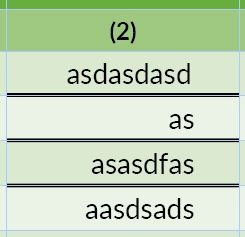
Is there any script to center right-aligned text/numbers inside every cell in every table?

  • July 19, 2024
  • 4 replies
  • 1859 views

Is there any script to center but also right-aligned text/numbers inside every cell in every table?

so that the output on every table looks like this. I'm working on a template file that contains about 200 tables, but unfortunately it's bit of a mess. Thank you in advance


4 replies

m1b
Community Expert
July 20, 2024

Hi @KALSEL33703823ork9, you've got some ideas already, but here's another scripting approach. I've focused on (a) the selection vs the document, and (b) using findGrep to do the heavy lifting. I've also tried to show the workings so you can adjust yourself. For example, instead of justifying right, you could apply a paragraph style that was justified right.


Anyway, let me know if it helps.

- Mark


/**
 * @file Numbered Cells Align Right.js
 * 
 * Finds paragraphs inside table cells which
 * consist of numerical representations,
 * eg. 123 or 12.3 or -123 or (123) or (1,234.00)
 * It will not find currency symbols.
 * 
 * If a selection, it will try to process those item(s),
 * or if no selection, will process the whole document;
 * 
 * To adjust the find, look at the line that assigns
 * a string to `app.findGrepPreferences.findWhat`.
 * 
 * @author m1b
 * @version 2024-07-20
 * @discussion https://community.adobe.com/t5/indesign-discussions/is-there-any-script-to-center-right-aligned-text-numbers-inside-every-cell-in-every-table/m-p/14747317
 */
function main() {

    if (0 === app.documents.length)
        return alert('Please open a document and try again.');

    // reset grep
    app.findGrepPreferences = NothingEnum.NOTHING;

    // grep to find paragraphs which are numbers
    app.findGrepPreferences.findWhat = '^\\h*\\(?-?[\\d\\.,]+\\)?\\h*$';

    var doc = app.activeDocument,
        items = doc.selection.length > 0 ? doc.selection : [doc];

    itemLoop:
    for (var i = 0, item, found; i < items.length; i++) {

        // we want only specific items here
        var item = getParent(items[i], ['Document', 'Table', 'TextFrame', 'Story']);

        if (undefined == item.findGrep)
            // can't do findGrep on this, so move on
            continue itemLoop;

        // find paragraphs we want
        var found = item.findGrep();

        foundLoop:
        for (var j = 0; j < found.length; j++) {

            if (
                'Cell' !== found[j].parent.constructor.name
                || RowTypes.BODY_ROW !== found[j].parent.rowType
            )
                // we don't want this paragraph
                continue foundLoop;

            // make the change
            found[j].justification = Justification.RIGHT_ALIGN;

        }

    };

};
app.doScript(main, ScriptLanguage.JAVASCRIPT, undefined, UndoModes.ENTIRE_SCRIPT, 'Numbered Cells Align Right');

/**
 * Returns a parent of `item`, chosen
 * according to a list of types.
 * The order of types matters.
 * @author m1b
 * @version 2024-07-20
 * @param {PageItem} item - an Indesign page item.
 * @param {Array<String>} types - the desired types.
 * @returns {PageItem} - the parent page item.
 */
function getParent(item, types) {

    while (item.hasOwnProperty('parent') && item.parent) {

        for (var i = 0; i < types.length; i++)
            if (types[i] === item.constructor.name)
                return item;

        if (!item.parent)
            break;

        item = item.parent;

    }

};


Edit 2024-07-22: fixed typo in the script documentation.

TᴀW
Brainiac
July 21, 2024

@m1bI think the OP wants to "center and right align," not just right-align, which is what I think your script does.

IIUC, the idea is to center the longest number in the column, and then right-align all the other numbers in the column to that number.

Robert at ID-Tasker
Brainiac
July 21, 2024
quote

@m1bI think the OP wants to "center and right align," not just right-align, which is what I think your script does.

IIUC, the idea is to center the longest number in the column, and then right-align all the other numbers in the column to that number.


By @TᴀW


Can be hard to achieve if you are right... 


123456789

12.3456


And columns are narrow... 


And if ALL tables should look the same... 


@KALSEL33703823ork9 could you please confirm your requirements - with much more "real" example. 


Robert at ID-Tasker
Brainiac
July 19, 2024

If we are suggesting paid solutions - my tool will load texts from the tables, then can selectively style them / align. But it's PC only. 


Find&Change GREP would work "globally" - but only if texts you want to realign are ONLY in tables.


@KALSEL33703823ork9

Do you have a unique Char / Para Style already applied to the texts in Tables - that could be used to narrow the search?


Participating Frequently
July 30, 2024

Thank you for the reply, I'm sorry for the late reply, yes!, the file already has Paragraph Style applied in each cells in the Tables, so the first column has its own style, the second and the rest of the tables has same style but different from the first column, the header (column title cells) already has it's own style too.

TᴀW
Brainiac
July 19, 2024

Yes, there's my (not free) https://www.id-extras.com/products/centertablecolumns/ which does just that!


Participating Frequently
July 30, 2024

This is exactly what I'm looking for, even better than what I need, because you create UI (menu) to help the user. Sadly, I would need my own bucks to buy it since the company just pretty much being cheap T_T. I'm sorry in advance if this offending you (because i have so little information about how intellectual property works), if I buy it, will i get the script and find out how you write the script or i can only merely use it ? 

TᴀW
Brainiac
July 31, 2024

No offense, but unfortunately it is a commercial product, so you would be able to use it, but not inspect the code.

brian_p_dts
Community Expert
July 19, 2024

Maybe a better way, but this should work. 

app.activeDocument.stories.everyItem().tables.everyItem().columns.lastItem().cells.everyItem().texts.everyItem().justification = Justification.RIGHT_ALIGN;
brian_p_dts
Community Expert
July 19, 2024

Although, looks like maybe you're trying to exclude header cells, which would complicate matters.