Sunil Yadav
Legend
June 24, 2019
Answered

Is there any xml structure for creating and applying group paragraph style?

  • June 24, 2019
  • 4 replies
  • 5573 views

Hi all,

          I am looking for xml structure for directly applying styles from group style just like aid:pstyle="test", where if there's any style with name test will be applied directly and if there's none indesign will create one.

Do we have any such kind of xml structure for creating and applying style from a group styles?

Thanks in advance

Sunil

This topic has been closed for replies.
Correct answer Dirk Becker

Take a look at this,

This is before importing myGroup styles is : GroupStyle1
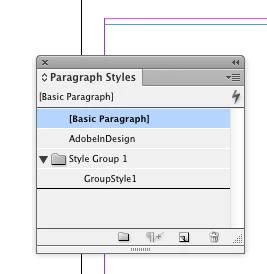
And this is after I imported XML: (Note: New style gets created named as per attributes : GroupStyle1 outside of group)
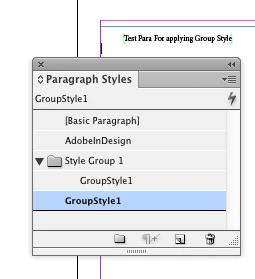
XML :

<?xml version='1.0' encoding='UTF-8'?><eduxml xmlns:aid="http://ns.adobe.com/AdobeInDesign/4.0/" xmlns:aid5="http://ns.adobe.com/AdobeInDesign/5.0/">

  <p aid:pstyle="GroupStyle1">Test Para For applying Group Style</p>

</eduxml>

If you have something, let me know...

Best

Sunil


My guess is that style groups have been added relatively later (CS4?) than XML import (CS3), and support for them by XML import was just not considered.

I currently see these possible approaches:

  1. File a feature request at Uservoice.
  2. Rearrange the styles to follow the observed limitations of the import feature.
  3. Write and use a post processing script for all kinds of adjustments after the import process. That script could for example utilize XML Rules or XPath features of InDesign's XML - which is different from the ExtendScript XML that you were using in the other forum thread.
  4. Use a different import format - a typical approach would be an externally run XSLT producing an ICML file.
  5. Write a plugin to implement own extensions to the XML import.

4 replies

Dave Creamer of IDEAS
Community Expert
Community Expert
March 14, 2020

By the way, have you looked at Adobe FrameMaker? 

It can easily apply paragraph and character styles based on XML tags with an EDD.

With a conversion table, it can wrap XML tags based on para/char styles. (Conversion tables are relatively simple to make for most jobs.)

David Creamer: Community Expert (ACI and ACE 1995-2023)
Sunil Yadav
Legend
March 16, 2020

Hi,

I am just wondering if any namespaces exists that while importing xml into InDesign, group style should applied.

If no currently I am using JavaScript to do that.

If I can get that XML structure for it, I will get rid off this looping code.


Thanks

Sunil


Inspiring
October 22, 2024

Hi Sunil,

I know I'm late to the party. But as a separator of group and style in the aid:pstyle attribute you can use the Charater U+E00B


A requirement for the correct assignment is that the group and the style already exist in the InDesign document, i.e. InDesign does not create the group by XML import if not. Works for me in InDesign 2024.


An example is attached.

Roland

rajesh.kumar
Participant
March 14, 2020

<p aid5:pstyle="TextStyleGroup___Body Indent 1">Here, is your solution.</p>

TextStyleGroup___Body Indent 1

TextStyleGroup: Use group name here

___: use seperator  (i have used 3 undersore, you can use any other)

Body Indent 1: Paragraph style


For complete referemce see my post rajesh_kumar4

Sunil Yadav
Legend
March 16, 2020

Hi rajesh_kumar4,

I think you did not read my question properly.

I am also able to write JavaScript to apply group paragraph styles, and also able to put 3 or 1000 underscores.

I am also able to write xslt as well.

My concern was is there any direct XML structure exists or not for applying group styles while importing XML like aid:pstyle.

The post your are refering is nothing but you are applying group paragraph styles from javascript, instead it is not applying those styles while importing into InDesign.

So as Dirk Becker​ suggested that this xml structure for group styles was not considered while developing those.


Dirk Becker​ says :

My guess is that style groups have been added relatively later (CS4?) than XML import (CS3), and support for them by XML import was just not considered.


If you have any solution over that please share.


Thanks

Sunil

rajesh.kumar
Participant
March 16, 2020

It is beyond InDesign scope right now, for coming version it could be possible yoe may talk to Adobe Developer.


My concern was is there any direct XML structure exists or not for applying group styles while importing XML like aid:pstyle.


priyak7746321
Inspiring
July 4, 2019

other way convert the ICML  to BackingStory.xml (idml structure). It may solve the issue.

Jorma_at_CoSo
Legend
June 24, 2019

Which Adobe product are you asking about?

Sunil Yadav
Legend
June 25, 2019

I am looking for help in Adobe InDesign XML.

Currently InDesign is having two namespaces as : http://ns.adobe.com/AdobeInDesign/4.0/  for paragraph styles and character styles, And second http://ns.adobe.com/AdobeInDesign/5.0/  is for table structure.

My concern is for how to do it for Group styles (Paragraph style/Character style).

Best

Sunil

priyak7746321
Inspiring
June 25, 2019

@https://forums.adobe.com/people/Steve%20Werner

I can do that with InDesign JavaScript as well but If there's a xml structure for it why should I write code for the same.

If I don't get that XML I'll be writing InDesign JS only.

But reason behind searching for XML is that importing XML is much more faster than executing JS for applying such styles while going in a loop n all.

Thanks

Sunil


please try this code

var myDoc = app.activeDocument;

maptagToparastyle('*')

function maptagToparastyle(xmlElement)

{

    ruleSet = new Array (new AddReturns);   

__processRuleSet(myDoc.xmlElements.item(0), ruleSet);   

function AddReturns()   

{   

    this.name = "MapStyles";   

    this.xpath = "//"+ xmlElement;   

    this.apply = function(element)    {   


        if (element.xmlAttributes.item("aid:pstyle").isValid){

            var style =  element.xmlAttributes.item("aid:pstyle").value


            if (myDoc.paragraphStyles.item(style).isValid)

            {  

                    element.texts[0].applyParagraphStyle(style);   

                }

      }


        }   

    } 

}