



Zebra Jamie
Known Participant
June 26, 2024
Question

Issues with Color Picker in InDesign: HSB and RGB Confusion Leading to Unexpected Colors

  • June 26, 2024
  • 3 replies
  • 4935 views

When I open the color picker to adjust a shade, I usually automatically do so in HSB, since I usually want a lighter or darker shade of what I'm working on. But if I don't actually click on the radial buttons for the HSB value I'm working on, InDesign will give me some wild colors! It seems to be confusing HSB and RGB somehow--but I don't know why or how, since I'm editing in the HSB boxes.


As an example, let's say I want a darker version of this blue:
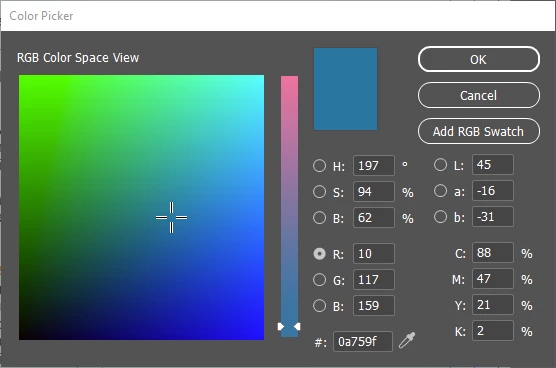
 

So I'm going to go to brightness and reduce it to 50%. This is what I get:
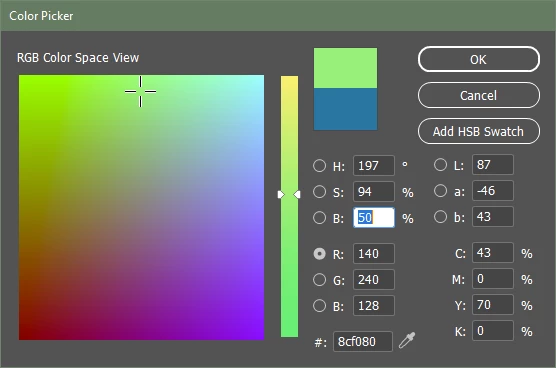
 

Like I said, if I toggle the button to "B" instead of where it starts out in"R," it's snapps back and starts behaving again:
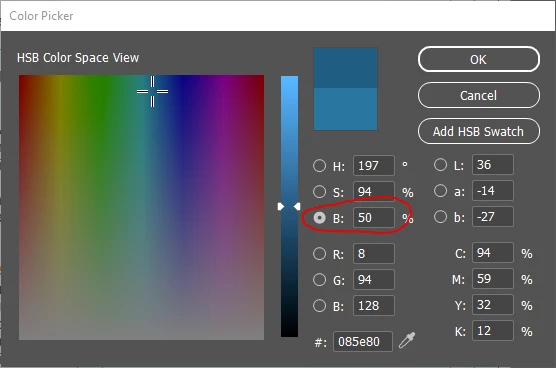
 

It's not a huge problem, but it's still kind of annoying. Does anyone else experience this?


<Title renamed by moderator>


This topic has been closed for replies.

3 replies

Inspiring
October 28, 2024

The current color in my color picker displays totally wrong. There is a big shift in hue and brightness of the color. It happens with every color, no matter the settings. Here is an example: Light gray displayed as vibrant blue. 


Since I'm already trying to fix another (maybe related) issue, I already have done the following: 

  • Turning on/off all settings that affect color and color rendering
  • Restarting InDesign and Computer (multiple times in between)
  • Reset InDesign preferences 
  • Totally reinstalled InDesign without saving the preferences
  • Reinstalled NVIDIA graphics drivers
  • Reset color management
  • Some more...


Specs: 

  • Windows 11 23H2
  • InDesign Version 20.0.
  • Dell XPS 17 1910, Intel Core i7-11800H, 64GB RAM, NVIDIA GeForce RTX 3060


Any idea what's going on?


<Title renamed by MOD>

Abhishek Rao
Community Manager
Community Manager
October 28, 2024

Hi @Nico Kobel,


Thanks for reaching out about the color picker issue you're experiencing in InDesign. I understand how frustrating this must be, especially after trying multiple troubleshooting steps. 

To further investigate the issue, could you please test this in a new InDesign document and let us know if the problem persists? Additionally, if you could share a screen recording demonstrating the issue, that would be incredibly helpful for us to understand what’s happening.

In the meantime, here’s a solution you can try: 

1. Go to Edit > Color Settings and ensure that your color settings are correctly set for your workflow (e.g., Adobe RGB or sRGB). You might also want to experiment with different settings to see if that resolves the issue.


Let us know how it goes, we will wait to hear from you. 


Best,  
Abhishek Rao

Abhishek Rao
Community Manager
Community Manager
November 6, 2024

Hi @Abhishek Rao 


Yes, it happens in every document, no matter the current color settings. 


I was able to narrow down the issue and discovered that it only happens once you open the color picker (in the lower left corner of InDesign) in the HSB mode. If the initial mode is set to RGB or CMYK, the colors are correct. I attached a screen recording of the issue with the following steps: 


  1. Open colorpicker --> correct color visible
  2. Set mode to HSB
  3. Close and reopen colorpicker --> wrong color visible
  4. Set mode to RGB or CMYK
  5. Close and reopen color picker --> correct color visible


Best regards, 

Nico


Hello @18246796 Kobel,


Thank you for the update. Based on the details you've provided, this behavior is indeed unexpected. A couple of things I recommend to check:

1. Sync Color Profile via Adobe Bridge: Try syncing the color profiles across your Adobe apps using Adobe Bridge. This can help ensure that all the apps are using the same color settings, which might resolve any discrepancies in how colors are displayed in InDesign.

2. Disconnect External Displays: If you're using multiple displays, try disconnecting any external monitors and only use the primary display to see if the issue persists. Sometimes, color display issues can arise due to different color profiles being applied to multiple monitors.


Let me know how it goes, and we’ll be happy to assist further if needed!


Best,
Abhishek Rao

rob day
Community Expert
Community Expert
June 26, 2024

Hi @Zebra Jamie , Also if it isn’t clear, the radio buttons and the value fields have two different functions. The radio buttons determine the Color Picker’s Space View, and the selected value field determines the space of the color you choose.


So I can choose to pick colors in the HSB’s Brightness view and add an HSB swatch, or I might want to pick in the HSB view, but create or add a CMYK color or swatch—to add a CMYK Swatch, I have to put my cursor in one of the CMYK fields:


Also, there is no CMYK Color Space View (because of the 4th channel), so if you click on a CMYK color in the Swatches panel, the initial space view will be the R view when you open the Picker.


You can set the default space view for new documents to your preferred B by opening the Color Picker with no documents open, and clicking the B radio button and value field, then OK.

Zebra Jamie
Known Participant
June 26, 2024

Hi Rob, I'm aware of how swatches work and the differences between HSB, RGB, LAB, and CMYK. The problem I'm trying to point out is that the values in the color picker aren't mathing right. You'll notice when you're working in the color picker that changing one of the RGB values makes the numbers in the HSB, Lab, and CMYK areas update--except for whatever reason, working in HSB doesn't display the right colors automatically.


This seems like a bug and I wanted to know if other people had to deal with this. Or maybe my machine is haunted. (There's a strong body of evidence for that theroy, too.)


rob day
Community Expert
Community Expert
June 26, 2024

If you are entering values rather than mousing in the color field, you have to tab or click out of the field in order to get the change—or, do you mean the appearance of the chosen HSB or RGB color doesn’t exactly match the color when it’s used on the page?

Community Expert
June 26, 2024

When you edit the colour in the Colour Picker - it's starting point is the the swatch in the swatches panel.


If the Swatch is in RGB or CMYK or HSB etc. that's what is selected when starting off.

When you edit the colour - the swatch colour doesn't change. 


What you're doing is making a new colour outside the document swatches - which is not associated with any swatch.


Edit a CMYK colour in the Colour Picker - it asks to add a CMYK Colour


--------------------------

What you've done is edited a RGB colour in the Colour PIcker


That's why it shows the RGB dialog when using the colour picker


If you make it a HSB Swatch then when you edit the colour in the Colour PIcker

it will bring you directly to the HSB edit of the colour


In essence, when you use the colour picker it starts at the colour mode present in the Swatch setting.


Here you see no Swatch associated with the RED


Colour Picker starts in RGB


Here you see HSB Red - not associated in the Swatches Panel


Edit the Colour Picker


It's in HSB


Zebra Jamie
Known Participant
June 26, 2024

Hi Eugene,


I work with swatches all day, so I know how to edit the swatches as well as non-swatch colors. (I can even load palettes from other InDesign documents, create and load palette files, and use the color find/replace tool.) The problem I'm running into is that the HSB settings within the color picker aren't working how they should. 


It doesn't matter if I'm starting from a swatch color or from an untethered color. It doesn't matter if I start in HSB, RGB, or CMYK. The problem remains. 


Your last screen shot actually displays another part of the problem! You'll notice that when you have something colored with your HSB Red swatch and you go to adjust it in the color picker, the bottom "original" color is peach instead of red.

I've got the same problem.


Here's an example: I'm going to start out with this orangy-red as an HSB swatch, custom named as "Marker":


I have colored a random square with it, and let's say I want to make it a little darker, so I open the color picker:


But what's this? Even though it is the HSB swatch, the "original" color is showing up as BLUE. Not Marker red.


Here's another weird thing, if I pick another color, like purple or green, and then click on the light blue, it will still send me back to the original Marker red, even though the original color displayed isn't right. So I guess it's functional, as long as I don't need to compare my new color to my old color during the color picking process.


Maybe it's just me, but I work with a lot of colors and a lot of swatches that are HSB, RGB, and CMYK every day, and this sort of buggy color conversion feels like it belongs back in the days of CS6, not in InDesign2024. There is obviously something wrong with how InDesign handles HSB colors.


Am I out of touch? Is digital color conversion really that hard to program?

Community Expert
June 26, 2024

Yes - the same thing is happening for me


You can report bugs here

https://indesign.uservoice.com/forums/601180-adobe-indesign-bugs


And sorry, we have no way of knowing what level you are at in terms of InDesign, the question seemed quite basic and I explained it best I could. 


The swatch not updating is a another issue - you can report bugs.