


Participating Frequently
July 5, 2024
Answered

It's 2024 and text still not flowing within the textbox

  • July 5, 2024
  • 6 replies
  • 3120 views

Hello,


I have been trying to solve an issue with the textbox in InDesign for the past 2 hours. Despite watching various guidelines and videos, I'm still experiencing a problem where the whole paragraph disappears whenever the text exceeds the textbox's border. I'm also unable to adjust the size of the textbox while keeping all the text as intended. For example, when I make the textbox narrower, the entire paragraph disappears instead of pushing the text downwards.


As a user, I find this aspect of InDesign challenging. Could you please provide an effective solution to resolve this issue? It would be helpful if the textbox flow could be set to behave similarly to PowerPoint by default in future instances.


Thank you in advance.


Operations:
Desktop Windows (latest version)
InDesign (latest version) 
This topic has been closed for replies.
Correct answer Barb Binder

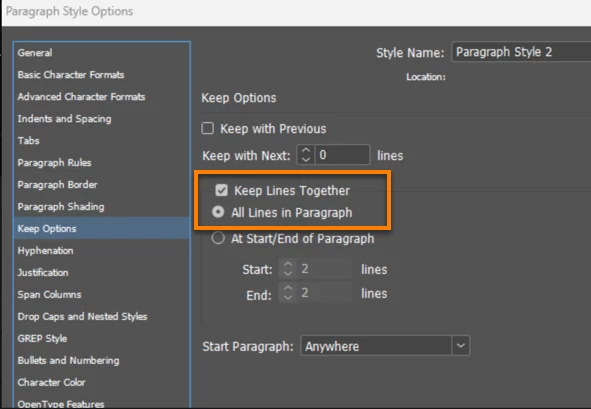
I'm sorry, but what your screen grab shows is EXACTLY the problem. You have "Keep Line Together" with "All Lines in Paragraph" checked. This is preventing your paragraph from splitting AT ALL, so will force it to the next text frame, and so on, when it doesn't fit. Either Uncheck "Keep Lines Together", or if you wnat the usual widow.orphan control, select "Keep Lines Together" >"At Start/End of Paragarph" The default 2 lines is a normal default.


This paragraph is disappearing because you have told Paragraph Style 2 to keep all lines in one paragraph together and if they all can't all fit in your frame, they all go to the next frame. (Or are overset, if you don't have a next frame.).


As per @Brad @ Roaring Mouse: either disable keep lines together or keep it on and enable at start/end of paragraph. Pick the one you prefer and then you can come back to mark his answer as correct.


~Barb


6 replies

Colin Flashman
Community Expert
Community Expert
July 8, 2024

If you are after the frame to actually become larger as more text enters, that's a textbox property. See this page for more details: https://helpx.adobe.com/indesign/using/text-frame-fitting.html


There is a third party plug-in called autofit from typefi that might be more what you're after to enhance InDesign's own auto-text features: https://www.typefi.com/autofit/

If the answer wasn't in my post, perhaps it might be on my blog at colecandoo!
James Gifford—NitroPress
Legend
July 5, 2024

As noted, the problem is almost certainly with your Keep Options for that paragraph style:


What this has to to with it being 2024, or implying that this is some kind of longstanding bug, is not helpful.

QSHKAuthor
Participating Frequently
July 8, 2024

Thank you for showing the panel where I could adjust the settings, unfortunately the text still disappears when I 'narrow down' the textframe with settings as the screenshot shows below.

Barb Binder
Community Expert
Barb BinderCommunity ExpertCorrect answer
Community Expert
July 8, 2024

I'm sorry, but what your screen grab shows is EXACTLY the problem. You have "Keep Line Together" with "All Lines in Paragraph" checked. This is preventing your paragraph from splitting AT ALL, so will force it to the next text frame, and so on, when it doesn't fit. Either Uncheck "Keep Lines Together", or if you wnat the usual widow.orphan control, select "Keep Lines Together" >"At Start/End of Paragarph" The default 2 lines is a normal default.


This paragraph is disappearing because you have told Paragraph Style 2 to keep all lines in one paragraph together and if they all can't all fit in your frame, they all go to the next frame. (Or are overset, if you don't have a next frame.).


As per @Brad @ Roaring Mouse: either disable keep lines together or keep it on and enable at start/end of paragraph. Pick the one you prefer and then you can come back to mark his answer as correct.


~Barb


~Barb at Rocky Mountain Training
pixxxelschubser
Community Expert
Community Expert
July 5, 2024

@QSHK 

Could it be that the described behaviour of InDesign is due to unsuitable settings on your part? Or a lack of knowledge about how to use the programme? 


Please upload a screenshot showing the hidden characters, the text editor open and the character and paragraph styles panel open, and/or a sample file.

BobLevine
Community Expert
Community Expert
July 5, 2024

Latest version is meaningless. If you're going to supply that information we need full version and build numbers. We also need screenshots and what exactly you're expecting. Powerpoint shrinks the text, InDesign will not and should not do that.

Community Expert
July 5, 2024

Can you post a screenshot? 
I'm not sure what you mean. Are you talking about Overset Text? Or it might be a (non intended) page break. 


Participating Frequently
July 5, 2024

At a guess the problem is not to do with the text frame but that the Keep Options selected in the paragraph settings are "Keep Lines Together / All Lines in Paragraph". (It's under the fly-out menu at the top right of the Paragraph panel.)

QSHKAuthor
Participating Frequently
July 8, 2024

Thank you for your concise reply, unfortunately the text still disappears when I 'narrow down' the textframe with settings as the screenshot shows below.

Joel Cherney
Community Expert
Community Expert
July 8, 2024

Edit: I can't believe I just tried to respond to this one without scrolling down; there's no need for me to repost the advice that has already been posted.