


Exit
  • Global community
    • Language:
      • Deutsch
      • English
      • Español
      • Français
      • Português
  • 日本語コミュニティ
  • 한국 커뮤니티
0

Japanese plug in, how to turn off

Guide ,
Sep 10, 2018 Sep 10, 2018

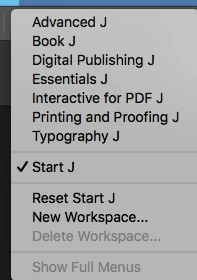
I downloaded the Japanese version of InDesign CC 2018 in order to set some type, but I can't see where to turn it off. Mac 10.11.6.Japanese.png
379
Translate
Report
Community guidelines
Be kind and respectful, give credit to the original source of content, and search for duplicates before posting. Learn more
community guidelines

correct answers 1 Correct answer

Enthusiast , Sep 10, 2018 Sep 10, 2018

Your question states plug in, but then you state you downloaded the Japanese version of Indesign. I would think you'd have to uninstall and then install the version you wish to use.

Translate
Enthusiast ,
Sep 10, 2018 Sep 10, 2018

Your question states plug in, but then you state you downloaded the Japanese version of Indesign. I would think you'd have to uninstall and then install the version you wish to use.

Translate
Report
Community guidelines
Be kind and respectful, give credit to the original source of content, and search for duplicates before posting. Learn more
community guidelines
Guide ,
Sep 10, 2018 Sep 10, 2018
LATEST

That's what I did. As I understand it, when you install a 2nd language version of InDesign, a plug in gets added to the base install. I was hoping there was an easy way to turn it on and off without reinstalling it.

Thanks for your reply.

Translate
Report
Community guidelines
Be kind and respectful, give credit to the original source of content, and search for duplicates before posting. Learn more
community guidelines
