


LynxKx
Inspiring
January 6, 2022
Answered

Javascript to copy clipboard contents to selected form field description?

  • January 6, 2022
  • 1 reply
  • 1513 views

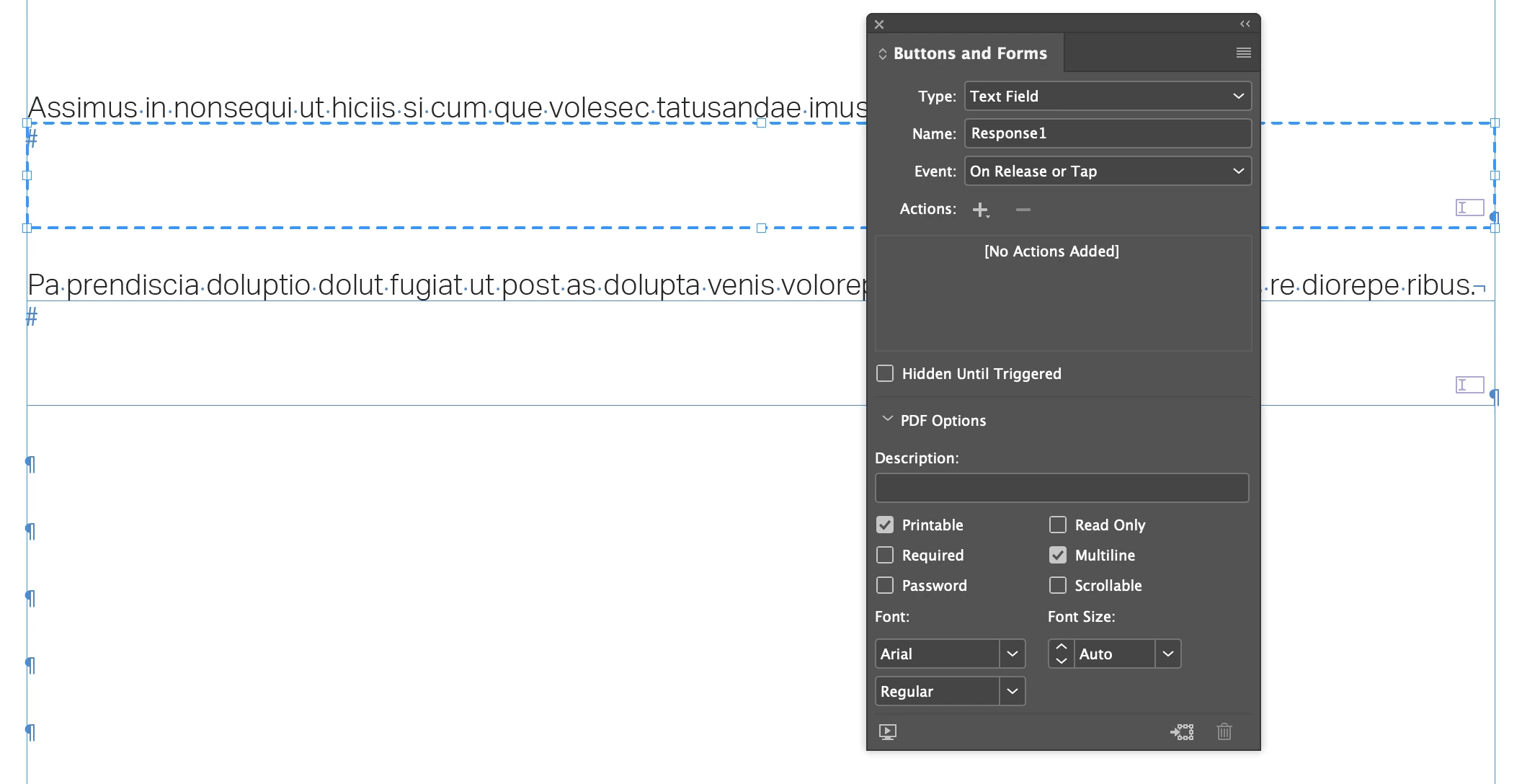
Is there a way to copy clipboard content to the description of the form field i have selected?

This topic has been closed for replies.
Correct answer Mike Bro

Hello @LynxKx,


Give the below code a try...


function Main() {

  function GetClipboard(){  
    var clipboard;  
    if(File.fs == "Macintosh"){  
        var script = 'tell application "Finder"\nset clip to the clipboard\nend tell\nreturn clip';  
        clipboard = app.doScript (script,ScriptLanguage.APPLESCRIPT_LANGUAGE);  
    } else {  
        var script = 'Set objHTML = CreateObject("htmlfile")\r'+  
        'returnValue = objHTML.ParentWindow.ClipboardData.GetData("text")';  
        clipboard = app.doScript(script,ScriptLanguage.VISUAL_BASIC);  
    }  
    return clipboard;  
} 

myDescriptionText = GetClipboard();

	try { 
        mySelObject.properties = {
        appliedFont: "Arial",
        fontSize: 0,
        fontStyle: "Regular",
        description: myDescriptionText,
        multiline: true,
        scrollable: false

        }} catch(e) {}
    }
  
  if (app.selection.length == 0) {
	alert("Error!\nNothing is selected.");
   }

  else if (app.selection.length > 1) {
    alert("Error!\nThere's more than one object selected.");
  }

  else if (app.selection.length == 1 && app.selection[0].hasOwnProperty("baseline")) {
	alert("Error!\nThere's some text selected.");
   }

  else if (app.selection[0].constructor.name != "TextBox") {
    alert("Error!\nNo form field Text Box is selected.")
  }

  mySelObject = app.selection[0];

  Main();


Regards,

Mike

1 reply

LynxKx
LynxKxAuthor
Inspiring
January 6, 2022

Clarifying. I'm also trying to set multiple properties and assign a shortcut to the script.

Ideally, I'd like to copy the content I want for the form field description, select the form field, activate the script which would then:

  • copy clipboard elements to description
  • check 'multiline'
  • uncheck 'scrollable'
  • change font to Arial, Auto, Regular
Mike BroCorrect answer
Brainiac
January 6, 2022

Hello @LynxKx,


Give the below code a try...


function Main() {

  function GetClipboard(){  
    var clipboard;  
    if(File.fs == "Macintosh"){  
        var script = 'tell application "Finder"\nset clip to the clipboard\nend tell\nreturn clip';  
        clipboard = app.doScript (script,ScriptLanguage.APPLESCRIPT_LANGUAGE);  
    } else {  
        var script = 'Set objHTML = CreateObject("htmlfile")\r'+  
        'returnValue = objHTML.ParentWindow.ClipboardData.GetData("text")';  
        clipboard = app.doScript(script,ScriptLanguage.VISUAL_BASIC);  
    }  
    return clipboard;  
} 

myDescriptionText = GetClipboard();

	try { 
        mySelObject.properties = {
        appliedFont: "Arial",
        fontSize: 0,
        fontStyle: "Regular",
        description: myDescriptionText,
        multiline: true,
        scrollable: false

        }} catch(e) {}
    }
  
  if (app.selection.length == 0) {
	alert("Error!\nNothing is selected.");
   }

  else if (app.selection.length > 1) {
    alert("Error!\nThere's more than one object selected.");
  }

  else if (app.selection.length == 1 && app.selection[0].hasOwnProperty("baseline")) {
	alert("Error!\nThere's some text selected.");
   }

  else if (app.selection[0].constructor.name != "TextBox") {
    alert("Error!\nNo form field Text Box is selected.")
  }

  mySelObject = app.selection[0];

  Main();


Regards,

Mike

LynxKx
LynxKxAuthor
Inspiring
January 7, 2022

Beautiful!