Known Participant
January 8, 2024
Answered

KDP error on a single page (text outside margins)

  • January 8, 2024
  • 3 replies
  • 2925 views

Hi,

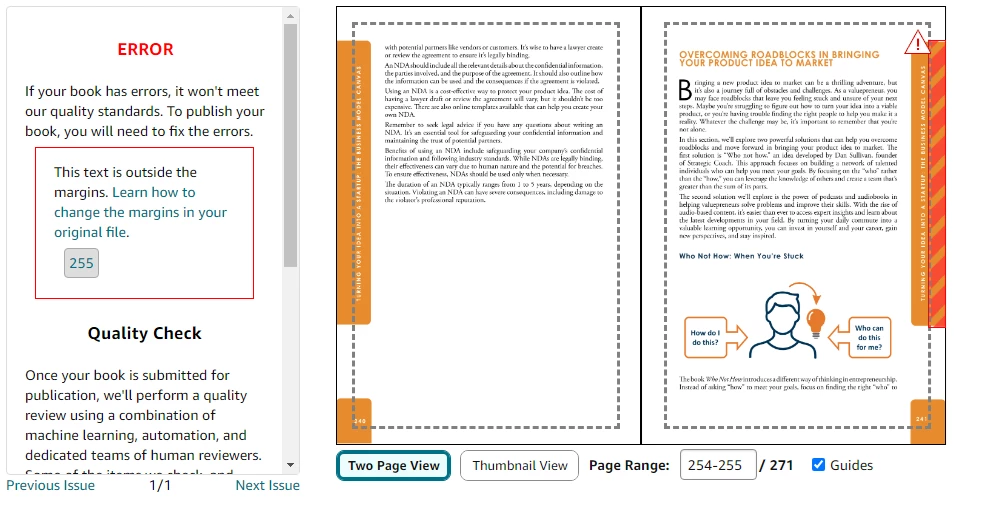
I'm stuck with this error. It's weird because the object on the right (the one that is being flagged as the error) is a master page and is applied to the entire book BUT it is only in this page that they say the text is outside margin. 😞

Has anyone ever encountered this before?


I tried moving the head to the left a lot of times and still getting the error. 😞
 

This topic has been closed for replies.
Correct answer rob day

It's weird because the object on the right (the one that is being flagged as the error) is a master page and is applied to the entire book


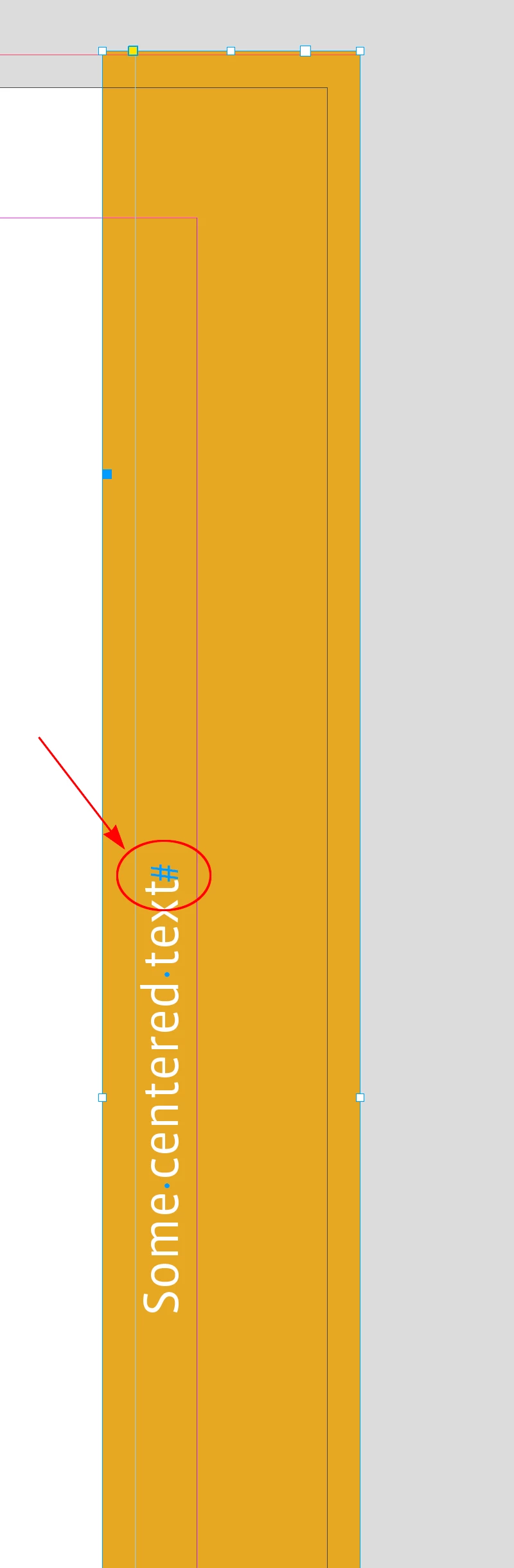
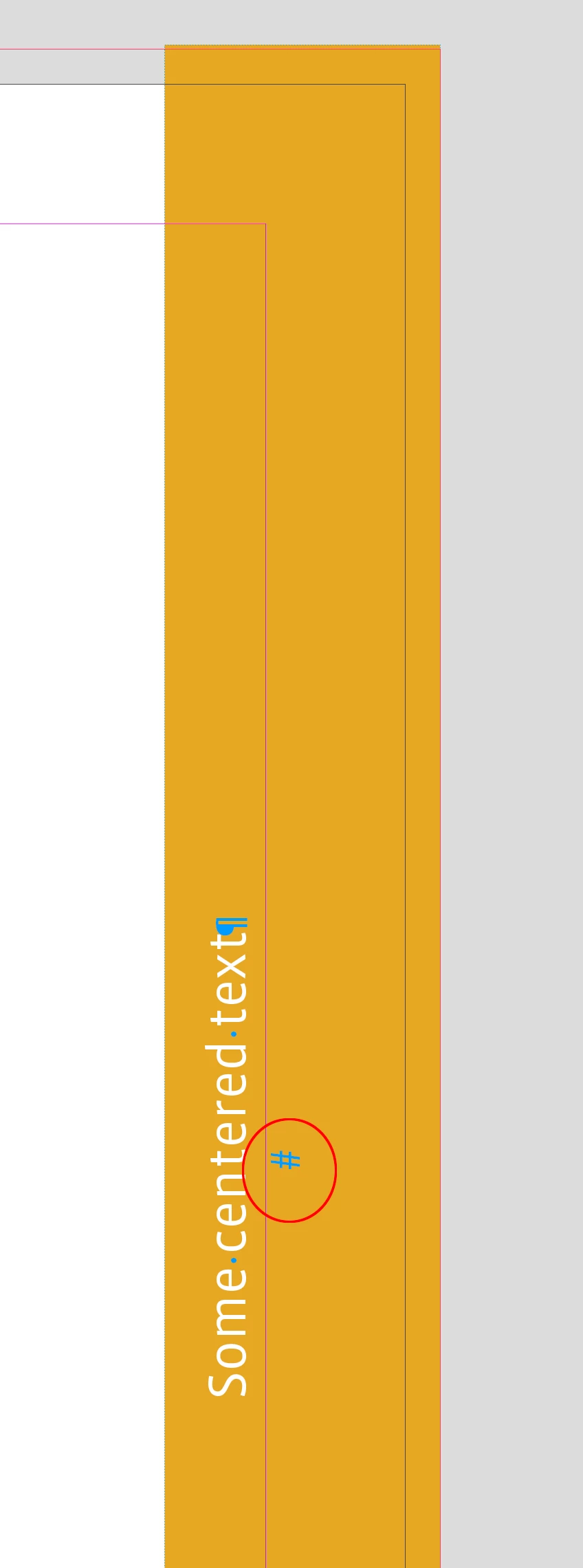
Hi @Sofia25629549ta0q , Is the orange band the text frame and has it been overridden on the page? If it has been overridden, turn on invisibles and check to make sure the end of story marker is on the same line as the text and there is not an added return forcing the text to cross over the margin line:


3 replies

James Gifford—NitroPress
Legend
January 8, 2024

Just to be clear, KDP can be absolutely maddening about this kind of stuff. I have more problems with print editions than with Kindle ones, and my batting average for resolving the problem in my favor is below the Mendoza Line.


You are not dealing with anyone sensible or empowered to actually analyze an issue; you are most likely battling an AI that insists element X falls outside the list of layout rules. You're not likely to win, and if ther's a way to elevate these claims to wetware (or at least a smarter AI) I've never found it. For one thing, the "problem" may not be just this one page or object; I've had books with an element on hundreds of pages and told it's faulty on "pages 23, 41, 68 and 124." The next pass will name a few other, apparently random pages. It's Whac-a-Mole and can't be resolved.


The only thing you have going for you is that this is limited to the one page with that illustration. I would first make sure that NO element on that page is outside the margins, including invisible strays and legitimate elements that might be "almost" at or over the margin. Nudge everything in a tad, especially that page flag so that the text is more within the line. Rob's note that there may be a stray empty line below the visible text is a good one,


Good luck. I am battling almost exactly this same problem, with a book that uses thumb-tabs to locate chapters. KDP stubbornly refuses to accept them because "content is outside the trim line" — and I even converted the tabs from text frames to JPEG images so that they are not interpreted as 'content.' I will almost certainly have to solve the issue as several times before: delete the d*mn tabs.


Good luck to both of us. 🙂

J E L
Community Expert
Community Expert
January 10, 2024

FWIW, I have run into the same problem with KDP. The same element (close-to, but still within the trim line) found on one or two pages throws off the error when that exact element is the same on all the other pages. I've called support and they fixed it pronto!

James Gifford—NitroPress
Legend
January 10, 2024

KDP support has proven to be almost impossible to reach and then, for all of the usual reasons including that of outsourcing to heavily-accented countries that can only do things from the playbook in front of them, usually useless. But glad to hear you had a positive outcome; I think I had one, once.


It's like engaging any of the tech support systems where the reps are either not really up to the task, confined to a prewritten playbook or horribly burnt out, and from both training and experience start with the weary list of "Is the computer plugged in? Is it turned on?" level of 'help.' It takes forever to get them to agree that an anomaly is not going to bring Jeff's empire to rubble, and then if you're lucky they'll actually okay the exception.


Not really useful. I would happily pay or go through a vetting process or whatever to be able to reach someone up to speed, with an intelligible accent, who will listen to a reasonable claim, and is then empowered to either fully explain the problem from the production end or grant a waiver for reasonable variations.


Hell, I'd chip in on a team of technical writers who can keep up with the endless changes to the system and fully document all the features, requirements, errors, best-practices etc. The help system is a mix of extremely overwritten pages, pages only an internal developer can make sense of, and (far too much) outdated or 'lost' material that does not come up in a reasonable search for help. All connected with a spiderweb of links that will often send you in a frustrating loop without ever connecting to anything like the page with the answer you're looking for.

rob day
Community Expert
rob dayCommunity ExpertCorrect answer
Community Expert
January 8, 2024

It's weird because the object on the right (the one that is being flagged as the error) is a master page and is applied to the entire book


Hi @Sofia25629549ta0q , Is the orange band the text frame and has it been overridden on the page? If it has been overridden, turn on invisibles and check to make sure the end of story marker is on the same line as the text and there is not an added return forcing the text to cross over the margin line:


Known Participant
January 9, 2024

IT WORKED! Thank you so much!!

rob day
Community Expert
Community Expert
January 10, 2024

And just to close this out, the simple line tab passed inspection. So my conclusion is that any kind of text outside the safe-text area will trip this "text near trim line" error, even if a monkey on Xanax can tell the text is supposed to be there.


With the OP's project, the colored page tab is irrelevant, but even that tiny bit of empty rollover text is enough to trigger the border-invasion alarms.


So the only way you can do thumb tabs with any kind of markers is if all the text — A B C etc. included, and either live fonts or images — is within the text zone, which is rather deep for a small book. Sigh.


but even that tiny bit of empty rollover text is enough to trigger the border-invasion alarms.


Right, I think the end of story marker, which you can see with invisibles turned on and in my captures, has to be with the line of text—a return would put it into the margin. I don‘t think there is a way to catch that with an InDesign Preflight Rule, but an InDesign script could find the end of line x,y position.

Rishabh_Tiwari
Community Manager
Community Manager
January 8, 2024

Hi,


Thank you for reaching out. Can you check if any empty text frame was created outside permitted margins? If yes, please remove that and test again. 

Thanks

Rishabh