aaronf31067511
Known Participant
July 16, 2019
Answered

Layer Visibility Overrides for all Instances of a linked file

  • July 16, 2019
  • 7 replies
  • 13757 views

Is there a way to remove “layer visibility overrides” from all instances of a linked Illustrator file in InDesign? Example: I have 25 instances of an illustrator file and I want to change all of the instances to “use PDF layer visibility” without changing each manually.  Or alternatively, select all instances of a linked file and set all the visible layers for all instances in one place. 

Correct answer crazyPanda

Brilliant!!! Thank you once again @crazyPanda it works perfect! 


Would adding a button for "check all"  & "check none" be a difficult ask?  Alternatively, shift+click to select first and last. 


Well,

just for the heck of it I added a third button that inverts the selection.
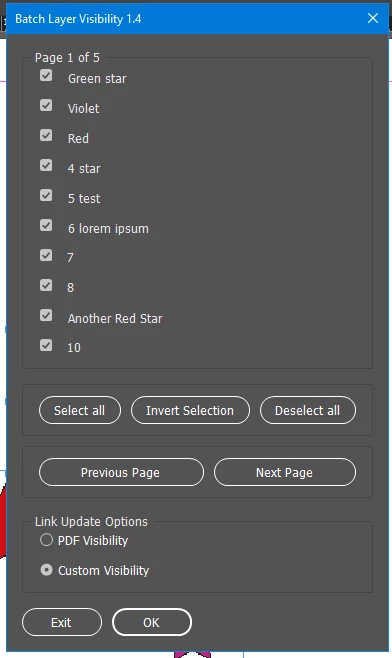
#targetengine "batchLayerVisibility"

var graphicInstances = null, instancesCount = null, checkboxes = null, ui_layerList = null, sel = null, pbarWindow = null, pbar_layer, pbarText;

main();

function main() {

	proceed = false;

	if (app.selection.length == 0) {
		alert("Nothing selected.");
		exit();
	}

	sel = app.selection[0];
	
	sel = sel instanceof PDF ? sel : sel.graphics[0];
	try {
		var test = sel.graphicLayerOptions.graphicLayers;

		if (test.length == 0) {
			alert("Selected object not supported.");
			exit();
		}

		} catch (err) {
			alert("Please select an .AI image with the white selection tool or click in the links panel on the graphic.");
			
			exit();
		}
		
		var graphicFile = sel.itemLink.filePath;

		graphicInstances = [];

		var allGraphics= app.activeDocument.allGraphics;

    // collect instances

    for (var i = 0; i < allGraphics.length; i++) {

	if (allGraphics[i].itemLink == null) {
		continue;
	}

	if (allGraphics[i].itemLink.filePath == graphicFile) {
		graphicInstances.push(allGraphics[i]);
	}
    }
	
	instancesCount = graphicInstances.length;

	makeDialog();
}

function makeDialog() {
	var w = new Window("dialog", "Batch Layer Visibility 1.4");
	w.alignChildren = ["fill", "fill"];
	checkboxes = [];
	
	var panel = w.add("panel", undefined, "Page x of y");
	panel.alignChildren = ["fill", "fill"];
	
	var panelStack = panel.add("group");
	panelStack.orientation = "stack";
	
	var g_options = graphicInstances[0].graphicLayerOptions;
	var g_layers = graphicInstances[0].graphicLayerOptions.graphicLayers;
	var g_layersCount = g_layers.length;
	
	var layersPerPage = 10;
	var pages2create = (g_layersCount / layersPerPage);
	pages2create = g_layersCount % layersPerPage == 0 ? pages2create : pages2create +1;
	var stackPages = [];
	var curLayer = 0;
	
	for (var p = 0; p < pages2create; p++){
		stackPages.push(panelStack.add("group"));
		stackPages[p].orientation = "column";
		stackPages[p].alignment = ["fill", "top"];
		
		for (var i = 0; i < layersPerPage; i++){
			//curLayer++;
			
			var cb_group = stackPages[p].add("group");
			cb_group.alignment = ["fill", "fill"];
			cb_group.orientation = "row";
			checkboxes.push( cb_group.add("checkbox") );
			
			var cb_label = cb_group.add("statictext", undefined, g_layers[curLayer].name);
			checkboxes[curLayer].value = g_layers[curLayer].currentVisibility;
			
			curLayer++;
			
			if(curLayer > g_layersCount -1){
				break;
			}
		}
		
		if (p == 0){
			stackPages[p].visible = true;
		} else {
			stackPages[p].visible = false;
		}
		
		if(curLayer > g_layersCount -1){
			break;
		}
	}
	
	panel.text = "Page 1 of " + stackPages.length;
	
	var btnsPanel = w.add("group");
	btnsPanel.orientation = "column";
	
	var selectBtns = btnsPanel.add("panel");
	selectBtns.orientation = "row";
	selectBtns.alignment = ["fill", "bottom"];
	selectBtns.alignChildren = ["fill", "fill"];
	selectBtns.orientation = "row";
	
	var selectAllBtn = selectBtns.add("button", undefined, "Select all");
	var invertAllBtn = selectBtns.add("button", undefined, "Invert Selection");
	var deselectAllBtn = selectBtns.add("button", undefined, "Deselect all");
	
	selectAllBtn.onClick = function(){
		for (var i = 0; i < checkboxes.length; i++){
			checkboxes[i].value = true;
		}
	}
	
	deselectAllBtn.onClick = function(){
		for(var i = 0; i < checkboxes.length; i++){
			checkboxes[i].value = false;
		}
	}
	
	invertAllBtn.onClick = function(){
		for(var i = 0; i < checkboxes.length; i++){
			checkboxes[i].value = checkboxes[i].value == true ? false : true;
		}
	}
	
	var pageBtns = btnsPanel.add("panel");
	pageBtns.alignment = ["fill", "bottom"];
	pageBtns.alignChildren = ["fill", "fill"];
	pageBtns.orientation = "row";
	
	var prevBtn = pageBtns.add("button", undefined, "Previous Page");
	var nextBtn = pageBtns.add("button", undefined, "Next Page");
	
	var curPage = 0;
	
	prevBtn.onClick = function(){
		if(curPage == 0){
			return;
		}
		
		stackPages[curPage].visible = false;
		stackPages[curPage -1].visible = true;
		panel.text = "Page " +  (curPage) + " of " + stackPages.length;
		
		if(curPage > 0){
			curPage--;
		}

	}
	
	nextBtn.onClick = function(){
		if(curPage == stackPages.length -1){
			return;
		}
		
		stackPages[curPage].visible = false;
		stackPages[curPage +1].visible = true;
		panel.text = "Page " +  (curPage +2) + " of " + stackPages.length;
		
		if(curPage < stackPages.length -1){
			curPage++;
		}
	}
	
	update_options = [];   
	
	updateOptionsPanel = w.add("panel", undefined, "Link Update Options");
	updateOptionsPanel.alignChildren = ["fill", "fill"];
	update_options[0] = updateOptionsPanel.add("radiobutton", undefined, "PDF Visibility");
	update_options[1] = updateOptionsPanel.add("radiobutton", undefined, "Custom Visibility");   
	
	if (sel.graphicLayerOptions.updateLinkOption.toString() == "APPLICATION_SETTINGS") {
		update_options[0].value = true;
	} else {
		update_options[1].value = true;
	} 
	
	var btnGrp = w.add("group");
	
	btnGrp.orientation = "row";   
	
	var closeBtn = btnGrp.add("button", undefined, "Exit", {name: "cancel"});
	
	closeBtn.onClick = function () {
		w.close();
		exit();
	}   

	var exeBtn = btnGrp.add("button", undefined, "OK", {name: "ok"});
	
	if(w.show() ==1) {
		app.doScript(setVisibility, ScriptLanguage.JAVASCRIPT, undefined, UndoModes.entireScript, "Batch Layer Visibility");
	}
}

function setVisibility() {
	pbar();
	var graphicFile = sel.itemLink.filePath;
	for (var c = 0; c < checkboxes.length; c++) {
		var allGraphics= app.activeDocument.allGraphics;
		
		// seek instances and change visibility
		
		for (var i = 0; i < allGraphics.length; i++) {
			if (allGraphics[i].itemLink == null) {
				continue;
			}
			
			if (allGraphics[i].itemLink.filePath == graphicFile) {
				allGraphics[i].graphicLayerOptions.graphicLayers[c].currentVisibility = checkboxes[c].value;
				pbar_layer.value++;
				pbarText.text = "Layer " + (c+1) + " of " + checkboxes.length; 
			}
		}
	}
	
	allGraphics = app.activeDocument.allGraphics;
	
	// set link update option
	for (var i = 0; i < allGraphics.length; i++) {
		if (allGraphics[i].itemLink == null) {continue;}
		if (allGraphics[i].itemLink.filePath ==graphicFile) {
			if (updateOptionSel = updateOptionsPanel.children[0].value == true) {
				allGraphics[i].graphicLayerOptions.updateLinkOption = UpdateLinkOptions.APPLICATION_SETTINGS;
			} else {
				allGraphics[i].graphicLayerOptions.updateLinkOption = UpdateLinkOptions.KEEP_OVERRIDES;
			}
			
			pbar_layer.value++;
		}
	}
	
	pbarWindow.close();
}

function setCheckboxStatus() {
	if (ui_layerList.selection.checked == true) {
		ui_layerList.selection.checked = false;
	} else {
		ui_layerList.selection.checked = true;
	}

	var tempSel = ui_layerList.selection;
	ui_layerList.selection = null;
}

function pbar () {

	pbarWindow = new Window ("palette", "Processing ...", undefined);
	var pbarPanel = pbarWindow.add("panel", undefined, undefined);
	pbarText = pbarPanel.add("statictext", undefined, "Progress:");
	pbarText.alignment = ["fill","fill"];
	pbar_layer = pbarPanel.add("progressbar", undefined, 0, (instancesCount * checkboxes.length) + instancesCount);
	pbar_layer.preferredSize.width = 200;
	pbarWindow.show();

}


7 replies

Volition74au
Inspiring
September 11, 2025

Selected only Objects not all - alternative script with a checkbox to choose whether all or selected.

i use this script all the time but i wanted a version that doesn't always update all linked objects in the document but the selected objects only.

i have added a checkbox rto the panel to chose the option to use 'selected only' i've only teseted with .ai files on a windows pc so use at your own risk but the updated script based on the original one proivded works for me.

/**
 * Batch Layer Visibility — Selection vs Document Toggle
 * v1.0 — Moves "Selected linked files only" panel under Link Update Options

  script is based on a forum post  - source: https://community.adobe.com/t5/indesign-discussions/layer-visibility-overrides-for-all-instances-of-a-linked-file/m-p/11377839/page/2

   importing option - crop to settings - https://creativepro.com/changing-illustrator-layers/
   ensure you choose crop to: 'Bounding Box (All Layers)' when importing/placing layered objects AI, PSD's, PDF's etc
   this ensures they don;t move when certain layers are turned on and off. It seems this can only be set at the moment of importing

 */

var selGraphicItemIDs = [];
var instancesCount = 0;
var skippedCount = 0;

var keyFilePath = null;

// Snapshots from UI
var visValues = null;          // Array<boolean> — by index
var updateOptionSel = null;    // true => APPLICATION_SETTINGS, false => KEEP_OVERRIDES
var scopeSelectionOnly = true; // true => selected-only, false => all instances in doc

// UI bits
var pbarWindow = null, pbar_layer = null, pbarText = null;

main();

function main() {
    if (!app.documents.length) { alert("No open document."); return; }
    if (app.selection.length === 0) { alert("Nothing selected."); return; }

    var firstGraphic = getGraphicFromSelectionItem(app.selection[0]);
    if (!firstGraphic) { alert("Please select an .AI graphic (white arrow) or its graphic in Links panel."); return; }

    try {
        var gl = firstGraphic.graphicLayerOptions.graphicLayers;
        if (!gl || gl.length === 0) { alert("Selected object not supported for Object Layer Options."); return; }
    } catch (_) {
        alert("Please select an .AI image with the white selection tool or click the graphic in the Links panel.");
        return;
    }

    keyFilePath = firstGraphic.itemLink && firstGraphic.itemLink.filePath ? firstGraphic.itemLink.filePath : null;
    if (!keyFilePath) { alert("First selected graphic has no link path."); return; }

    // Build selection list by default (used if scope = selection-only)
    selGraphicItemIDs = []; skippedCount = 0;
    for (var s = 0; s < app.selection.length; s++) {
        var g = getGraphicFromSelectionItem(app.selection[s]);
        if (!g) continue;
        if (g.itemLink && g.itemLink.filePath === keyFilePath) {
            try { selGraphicItemIDs.push(g.parent.id); } catch (_) {}
        } else {
            skippedCount++;
        }
    }

    makeDialog(firstGraphic);
}

function getGraphicFromSelectionItem(item) {
    try { if (item instanceof PDF) return item; } catch (_) {}
    try { if (item.graphics && item.graphics.length > 0) return item.graphics[0]; } catch (_) {}
    try { if (item instanceof Link && item.parent && item.parent.graphics && item.parent.graphics.length > 0) return item.parent.graphics[0]; } catch (_) {}
    return null;
}

function makeDialog(firstGraphic) {
    var w = new Window("dialog", "Batch Layer Visibility");
    w.alignChildren = ["fill", "fill"];

    // Layers (paged)
    var panel = w.add("panel", undefined, "Page x of y");
    panel.alignChildren = ["fill", "fill"];
    var stack = panel.add("group"); stack.orientation = "stack";

    var g_layers = firstGraphic.graphicLayerOptions.graphicLayers;
    var g_layersCount = g_layers.length;

    var checkboxes = [];
    var layersPerPage = 10;
    var pages = Math.ceil(g_layersCount / layersPerPage);
    var curLayer = 0;

    for (var p = 0; p < pages; p++) {
        var pageGroup = stack.add("group");
        pageGroup.orientation = "column";
        pageGroup.alignment = ["fill", "top"];

        for (var i = 0; i < layersPerPage && curLayer < g_layersCount; i++) {
            var row = pageGroup.add("group");
            row.alignment = ["fill", "fill"];
            row.orientation = "row";

            var cb = row.add("checkbox");
            row.add("statictext", undefined, g_layers[curLayer].name);

            cb.value = g_layers[curLayer].currentVisibility;
            checkboxes.push(cb);
            curLayer++;
        }
        pageGroup.visible = (p === 0);
    }
    panel.text = "Page 1 of " + pages;

    // Bulk select buttons
    var btnsPanel = w.add("group"); btnsPanel.orientation = "column";
    var selPanel = btnsPanel.add("panel", undefined, "Selection");
    selPanel.orientation = "row"; selPanel.alignment = ["fill","bottom"]; selPanel.alignChildren = ["fill","fill"];
    var btnAll = selPanel.add("button", undefined, "Select all");
    var btnInv = selPanel.add("button", undefined, "Invert");
    var btnNone = selPanel.add("button", undefined, "Deselect");
    btnAll.onClick = function(){ for (var k=0;k<checkboxes.length;k++) checkboxes[k].value = true; };
    btnNone.onClick = function(){ for (var k=0;k<checkboxes.length;k++) checkboxes[k].value = false; };
    btnInv.onClick = function(){ for (var k=0;k<checkboxes.length;k++) checkboxes[k].value = !checkboxes[k].value; };

    var pageBtns = btnsPanel.add("panel", undefined, "Pages");
    pageBtns.alignment = ["fill","bottom"]; pageBtns.alignChildren = ["fill","fill"]; pageBtns.orientation = "row";
    var prevBtn = pageBtns.add("button", undefined, "Previous");
    var nextBtn = pageBtns.add("button", undefined, "Next");
    var curPage = 0;
    prevBtn.onClick = function(){
        if (curPage === 0) return;
        stack.children[curPage].visible = false;
        curPage--;
        stack.children[curPage].visible = true;
        panel.text = "Page " + (curPage + 1) + " of " + pages;
    };
    nextBtn.onClick = function(){
        if (curPage === pages - 1) return;
        stack.children[curPage].visible = false;
        curPage++;
        stack.children[curPage].visible = true;
        panel.text = "Page " + (curPage + 1) + " of " + pages;
    };

    // Update options
    var updPanel = w.add("panel", undefined, "Link Update Options");
    updPanel.alignChildren = ["fill","fill"];
    var rbPdf    = updPanel.add("radiobutton", undefined, "PDF Visibility");
    var rbCustom = updPanel.add("radiobutton", undefined, "Custom Visibility");
    if (firstGraphic.graphicLayerOptions.updateLinkOption.toString() === "APPLICATION_SETTINGS") rbPdf.value = true;
    else rbCustom.value = true;

    // Scope panel (placed AFTER update options, BEFORE OK/Exit)
    var scopePanel = w.add("panel", undefined, "Scope");
    scopePanel.alignChildren = ["left","fill"];
    var cbScope = scopePanel.add("checkbox", undefined, "Selected linked files only");
    cbScope.value = true; // default ON

    // OK / Cancel
    var btnGrp = w.add("group"); btnGrp.orientation = "row";
    var btnCancel = btnGrp.add("button", undefined, "Exit", {name:"cancel"});
    var btnOK     = btnGrp.add("button", undefined, "OK",   {name:"ok"});

    btnOK.onClick = function(){
        // Snapshot UI
        visValues = [];
        for (var i = 0; i < checkboxes.length; i++) visValues.push(!!checkboxes[i].value);
        updateOptionSel    = !!rbPdf.value;
        scopeSelectionOnly = !!cbScope.value;
        w.close(1);
    };
    btnCancel.onClick = function(){ w.close(0); };

    if (w.show() === 1) {
        app.doScript(applyBatch, ScriptLanguage.JAVASCRIPT, undefined, UndoModes.entireScript, "Batch Layer Visibility");
    }
}

function applyBatch() {
    if (!visValues || visValues.length === 0) return;

    var doc = app.activeDocument;

    // Determine working ID list based on scope
    var ids = [];
    if (scopeSelectionOnly) {
        if (selGraphicItemIDs.length === 0) {
            alert("No selected graphics match the first selected file.");
            return;
        }
        ids = selGraphicItemIDs.slice(0);
        instancesCount = ids.length;
    } else {
        // Collect ALL instances in the document that match keyFilePath
        var all = doc.allGraphics;
        for (var i = 0; i < all.length; i++) {
            try {
                if (all[i].itemLink && all[i].itemLink.filePath === keyFilePath) {
                    ids.push(all[i].parent.id);
                }
            } catch (_) {}
        }
        if (ids.length === 0) {
            alert("No instances of the first selected file were found in the document.");
            return;
        }
        instancesCount = ids.length;
    }

    // Progress bar
    pbar(visValues.length, instancesCount);

    var prevRedraw = app.scriptPreferences.enableRedraw;
    app.scriptPreferences.enableRedraw = false;

    try {
        // Pass 1: apply all layer visibilities by INDEX (like original)
        for (var c = 0; c < visValues.length; c++) {
            for (var idx = 0; idx < ids.length; idx++) {
                try {
                    var item = doc.pageItems.itemByID(ids[idx]);
                    if (!item || !item.isValid || !item.graphics || item.graphics.length === 0) continue;
                    var g = item.graphics[0];
                    if (!g.isValid) continue;

                    var gls = g.graphicLayerOptions.graphicLayers;
                    if (c >= gls.length) continue;

                    gls[c].currentVisibility = visValues[c];

                    pbar_layer.value++;
                    pbarText.text = "Layer " + (c + 1) + " / " + visValues.length;
                } catch (_) {}
            }
        }

        // Pass 2: set link update option (once per item)
        for (var j = 0; j < ids.length; j++) {
            try {
                var it = doc.pageItems.itemByID(ids[j]);
                if (!it || !it.isValid || !it.graphics || it.graphics.length === 0) continue;
                var gg = it.graphics[0];
                if (!gg.isValid) continue;

                gg.graphicLayerOptions.updateLinkOption = updateOptionSel
                    ? UpdateLinkOptions.APPLICATION_SETTINGS
                    : UpdateLinkOptions.KEEP_OVERRIDES;

                pbar_layer.value++;
            } catch (_) {}
        }
    } finally {
        app.scriptPreferences.enableRedraw = prevRedraw;
        if (pbarWindow) pbarWindow.close();
    }

    // Only show mismatch alert in selection-only mode
    if (scopeSelectionOnly && skippedCount > 0) {
        alert("Skipped " + skippedCount + " object(s): layer mismatch");
    }
}

function pbar(layerCount, instanceCount) {
    pbarWindow = new Window ("palette", "Processing …", undefined);
    var pbarPanel = pbarWindow.add("panel", undefined, undefined);
    pbarText = pbarPanel.add("statictext", undefined, "Progress:");
    pbarText.alignment = ["fill","fill"];
    var total = (instanceCount * layerCount) + instanceCount;
    pbar_layer = pbarPanel.add("progressbar", undefined, 0, total);
    pbar_layer.preferredSize.width = 220;
    pbarWindow.show();
}


Known Participant
October 20, 2025

@Volition74au Just stumbled on your reply...this is perfect! Been waiting for an update like this for years.

Volition74au
Inspiring
October 21, 2025

yeah I use this script all the time. and desperately wanted a version that could do selected copies only rather than all. I'd tried editing the script myself without luck. but with ai coding engines now I finally got it working how I wanted. I'm stoked as I do a lot of cut lines only documents and this is perfect now. 

Known Participant
January 14, 2024

Hi All,

Just wanted to follow up on this. I use @crazyPanda 's script pretty regularly but I wanted to see if anyone had found a way to pick and chose the files you want to change the layers to, or trick it somehow by locking ones you didn't want it to touch, hiding, etc.

Any updates?

Best,

Matt

Participant
March 1, 2024

I just found this script, it seems the only way to do what you are asking is to copy/paste the file and rename it for the ones you want to use differnt layer options. I was looking for a script that you could select all the instances you want to change and have the options you select only effect those instances of the file. Copy/pasteing once, compared to selecting several in InDesign is still faster for me.

Participant
July 2, 2020

Why doesn't AI just have tthis built in? I just wasted 2 hours trying to figure out where these features were, only to find that this intuitive, expected feature requires a script. Do proactive, complete work, Adobe. How many users' time are you wasting? 

Community Expert
February 10, 2020

aaronf31067511 said: Is this an easy modification or does this require extensive re-write?


I cannot speak for crazyPanda, but I think the UI part needs an extensive re-write to work around the bug.


Regards,
Uwe Laubender

( ACP )

aaronf31067511
Known Participant
February 27, 2020
Uwe,
Would you be willing to help with a rewrite? Looks like @crazyPanda is off
the radar.

Best,
Aaron
Known Participant
July 8, 2020

Well,

just for the heck of it I added a third button that inverts the selection.

#targetengine "batchLayerVisibility"

var graphicInstances = null, instancesCount = null, checkboxes = null, ui_layerList = null, sel = null, pbarWindow = null, pbar_layer, pbarText;

main();

function main() {

	proceed = false;

	if (app.selection.length == 0) {
		alert("Nothing selected.");
		exit();
	}

	sel = app.selection[0];
	
	sel = sel instanceof PDF ? sel : sel.graphics[0];
	try {
		var test = sel.graphicLayerOptions.graphicLayers;

		if (test.length == 0) {
			alert("Selected object not supported.");
			exit();
		}

		} catch (err) {
			alert("Please select an .AI image with the white selection tool or click in the links panel on the graphic.");
			
			exit();
		}
		
		var graphicFile = sel.itemLink.filePath;

		graphicInstances = [];

		var allGraphics= app.activeDocument.allGraphics;

    // collect instances

    for (var i = 0; i < allGraphics.length; i++) {

	if (allGraphics[i].itemLink == null) {
		continue;
	}

	if (allGraphics[i].itemLink.filePath == graphicFile) {
		graphicInstances.push(allGraphics[i]);
	}
    }
	
	instancesCount = graphicInstances.length;

	makeDialog();
}

function makeDialog() {
	var w = new Window("dialog", "Batch Layer Visibility 1.4");
	w.alignChildren = ["fill", "fill"];
	checkboxes = [];
	
	var panel = w.add("panel", undefined, "Page x of y");
	panel.alignChildren = ["fill", "fill"];
	
	var panelStack = panel.add("group");
	panelStack.orientation = "stack";
	
	var g_options = graphicInstances[0].graphicLayerOptions;
	var g_layers = graphicInstances[0].graphicLayerOptions.graphicLayers;
	var g_layersCount = g_layers.length;
	
	var layersPerPage = 10;
	var pages2create = (g_layersCount / layersPerPage);
	pages2create = g_layersCount % layersPerPage == 0 ? pages2create : pages2create +1;
	var stackPages = [];
	var curLayer = 0;
	
	for (var p = 0; p < pages2create; p++){
		stackPages.push(panelStack.add("group"));
		stackPages[p].orientation = "column";
		stackPages[p].alignment = ["fill", "top"];
		
		for (var i = 0; i < layersPerPage; i++){
			//curLayer++;
			
			var cb_group = stackPages[p].add("group");
			cb_group.alignment = ["fill", "fill"];
			cb_group.orientation = "row";
			checkboxes.push( cb_group.add("checkbox") );
			
			var cb_label = cb_group.add("statictext", undefined, g_layers[curLayer].name);
			checkboxes[curLayer].value = g_layers[curLayer].currentVisibility;
			
			curLayer++;
			
			if(curLayer > g_layersCount -1){
				break;
			}
		}
		
		if (p == 0){
			stackPages[p].visible = true;
		} else {
			stackPages[p].visible = false;
		}
		
		if(curLayer > g_layersCount -1){
			break;
		}
	}
	
	panel.text = "Page 1 of " + stackPages.length;
	
	var btnsPanel = w.add("group");
	btnsPanel.orientation = "column";
	
	var selectBtns = btnsPanel.add("panel");
	selectBtns.orientation = "row";
	selectBtns.alignment = ["fill", "bottom"];
	selectBtns.alignChildren = ["fill", "fill"];
	selectBtns.orientation = "row";
	
	var selectAllBtn = selectBtns.add("button", undefined, "Select all");
	var invertAllBtn = selectBtns.add("button", undefined, "Invert Selection");
	var deselectAllBtn = selectBtns.add("button", undefined, "Deselect all");
	
	selectAllBtn.onClick = function(){
		for (var i = 0; i < checkboxes.length; i++){
			checkboxes[i].value = true;
		}
	}
	
	deselectAllBtn.onClick = function(){
		for(var i = 0; i < checkboxes.length; i++){
			checkboxes[i].value = false;
		}
	}
	
	invertAllBtn.onClick = function(){
		for(var i = 0; i < checkboxes.length; i++){
			checkboxes[i].value = checkboxes[i].value == true ? false : true;
		}
	}
	
	var pageBtns = btnsPanel.add("panel");
	pageBtns.alignment = ["fill", "bottom"];
	pageBtns.alignChildren = ["fill", "fill"];
	pageBtns.orientation = "row";
	
	var prevBtn = pageBtns.add("button", undefined, "Previous Page");
	var nextBtn = pageBtns.add("button", undefined, "Next Page");
	
	var curPage = 0;
	
	prevBtn.onClick = function(){
		if(curPage == 0){
			return;
		}
		
		stackPages[curPage].visible = false;
		stackPages[curPage -1].visible = true;
		panel.text = "Page " +  (curPage) + " of " + stackPages.length;
		
		if(curPage > 0){
			curPage--;
		}

	}
	
	nextBtn.onClick = function(){
		if(curPage == stackPages.length -1){
			return;
		}
		
		stackPages[curPage].visible = false;
		stackPages[curPage +1].visible = true;
		panel.text = "Page " +  (curPage +2) + " of " + stackPages.length;
		
		if(curPage < stackPages.length -1){
			curPage++;
		}
	}
	
	update_options = [];   
	
	updateOptionsPanel = w.add("panel", undefined, "Link Update Options");
	updateOptionsPanel.alignChildren = ["fill", "fill"];
	update_options[0] = updateOptionsPanel.add("radiobutton", undefined, "PDF Visibility");
	update_options[1] = updateOptionsPanel.add("radiobutton", undefined, "Custom Visibility");   
	
	if (sel.graphicLayerOptions.updateLinkOption.toString() == "APPLICATION_SETTINGS") {
		update_options[0].value = true;
	} else {
		update_options[1].value = true;
	} 
	
	var btnGrp = w.add("group");
	
	btnGrp.orientation = "row";   
	
	var closeBtn = btnGrp.add("button", undefined, "Exit", {name: "cancel"});
	
	closeBtn.onClick = function () {
		w.close();
		exit();
	}   

	var exeBtn = btnGrp.add("button", undefined, "OK", {name: "ok"});
	
	if(w.show() ==1) {
		app.doScript(setVisibility, ScriptLanguage.JAVASCRIPT, undefined, UndoModes.entireScript, "Batch Layer Visibility");
	}
}

function setVisibility() {
	pbar();
	var graphicFile = sel.itemLink.filePath;
	for (var c = 0; c < checkboxes.length; c++) {
		var allGraphics= app.activeDocument.allGraphics;
		
		// seek instances and change visibility
		
		for (var i = 0; i < allGraphics.length; i++) {
			if (allGraphics[i].itemLink == null) {
				continue;
			}
			
			if (allGraphics[i].itemLink.filePath == graphicFile) {
				allGraphics[i].graphicLayerOptions.graphicLayers[c].currentVisibility = checkboxes[c].value;
				pbar_layer.value++;
				pbarText.text = "Layer " + (c+1) + " of " + checkboxes.length; 
			}
		}
	}
	
	allGraphics = app.activeDocument.allGraphics;
	
	// set link update option
	for (var i = 0; i < allGraphics.length; i++) {
		if (allGraphics[i].itemLink == null) {continue;}
		if (allGraphics[i].itemLink.filePath ==graphicFile) {
			if (updateOptionSel = updateOptionsPanel.children[0].value == true) {
				allGraphics[i].graphicLayerOptions.updateLinkOption = UpdateLinkOptions.APPLICATION_SETTINGS;
			} else {
				allGraphics[i].graphicLayerOptions.updateLinkOption = UpdateLinkOptions.KEEP_OVERRIDES;
			}
			
			pbar_layer.value++;
		}
	}
	
	pbarWindow.close();
}

function setCheckboxStatus() {
	if (ui_layerList.selection.checked == true) {
		ui_layerList.selection.checked = false;
	} else {
		ui_layerList.selection.checked = true;
	}

	var tempSel = ui_layerList.selection;
	ui_layerList.selection = null;
}

function pbar () {

	pbarWindow = new Window ("palette", "Processing ...", undefined);
	var pbarPanel = pbarWindow.add("panel", undefined, undefined);
	pbarText = pbarPanel.add("statictext", undefined, "Progress:");
	pbarText.alignment = ["fill","fill"];
	pbar_layer = pbarPanel.add("progressbar", undefined, 0, (instancesCount * checkboxes.length) + instancesCount);
	pbar_layer.preferredSize.width = 200;
	pbarWindow.show();

}

@crazyPanda This script is excellent. The fact that this doesn't exist built in is a shame but luckily there's people like you around. Does anyone know if it's possible to modify this to include INDD files? Also would there be a way to select multiple files at once and change the layers without having to blanket change every instance in the document?


Community Expert
February 6, 2020

Hi aaronf31067511,

what's the exact error message you get?


Did you save the code back in July 2019 to a script file?
And are you using the same script file from back then with InDesign 2020?


If not, because you copied the code by the end of last year or this year and made a new script file, the reason why the code is broken is: The code was damaged while this thread was moved to the new Adobe InDesign forum.


Then we could only hope that crazyPanda stops by and corrects the code in his post or posts the not damaged code again.


I'm 100% sure that the code you can read and copy right now as I am writing this reply is damaged.


Regards,
Uwe Laubender

( ACP )

aaronf31067511
Known Participant
February 6, 2020

Thanks @Uwe,

Hopefully crazyPanda or someone is able to help! I'm still learning 🙂 


Yes using exactly the same script file with the new Adobe Indesign 2020... No error message.. the script doesn't seem "broken," as in it still runs, but the check boxes for the layers are no longer showing... 


InDesign 2020 (missing check boxes):


InDesign 2019 (check boxes showing): 


Original Script that worked with 2019

#targetengine batchLayerVisibility  
  
main();  
  
function main() {  
    proceed = false;  
     
    if (app.selection.length == 0) {  
        alert("Nothing selected.");  
        exit();  
    }  
  
    var sel = app.selection[0];  
     
    try {  
        var test = sel.graphicLayerOptions.graphicLayers;  
        if (test.length == 0) {  
            alert("Selected object not supported.");  
            exit();  
        }  
        } catch (err) {  
            alert("Please select an .AI image with the white selection tool or click in the links panel on the graphic.");  
            exit();  
        }  
     
    var graphicFile = sel.itemLink.filePath;  
    instances = new Array();  
    var allGraphics= app.activeDocument.allGraphics;  
     
    // collect instances  
    for (var i = 0; i < allGraphics.length; i++) {  
        if (allGraphics[i].itemLink == null) {continue;}  
        if (allGraphics[i].itemLink.filePath == graphicFile) {  
            instances.push(allGraphics[i]);  
        }  
    }  
  
    instancesCount = instances.length;  
     
    makeWindow();  
}  
  
function makeWindow() {  
    var w = new Window("dialog", "Batch Layer Visibility 1.2");  
    w.alignChildren = ["fill", "fill"];  
    checkboxes = new Array();  
     
    var panel = w.add("panel", undefined, "Layer Visibility");  
    panel.alignChildren = ["fill", "fill"];  
     
    layerList = panel.add("listbox", [0, 0, 400, 500], undefined, {multiselect: false, scrolling: true});  
     
    for (var i = 0; i < instances[0].graphicLayerOptions.graphicLayers.length; i++) {  
        var tempItem = layerList.add("item", instances[0].graphicLayerOptions.graphicLayers[i].name);  
        tempItem.checked = instances[0].graphicLayerOptions.graphicLayers[i].currentVisibility;  
        //tempItem.onClick = function () {alert();}  
    }  
  
    layerList.onChange =setCheckboxStatus; // call function setCheckboxStatus  
     
    checkboxes = layerList.items;  
     
    update_options = new Array();  
     
    updateOptionsPanel = w.add("panel", undefined, "Link Update Options");  
    updateOptionsPanel.alignChildren = ["fill", "fill"];  
    update_options[0] = updateOptionsPanel.add("radiobutton", undefined, "PDF Visibility");  
    update_options[1] = updateOptionsPanel.add("radiobutton", undefined, "Custom Visibility");  
     
    if (app.selection[0].graphicLayerOptions.updateLinkOption.toString() == "APPLICATION_SETTINGS") {  
        update_options[0].value = true;  
    } else {update_options[1].value = true;}  
     
    var btnGrp = w.add("group");  
    btnGrp.orientation = "row";  
     
    var closeBtn = btnGrp.add("button", undefined, "Exit");  
    closeBtn.onClick = function () {  
        proceed = false;  
        w.close();  
        exit();  
    }  
     
    var exeBtn = btnGrp.add("button", undefined, "OK", {name: "ok"});  
    exeBtn.onClick = function() {  
        proceed = true;  
        w.close();  
    }  
     
    w.show();  
}  
  
if (proceed == true) {  
    app.doScript(setVisibility, ScriptLanguage.JAVASCRIPT, undefined, UndoModes.entireScript, "Batch Layer Visibility");  
}  
  
function setVisibility() {  
    pbar();  
     
    var graphicFile = app.selection[0].itemLink.filePath;  
     
    for (var c = 0; c < checkboxes.length; c++) {  
         
        var allGraphics= app.activeDocument.allGraphics;  
         
        // seek instances and change visibility  
        for (var i = 0; i < allGraphics.length; i++) {  
            if (allGraphics[i].itemLink == null) {continue;}  
            if (allGraphics[i].itemLink.filePath == graphicFile) {  
                 
                //pbar_instance.value++;  
                 
                allGraphics[i].graphicLayerOptions.graphicLayers[c].currentVisibility = checkboxes[c].checked;  
                 
                pbar_layer.value++;  
            }  
        }  
    }  
  
    allGraphics = app.activeDocument.allGraphics;  
     
    // set link update option  
    for (var i = 0; i < allGraphics.length; i++) {  
        if (allGraphics[i].itemLink == null) {continue;}  
        if (allGraphics[i].itemLink.filePath ==graphicFile) {  
            if (updateOptionSel = updateOptionsPanel.children[0].value == true) {  
                allGraphics[i].graphicLayerOptions.updateLinkOption = UpdateLinkOptions.APPLICATION_SETTINGS;  
            } else {  
                allGraphics[i].graphicLayerOptions.updateLinkOption = UpdateLinkOptions.KEEP_OVERRIDES;  
            }  
            pbar_layer.value++;  
        }  
    }  
     
    pbarWindow.close();  
     
}  
  
function setCheckboxStatus() {  
     
    if (layerList.selection.checked == true) {  
        layerList.selection.checked = false;  
    } else {layerList.selection.checked = true;}  
    var tempSel = layerList.selection;  
    layerList.selection = null;  
  
}  
  
function pbar () {  
    pbarWindow = new Window ("palette", "Processing ...", undefined);  
    pbarPanel = pbarWindow.add("panel");  
     
    //pbarPanel.add("statictext", undefined, "Instances");  
    //pbar_instance = pbarPanel.add("progressbar", undefined, 0, instancesCount);  
     
    pbarPanel.add("statictext", undefined, "Progress:");  
    pbar_layer = pbarPanel.add("progressbar", undefined, 0, (instancesCount * checkboxes.length) + instancesCount);  
    pbar_layer.preferredSize.width = 200;  
     
    pbarWindow.show();  
     
}  


Community Expert
February 6, 2020

Checkboxes not showing?

Ah. I see. Well, that could be a new bug with InDesign 2020 in the ScriptUI component.

Don't think that crazyPanda can do something about it.

Other than revising the code completely.


Regards,
Uwe Laubender

( ACP )

aaronf31067511
Known Participant
July 23, 2019

Does anyone know how to script something like this?

crazyPanda
Participating Frequently
July 24, 2019

Hi,

you could try this one

main();

function main() {

var sel = app.selection[0];

if (!sel) {

alert("Nothing selected.");

exit();

}

try {

var test = sel.graphicLayerOptions.graphicLayers;

if (test.length == 0) {

alert("Selected object not supported.");

exit();

}

} catch (err) {

alert("Please select an .AI image with the white selection tool or click in the links panel on the graphic.");

exit();

}

var graphicFile = sel.itemLink.filePath;

instances = new Array();

var allGraphics= app.activeDocument.allGraphics;

// collect instances

for (var i = 0; i < allGraphics.length; i++) {

if (allGraphics.itemLink.filePath == graphicFile) {

instances.push(allGraphics);

}

}

makeWindow();

}

function makeWindow() {

var w = new Window("dialog", "Batch Layer Visibility");

w.alignChildren = ["fill", "fill"];

checkboxes = new Array();

var panel = w.add("panel", undefined, "Layer Visibility");

panel.alignChildren = ["fill", "fill"];

for (var i = 0; i < instances[0].graphicLayerOptions.graphicLayers.length; i++) {

checkboxes = panel.add("checkbox");

checkboxes.text = instances[0].graphicLayerOptions.graphicLayers.name;

checkboxes.value = instances[0].graphicLayerOptions.graphicLayers.currentVisibility;

}

update_options = new Array();

updateOptionsPanel = w.add("panel", undefined, "Link Update Options");

updateOptionsPanel.alignChildren = ["fill", "fill"];

update_options[0] = updateOptionsPanel.add("radiobutton", undefined, "PDF Visibility");

update_options[1] = updateOptionsPanel.add("radiobutton", undefined, "Custom Visibility");

if (app.selection[0].graphicLayerOptions.updateLinkOption.toString() == "APPLICATION_SETTINGS") {

update_options[0].value = true;

} else {update_options[1].value = true;}

var btnGrp = w.add("group");

btnGrp.orientation = "row";

var closeBtn = btnGrp.add("button", undefined, "Exit");

closeBtn.onClick = function () {

proceed = false;

w.close();

exit();

}

var exeBtn = btnGrp.add("button", undefined, "OK", {name: "ok"});

exeBtn.onClick = function() {

proceed = true;

w.close();

}

w.show();

}

if (proceed == true) {

app.doScript(setVisibility, ScriptLanguage.JAVASCRIPT, undefined, UndoModes.entireScript, "Batch Layer Visibility");

}

function setVisibility() {

var graphicFile = app.selection[0].itemLink.filePath;

for (var c = 0; c < checkboxes.length; c++) {

var allGraphics= app.activeDocument.allGraphics;

// collect instances

for (var i = 0; i < allGraphics.length; i++) {

if (allGraphics.itemLink.filePath == graphicFile) {

allGraphics.graphicLayerOptions.graphicLayers.currentVisibility = checkboxes.value;

}

}

}

allGraphics = app.activeDocument.allGraphics;

for (var i = 0; i < allGraphics.length; i++) {

if (allGraphics.itemLink.filePath ==graphicFile) {

if (updateOptionSel = updateOptionsPanel.children[0].value == true) {

allGraphics.graphicLayerOptions.updateLinkOption = UpdateLinkOptions.APPLICATION_SETTINGS;

} else {

allGraphics.graphicLayerOptions.updateLinkOption = UpdateLinkOptions.KEEP_OVERRIDES;

}

}

}

}

Community Expert
July 24, 2019

Hi crazyPanda ,

if something goes wrong with currentVisibility and the loop through the allGraphics array read into this here:

Re: Place specific pdf layer into indesign with javascript

Note: Changing the value of currentVisibility of graphicLayer will change the ID of the placed graphic.

Old bug.

Regards,
Uwe

BobLevine
Community Expert
Community Expert
July 16, 2019

Try relinking it along with show options.

However, if you want different options for each, you'd probably need a script.

aaronf31067511
Known Participant
July 16, 2019

The issue with that is I need to maintain specific artboard / page links,

if I go that route I think it defaults to the 1st artboard in all

instances.

BobLevine
Community Expert
Community Expert
July 16, 2019

Right…which is why I pointed that out.

You might want to pop over to the scripting forum and see if anyone can help.