Participating Frequently
September 5, 2018
Answered

List of Figures

  • September 5, 2018
  • 2 replies
  • 11707 views

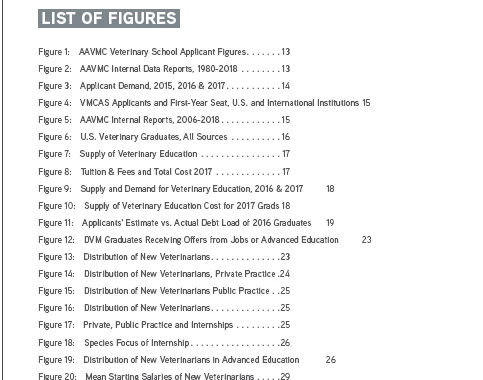
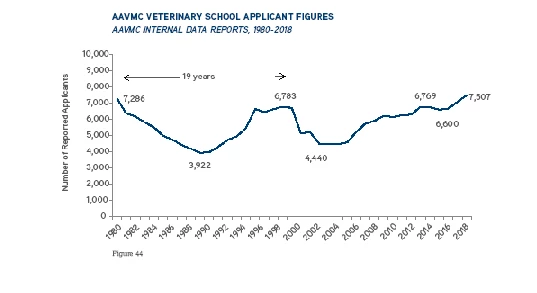
I created a list of figures in the beginning of a report. It looks great "Figure 1: Title....Page #". However, the actual figure numbers have changed and have continued numbering after the list. So Figure 1 is Figure 1 in the List of Figures, but on the actual page it's Figure 44, which is the next number in the sequence.  Not sure what I'm doing wrong. Pics below.

This topic has been closed for replies.
Correct answer Randy Hagan

Okay, I did Step 1 and the figures are back to the correct numbers. I'm sorry, but I don't quite understand Steps 2 & 3. Do you mean create a whole new Table of Contents Style?  If so, I tried and it's still incorrect. Is there a way to just change the Figure ^# part so it doesn't get a double entry?


You cannot, without breaking the automatic figure numbering.

You and I see Figure 1, 2, 3, but InDesign only sees the ^# and does the automatic numbering.

You can't crack the code unless you want to destroy your numbering. The only way to break it is to create another file for your ToC, as I said.

In retrospect, the problem lies in automating your bullets and then incorporating it into your Table of Contents. The fastest fix is to separate your table of contents from your report InDesign file. But given the opportunity to start over, I'd suggest you incorporate the figure numbering as text elements in your title and sidestep this entirely. Since the file is already created – and undoubtedly at this point, near complete – I'd recommend the quick fix.


2 replies

Community Expert
September 18, 2018

I have to ask: did what we discussed get you past your problem?

If so, would you please mark your question as answered so the moderators archive this for other people who have the same problem?

Thanks,

Randy Hagan

Participating Frequently
September 20, 2018

I'm so sorry!! I got sidetracked and forgot to mark this one answered. 

Thanks again for all of your help!!

Participating Frequently
September 21, 2018

It's not too late. You can mark it answered, and it will be put in the archive.

Unfortunately, the "Assumed Answered" setting is kind of a moderator-led purgatory for unanswered questions before they disappear. If this is answered, please mark it so and the moderators will send it to its assigned higher plane.


It actually never was really answered, but more of a work around.  But since I did get a solution, I'll mark it answered.

Community Expert
September 5, 2018

Is your report made up of more than one InDesign document? Do you, in fact, have 43 figures before page 13? And how are you generating your list of figures? Are you using InDesign Table of Contents or Indexing functions to generate your list of figures?

Answers to these questions will help us help you. We need to know a little more about how you generated your figures list and how your InDesign report is built to be able to help you.

Hope this helps,

Randy

Participating Frequently
September 5, 2018

Thanks for responding! It is only 1 InDesign Document. I'm using a paragraph and character style for my Figure Numbers and a paragraph style for my FIG TITLE. I then created a TOC paragraph and character style for my TOC List of Figs. I also have a Table of Contents Style, which is below.

When I create the Table of Contents List of Figs, it generates the Figure Numbers, but then continues the numbering onto the Figures themselves, where they should start at Figure 1, Figure 2, etc.

Community Expert
September 5, 2018

OK, so let me see if I've got this right:

You're generating the List of Figures through ToC functions, based on a Paragraph Style of FIG TITLE. It contains Character Styles to stylize the "Figure #:" within the paragraph.

The ToC generates the figure numbers, based on something independent of the ToC functions and Paragraph/Character styling. You're getting the correct layout as specified in the ToC generation – Name, Page #, formatting. But you're getting divergent numbering starting with page 13/Figure 44.

I've got some more questions:

Why aren't Figures 1-43 listed in the ToC text? Are the figure numbers text elements in the titles (literally typed in as Figure 1:, Figure 2:, etc.)? Or are they generated by metadata from the word processing program? It seems like there's some kind of inconsistency in how the Figure numbers are generated and how InDesign reads them. Often, some kind of data generation, like automated numbering, can cause problems – especially if it's generated externally.

I think the problem may lie in the Figure numbering itself, and how it's generated affects how we can get you past your problem.