


tahirs2392697
New Participant
January 7, 2019
Answered

Losing Character Styles When I update Linked Spreadsheet on InDesign

  • January 7, 2019
  • 2 replies
  • 1324 views

I have a 56 page price list that I am updating. I have linked the SpreadSheet into InDesign, putting it in unformatted and then adding the Table and Cell Styles that I need for the design. Each time I update the Spreadsheet with different prices however the Table and Cell styles remain the same BUT the Titles and Subtitles which have specific Paragraph/character styles seem to disappear when I update the Sheet! See example below

BEFORE UPDATE

This version has the titles with the specific Styles I added like I need them to be:
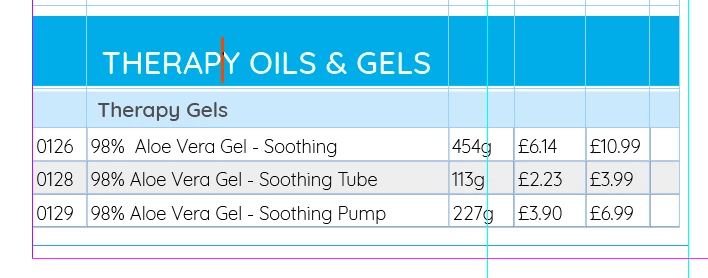
AFTER UPDATE

This shows after I have updated the Spreadsheet, the Cell and Table styles remain but the Paragraph and Character styles added to just the titles have disappear and the text is in the same style as the body text:
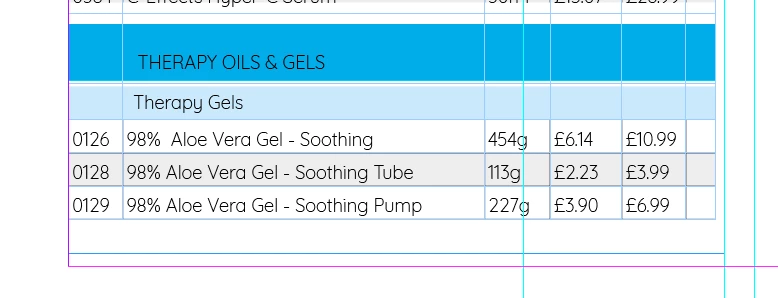
There are over 100 titles/subtitles in this document and I don't want to reapply the character/paragraph styles to them each time that the excel file gets update, what is the solution to this??

I would be very grateful for help on this
This topic has been closed for replies.
Correct answer vinny38

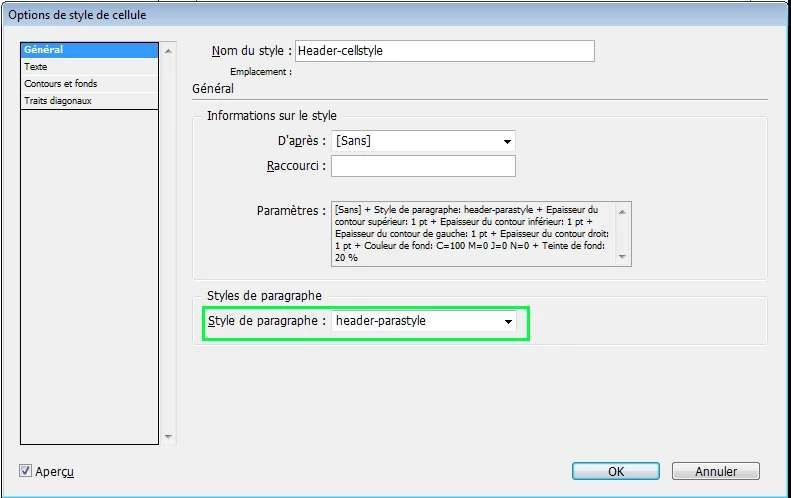
First thing to check is whether your cell style is set up to apply the relevant paragraph style:

Now, you must be aware that character styles are not retained while updating.

Which is probably why you loose some formatting.

Which means that you must either use only paragraph styles (that should do the job, from what I can see on your screenshot), or use nested or grep styles in order to apply character styles whithin your relevant paragraph style.

Find/replace will help you to clean up your document with unnecessary character styles.

Hope that makes sense

Vinny

2 replies

New Participant
January 28, 2021

Hi, I'm having the same issue.

I've imported a linked table from Excel. I've applied cell styles, which are linked to paragraph styles, and I've even applied nested character styles to the paragraph styles. Even so, whenever I update the table, all the character styles are lost. The cells retain their cell styles, but the only way for me to get the correct formatting back is to go to the paragraph style and choose 'Apply "Paragraph Style", Clear Character Styles'. Now the text will respond to whatever cell style I apply, until next time I update the table and it once again loses its formatting. 
This is extremely frustrating, and it seems like a bug in InDesign. Please tell me there's a way to fix it or work around it.

BobLevine
Community Expert
January 7, 2019

You have to create a cell style specifically for those cells and apply it that way.

tahirs2392697
New Participant
January 8, 2019

Hi BobLevine

Thanks for taking the time to look at my post. the thing is I have made Cell styles specifically for those cells and the cell style remain as you can see however its the character and paragraph styles that are disappearing. this is seen in my screenshots. What I need is for the character and paragraph styles to remain also after updating the link

vinny38
vinny38Correct answer
Brainiac
January 8, 2019

First thing to check is whether your cell style is set up to apply the relevant paragraph style:

Now, you must be aware that character styles are not retained while updating.

Which is probably why you loose some formatting.

Which means that you must either use only paragraph styles (that should do the job, from what I can see on your screenshot), or use nested or grep styles in order to apply character styles whithin your relevant paragraph style.

Find/replace will help you to clean up your document with unnecessary character styles.

Hope that makes sense

Vinny