Chris  P.  Bacon
Inspiring
September 5, 2022
Answered

Mark selection separate paragraph

  • September 5, 2022
  • 3 replies
  • 3160 views

How do I mark selected text as separate paragraph without adding any spacing to the paragraph?

I want to add the spacings and styling only after I marked the selection as separate paragraph.

Currently the whole copy text is one paragraph because I removed all paragraph returns with an online paragraph return remover.

This topic has been closed for replies.
Correct answer rob day

"

If you add spacing to an exisiting paragraph style, all paragraphs assigned that style will now have sapcing, but that does not create any new breaks.

You cannot create paragraph spacing in the middle of a paragraph without first breaking the paragraph in two."

That I totally noticed and understand.

But when I hit Enter, my system will add the line break too, not just the paragraph break character, even though I did not devine so far as I know or so far as I observed any spacing to paragraph styles. I will double check.

Because I only add top and bottom spacing to my subheads, because that seems more logical to me.

That will naturally add the spacing for the paragraphs too, when necessary.


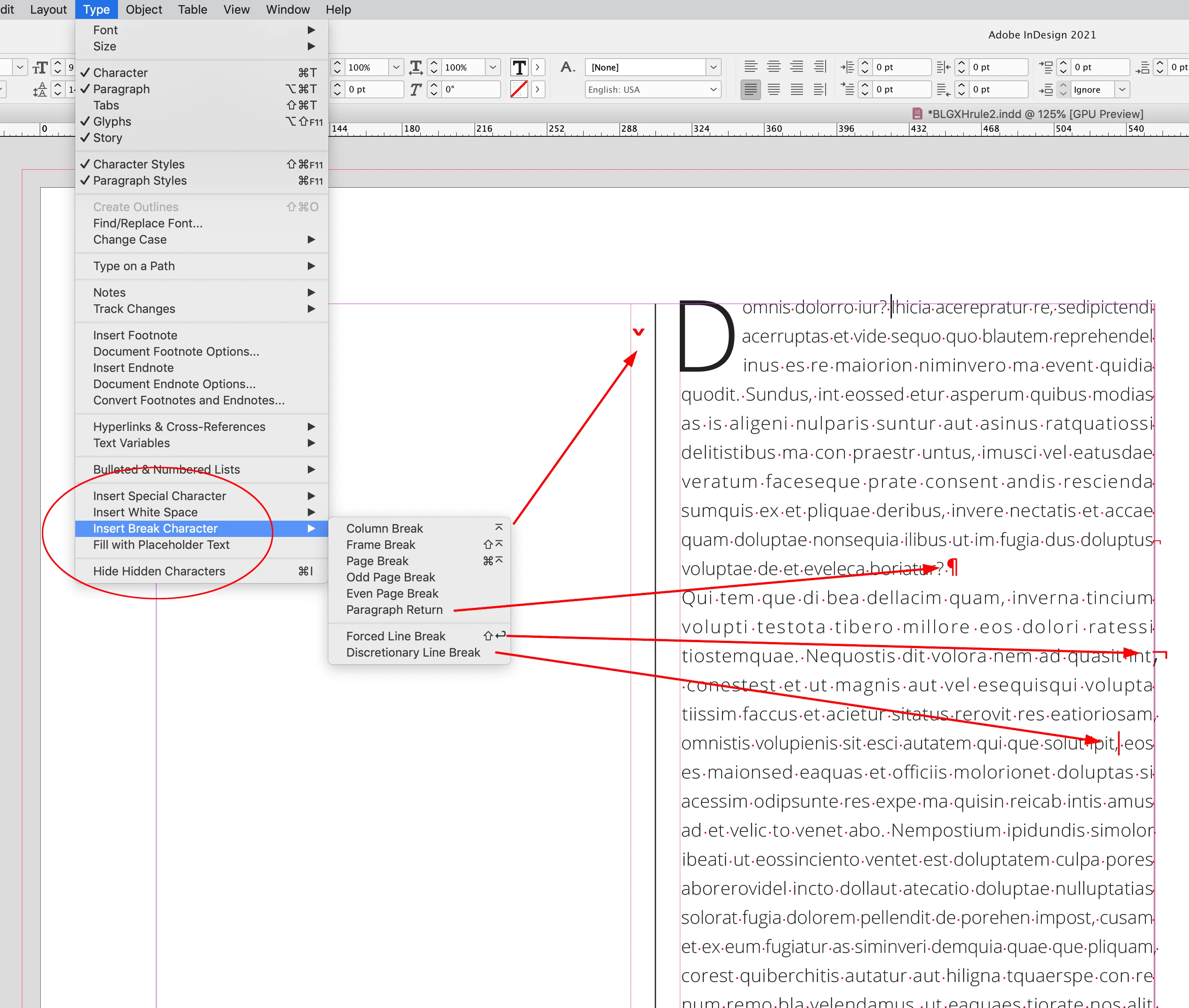
ID has 8 different Break Characters all with different functions and invisibles. You can also assign different Key Commands, so your Enter key might do something different than mine.


A Forced Line Break doesn’t create a new paragraph, it just breaks a line within a paragraph. Here are the Hidden Characters for a Column Break, Paragraph Return (a new styled paragraph), Forced Line Break, and Discretionary Line Break:

 

3 replies

James Gifford—NitroPress
Brainiac
September 6, 2022

Anyone grab a brass ring yet?


Chris  P.  Bacon
Inspiring
September 29, 2022

"Anyone grab a brass ring yet?"

This comment does NOT contribute anything to the thread, and as such it's not allowed.

Delete it immediately.

If you don't delete it, I will ask Adobe to delete it.

It's also bullying and violence.

Get out of here if you cannot respect people.

Now!

Willi Adelberger
Inspiring
September 5, 2022

A paragraph is always defined by a return. Spaces between paragraphs are defined in the paragraph styles with spaces befoe and after and between the same style.

Chris  P.  Bacon
Inspiring
September 5, 2022

Before I removed all carriage returns from my text, they were there, but they didn't cause any spacings, new lines, not even ampty space between words.

That is how I know that you can have a carriage return after the paragraph without any extra space after it. 

How do I achieve that?

Put the cursor after the last letter of the paragraph and press enter, then press backspace?


Willi Adelberger
Inspiring
September 5, 2022

Never use enter, press return. Enter causes a column break, not a paragraph.

Scott Falkner
Brainiac
September 5, 2022

Type a carriage return after the selection.


It sounds like you could improve your text clean-up process. You can convert multiple returns to one return instead of removing all returns. If you can clean up the text better you might be better off reimporting.

Chris  P.  Bacon
Inspiring
September 5, 2022

Inserting a carriage return will include extra spacing.

I want to mark selected text as separate paragraph without inserting extra spacing.

Because I will insert the spacings afterwards, and save it to the paragraph styles.


Willi Adelberger
Inspiring
September 5, 2022

Spacing depends on the paragraph style setting. Paragraph styles should be set up before you start to work. Never format a text without a style.