



dublove
Legend
December 10, 2024
Question

Merging styles: what's the best way to get certain settings from another style?

  • December 10, 2024
  • 2 replies
  • 290 views

For example:
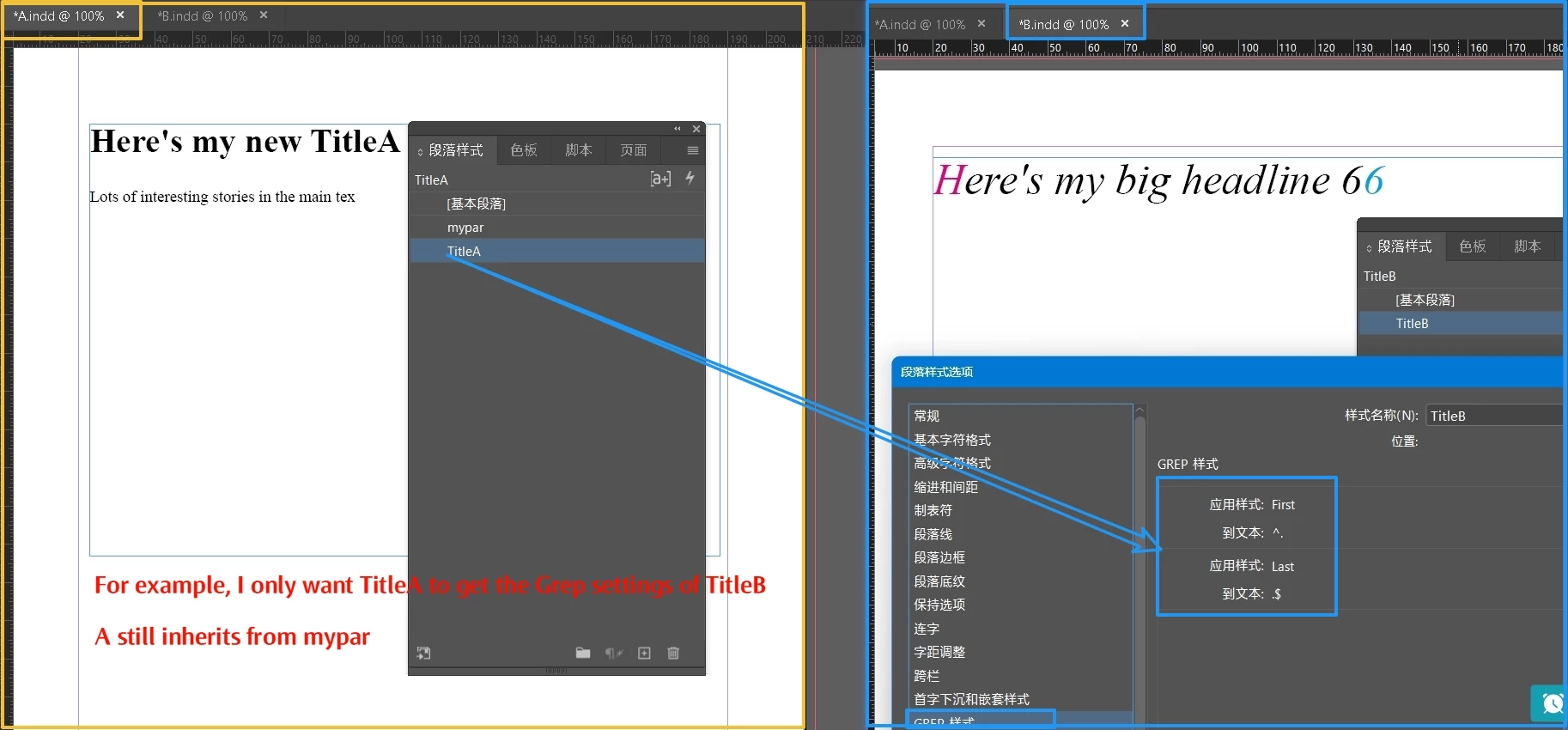
My current document is A.indd, which has a style TitleA, TitleA has inherited the body paragraph style.
Now, I also want TitleA to get some settings from TitleB in B.indd.

The fastest way, perhaps, is to copy TitleB directly into A.indd.
Or, use import styles.
But that would bring in a lot of stuff I don't need, maybe I just need the Grep settings in TitleB, and the font size.


Sometimes this need occurs in the same document

Any ideas, or scripts, or something?
This topic has been closed for replies.

2 replies

Robert at ID-Tasker
Legend
December 15, 2024

@dublove


You say "some settings" - it's either everything from the parent Style or nothing - even if you copy one ParaStyle between documents.


Of course it's possible - but you need to know which setting(s) you want to transfer. 


Community Expert
December 10, 2024

Fastest way I think would be an InDesign Book file - if the documents are unrelated in the page order - then you can turn off all the Automatic Page numbering and other book features. 


You'll setup the files and then be able to Sync the styles from the documents by selecting 1 of the documents to be the Style then you can Sync Styles


Then you'd have 

Body Paragraph

Title B - based on Body

Title A - based on Title B 


That way B gets the info from Body - so wholesale changes can be made to Body in terms of Font

Title B gets that info - and include your GREPS, change font size, colour etc. 

Title A gets that info from Title B - but you can change whatever setting you need. 


https://helpx.adobe.com/uk/indesign/using/creating-book-files.html


Once you make a change to the Parent Document that's selected as the Style Source - you can then sync all your styles across your document.


If you need further help with this let us know.


dublove
dubloveAuthor
Legend
December 10, 2024

The books will have synchronized all the settings.
I only want some of the settings in a style

Community Expert
December 10, 2024

Initially when you sync the styles it will work.

So you set your Style Source - and in this document you have all your styles with based on. 


So yes, if you change B and A is based on this - then A changes too.

The only way A won't change is if you have changed that style already to something else. 


It will take some style management and careful planning - but I can see it working. 

So if you change everything in A style - except GREPs - then go back to B style - update that GREP section - the A style GREP should change when synced.

And nothing else would change about A - as those attributes are not linked to B.


I don't know your workflow or the overall goal here. 

You could just have a Blank paragraph style with the GREP styles in there, then Base every other paragraph style off this.

And to update the GREPs for all styles you just need to change the BLANK style. 

Then all styles update automatically.


I don't think there's a way to inherently import arbitrary settings. 


Seems possible to be able to copy over the GREP styles to another paragraph style or all of them

https://creativepro.com/topic/script-to-insert-grep-style-in-all-paragraph-styles/


But we'd need a much more in-depth knowledge of your workflow and precisely what attributes you wish to move in to the other styles.