



Hazar Marji
Participant
November 8, 2023
Question

Missing dots at the end of pharagraph when exporting a PDF from Indesign

  • November 8, 2023
  • 10 replies
  • 6765 views

Hello, I hope someone can help.

I'm exporting a file as a pdf from InDesign. However, a strange thing happens. When I export the file as PDF, Strangely, the dots disappear when I make the text right-justify, but when it is no-justify, the dots appear normally.  


right justifying 
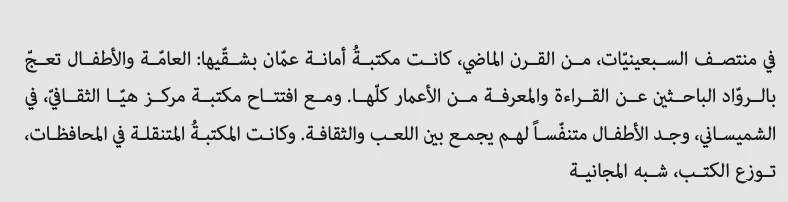
 

no justification 



What is the problem? Please help.

10 replies

Participant
November 23, 2024

I found a simple fix that worked perfectly for me, and I wanted to share it here to help others:

  1. Select all the text inside the paragraph.
  2. Go to the Insert Kashida tool.
  3. From the dropdown list, select None.

After making this adjustment, export your file to PDF, and you'll see that the full stops appear as expected.

I hope this helps!

Abhishek Rao
Community Manager
Community Manager
November 25, 2024

Hi @Hazar Marji,

Thank you for sharing your solution, Mostafa! This simple fix should be helpful for anyone encountering the same issue with full stops not displaying correctly in PDF exports. I appreciate you taking the time to post it. For anyone else facing this, please follow these steps:

  1. Select all the text in the paragraph.
  2. Go to the Insert Kashida tool.
  3. From the dropdown menu, choose None.

This should resolve the issue, and your full stops should display properly in the PDF export. Let us know if anyone needs further assistance!


Thanks, 

Abhishek Rao

Zaid Al Hilali
Community Expert
Community Expert
November 25, 2024

Dear Abhishek, The suggestion provided by Mostafa has been suggested previously. Kindly refer to my post dated Nov 29th 2023 with Illustration of where to select "None" for the Kashida. However, this was not recommended since the original poster wanted a Kashida, hence this issue is a bug and was treated by Joel and others including I as a bug.

InDesign didn't have this issue in earlier versions, we need the development team to address this matter.

Abhishek Rao
Community Manager
Community Manager
August 20, 2024

Hi everyone, 


Thank you for your patience. It looks like you're experiencing a similar issue mentioned in the UserVoice. Please continue to upvote the UserVoice page and add your feedback to help prioritize the issue. We will keep you posted if the product team needs any further details from you. Stay tuned to the UserVoice page for updates. 


Workarounduse ID 18.5 Eng Hebrew version. 


Hope it helps. 


Thank you,

Abhishek Rao

Zaid Al-Hilali
Participating Frequently
November 7, 2024

Hi Abhishek,

Thanks for reminding all about the UserVoice link to add our votes. As for the workaround you suggested which is to use the Hebrew version of InDesign, well this is NOT a valid suggestion because we're using Arabic language that needs the Arabic version of InDesign fixed.

Community Expert
July 26, 2024

Hi @Hazar Marji ,

with my German InDesign I see no issue when I export with the standard Print to PDF export preset [PDF/X-4 :2008].

InDesign:

Acrobat Pro:


Well, so I need a sample InDesign document from you to do my own tests.


My InDesign document from version 19.5.0.84 and the exported PDF is attached.


Regards,
Uwe Laubender
( Adobe Community Expert )

Participant
July 28, 2024

I noticed in my file it has only occured on almost 10 paragraphs (out of approx. 100), it's really odd and I don't have an example to share as I've already fixed everything manually.

If I see a new one, I'll share it. I also use the latest indesign software.

Participant
July 15, 2024

The easiest way to avoid this problem is to add a space after each full stop or colon. This is the quickest way

Participant
July 26, 2024

I've been have the same problem with my Arabic text. However, dding 2 spaces after the full-stop works! The tab suggestion by Msto Ismail didn't work for me though.

Bit tedious to add double spaces after each paragraph full-stop of a 250 page book but better than nothing until this bug issue is resolved.

Thanks!

Robert at ID-Tasker
Legend
July 26, 2024

@MayaSmadi


Have you added them already? It can be done with GREP automatically...


Participant
April 11, 2024

Apparentty its a bug. My work around is to download an earlier version. (in my case downloaded v18.5.2) it works fine. But it it will take time to convert once u try to open from the older version.


Rishabh_Tiwari
Community Manager
Community Manager
April 12, 2024

Hi,


Sorry to hear about the trouble. Can you share the version of InDesign & OS along with a sample document so that we can investigate this further. 

Thanks

Rishabh

Msto Ismail
Participant
January 1, 2024

السلام عليكم يمكنك حل المشكلة بإضافة تاب نهاية الجملة TAB

Robert at ID-Tasker
Legend
January 2, 2024

I don't have ME installed - how about just a space? 


Zaid Al Hilali
Community Expert
Community Expert
November 29, 2023

This issue is certainly a bug worth reporting. 

What you can do currently to avoid the problem is to open the "Paragraph" panel, and choose "None" from the Kashida setting drop-down menu as shown below. Then export to PDF.

Switching Kashida option off will certainly restrict you from controlling the word extension.

Joel Cherney
Community Expert
Community Expert
November 29, 2023

Well, that's certainly a workaround! I gave up trying to find a way to submit an INDD with my bug report, which I have now posted over at uservoice:


https://indesign.uservoice.com/forums/601180-adobe-indesign-bugs/suggestions/47515619-fully-justified-arabic-text-drops-the-final-period


Zaid Al Hilali
Community Expert
Community Expert
November 29, 2023

I supported your bug report… I hope we get a fix soon.

hanimuhammed
Participant
November 28, 2023

Unfortunately this issue is related to some Arabic and Persian characters such as T. For me I didn't find a technical sollution but you can add some scale even 1% to the text and the issue will be solved.

Joel Cherney
Community Expert
Community Expert
November 28, 2023

Can you go into a little bit more detail about your workaround? 


If I export fully justified Arabic or Persian text from InDesign 18.5 (the 2023 edition) then everything looks fine to my eyes. If I export fully justified Arabic or Persian text from 19.0.1, then the last full stop disappears from any multi-line paragraph. I've tried adding a few percent of horizontal scale, but the missing period does not reappear. How did you pull it off?


This is just one RTL complex-script text rendering errors in the newest version of InDesign, and I was about to file a bug report at uservoice.indesign.com about it. The only reason I haven't done so is that I got an error message when trying to upload a sample INDD, which I assume is a new bug with Uservoice itself. At any rate, if you can add some details on how you worked around this bug, I can include it in the bug report, which might help the devs find the bug (and will certainly help the frustrated users who are voting up that bug report, in that it might allow them to get back to work without rolling back to 18.5). 

Peter Spier
Community Expert
Community Expert
November 10, 2023

I don't read Arabic and have no experience setting right-to-left text, but I do see, in addition tot he missing dot, some differences in a few of the word forms as well and wondered if this was also unexpected...

Community Expert
November 10, 2023

Have you set the language for the Paragraph to your language, like Arabic or whatever language this is?
Have you used World Ready Paragraph Composer?
Are you using the ME version of InDesign?

Can you share more info on this?


I've limited experience with setting Right to Left languages, but hopefully can help a little.