


Participating Frequently
November 22, 2013
Question

Multiple record data merge into paragraph styles-applies the wrong style

  • November 22, 2013
  • 1 reply
  • 45374 views

Hi, I've been working on this project for sometime and everytime I manage to get one part of the workflow to work another seems to break. My agency publishes catalogs in multiple formats: large-print, audio, braille, and HTML. I've been trying to redesing our work process so that the catalogs will be laid out from merged data out of comma-separated file. The data merges have worked fairly well in Word, but InDesign is a challenge. I'm merging multiple records on a page, like a mailing label. The paragraphs need to be formatted and I'm trying to apply a paragraph style to them. After much work, I think I've finally got the data merge to work correctly, but the wrong paragraph styles are applied. I'm going to apply a new master page to the data once the data is merge that uses the paragraph styles for text variable running headers and I need to build a table of contents based on the paragraph styles so I need this to work. Attached are some screenshots.

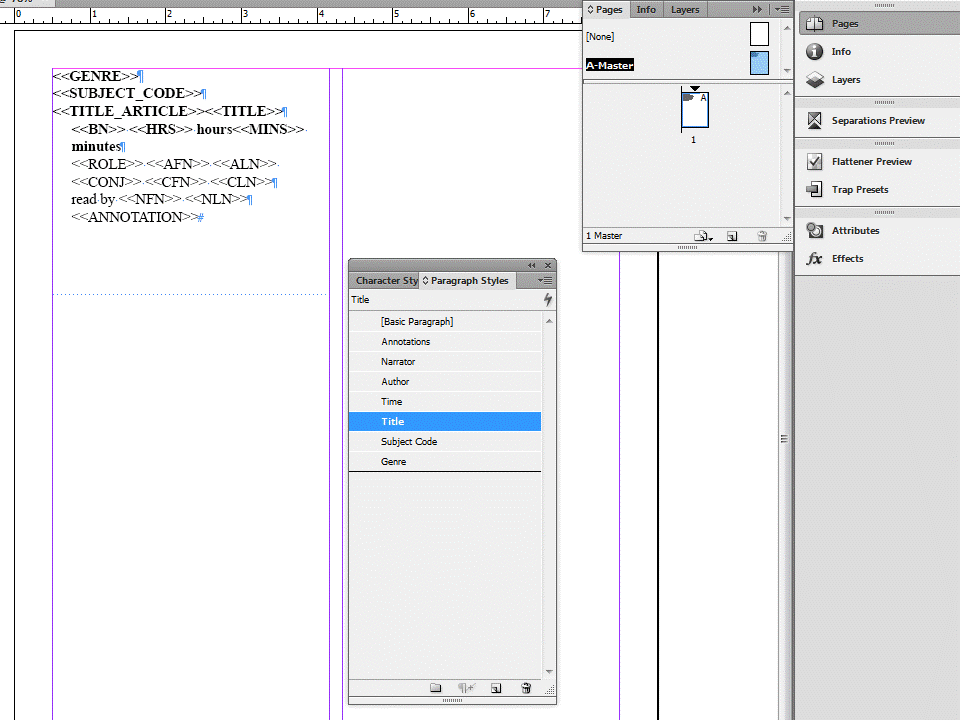
Master page set up for data merge with paragraph styles:
Here is the merged document with the wrong paragraph styles applied:

I have only a few weeks to get this process ironed out to keep to our rigorous production schedule. If anyone can help I would really appreciate it.

thanks,

Lina

1 reply

Peter Spier
Community Expert
Community Expert
November 22, 2013

Can't really tell from those screen shots what styles are applied to the placeholders....

LinaD36Author
Participating Frequently
November 22, 2013

Peter- All the styles on the screen have been applied.  The data has been merged onto 7 lines and each line has it's own paragraph style. But I think the problem is that some of the fields are empty and don't have data in them. The fields merged are below next to the paragraph style that they are supposed to be merged into:

<<GENRE>> (Genre)

<<SUBJECT_CODE>> (Subject Code)

<<TITLE_ARTICLE>><<TITLE>>(Title)

<<BN>> <<HRS>> hours<<MINS>> minutes (Time)

<<ROLE>> <<AFN>> <<ALN>> <<CONJ>> <<CFN>> <<CLN>> (author)

read by <<NFN>> <<NLN>> (narrator)

<<ANNOTATION>> (annotation)

The problem seems to occur because the Genre and Subject Code fields don't always have data in them and then somehow the Genre style is applied to the Title paragraph.

-Lina

Peter Spier
Community Expert
Community Expert
November 28, 2013

@Peter – of course it's all about "Merge Field Markers". In my oppinion <FEFF> should work.

See the following thread in the Scripting Forum (maybe the title is a bit misleading??):

Jean-Claude Tremblay

Remove All InDex Markers in empty cells

http://forums.adobe.com/thread/1344419?tstart=0

And: it does not work with GREP search. Seems to be a bug…

Is there a test file (IDML) available?

Uwe


I'll send you a package...