



Winginsue
Inspiring
July 8, 2025
Answered

Newbie to InDesign Scripting question

  • July 8, 2025
  • 3 replies
  • 1801 views

Hi all,


I've done programming for some time.  PHP, VB, VBA etc.  SOME JS but not extensive.   I decided I wanted to try to do some InDesign Scripts for things I do repeatedly.  I went to the getting started guide at https://developer.adobe.com/indesign/1688653963277/guides/getting-started/ .  Just to try it, I copied the code for the "Hello World" and saved it in my Scripts folder.  TaDA it showed up.  BUT when I attempt to run it I get this error: 
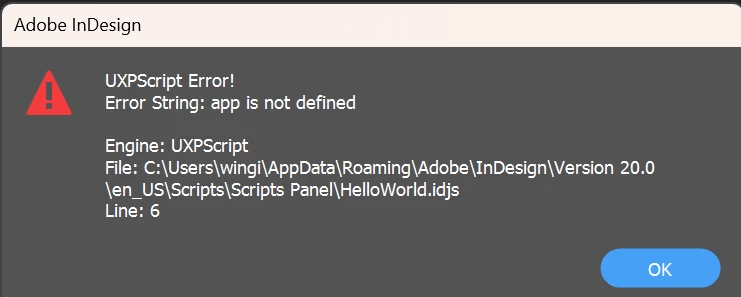
 

I've gone down all kinds of rabbit holes doing research but can't figurre out what is happening wrong.  It is the var myDocument = app.documents.add(); line that is causing the issue.  I attempted to try to figure it out BUT the only thing I've found is the UXP Plugin that Adobe has.   Did that replace scripts?  All of the links from the scripting page get 404 errors.   


Thanks for your help.


Correct answer Jakob Frey

Good luck getting started with InDesign scripting. Documentation is a mess and not so helpful most of the times.


For your problem:

Adobe changed the way you can access InDesign apis in version 18.4:

 https://developer.adobe.com/indesign/uxp/changelog/#indesign-v184 


You now need to require it first:

const { app } = require("indesign");

https://github.com/AdobeDocs/uxp-indesign-samples/blob/0536fb87cc743959211f2c4158653448b499bb5b/plugins/plugin-starter/index.js#L2 

3 replies

Mike Witherell
Community Expert
Community Expert
July 10, 2025

Why not work for now with jsx javascript? It is more stable than the unfinished uxp.

I have preserved some scant documentation on my website:

https://trainingonsite.com/useful-resources/adobe-indesign/207-indesign-2025-learning-resources.html

Look for "InDesign CS6 JavaScripting Guide CS6 2012"

Mike Witherell
Winginsue
WinginsueAuthor
Inspiring
July 17, 2025

Page won't load,

Mike Witherell
Community Expert
Community Expert
July 18, 2025

Really? It loads instantly for me.

Mike Witherell
Jakob FreyCorrect answer
Inspiring
July 8, 2025

Good luck getting started with InDesign scripting. Documentation is a mess and not so helpful most of the times.


For your problem:

Adobe changed the way you can access InDesign apis in version 18.4:

 https://developer.adobe.com/indesign/uxp/changelog/#indesign-v184 


You now need to require it first:

const { app } = require("indesign");

https://github.com/AdobeDocs/uxp-indesign-samples/blob/0536fb87cc743959211f2c4158653448b499bb5b/plugins/plugin-starter/index.js#L2 

Participating Frequently
July 18, 2025

The documentation for the getting started guide has been updated:

https://developer.adobe.com/indesign/uxp/scripts/getting-started/

—————————————————————————————Krommatine Systems — Makers of InDesign plugins, tools, and automations.
Winginsue
WinginsueAuthor
Inspiring
July 28, 2025

Oh, I see.
The textframe you just created is empty, so there is no paragraph in it.
You must use something like `myFrame.insertionPoints.item(-1).
contents="blah blah blah"`.


[personal information removed by moderator]


*sigh*  Line seven is bolded.

let { app } = require("indesign");
let myDocument = app.documents.item(0);
let myTextFrame = myDocument.pages.item(0).textFrames.add();

let myFont = app.fonts.item("Arial");

var myParagraph = myTextFrame.insertionPoints(-1);

myParagraph.contents = "Howdy"


I tried changing line 7 to myTextFrame.insertionPoints(-1).contents = "Howdy" but that didn't fly either.  Same error,

This is the problem with the documentation.  If one copies code and tries to run it, it should work.  Trying to hunt down the issue is crazy.  I tried the console.log commands but I can't find the log anywhere.  I've looked at several posts etc on the log but can't find it in any of the locations recommended.

m1b
Community Expert
Community Expert
July 8, 2025

Hmm, I'm no expert on UXP scripting, but it appears that the code on that tutorial is the old ExtendScript. For UXP you would start with something like this:

let myInDesign = require("indesign");
let app = myInDesign.app;

I have lodged an issue with the github repo for that tutorial page.


You could make a start by opening other .idjs scripts from within the Indesign app folder, for example I can see:

BreakFrame.idjs
Neon.idjs
PathEffects.idjs
AdjustPageItems.idjs
SplitStory.idjs
AnimationEncyclopedia.idjs
TabUtilities.idjs
CreateCharacterStyle.idjs
AddPoints.idjs
AlignToPage.idjs
MakeGrid.idjs
AddQRCode.idjs
CornerEffects.idjs
SortParagraphs.idjs
SelectObjects.idjs
ImageCatalog.idjs
AddGuides.idjs
ExportAllStories.idjs
CropMarks.idjs

 - Mark


P.S. for the DOM structure you can look up this invaluable resource. It was written for ExtendScript, but I believe it is very similar for UXP and many will work. Perhaps there are better resources for UXP, but it's not my area of expertise.