


Known Participant
March 8, 2025
Question

Newbie: TOC duplicating and HTML errors? (Related? Maybe not? Help!)

  • March 8, 2025
  • 5 replies
  • 1281 views

I'm at the final step of my first-ever InDesign epub export and I'm running into a maddening issue. 


When I create my table of contents, it's pulling from a single header style, as shown here:
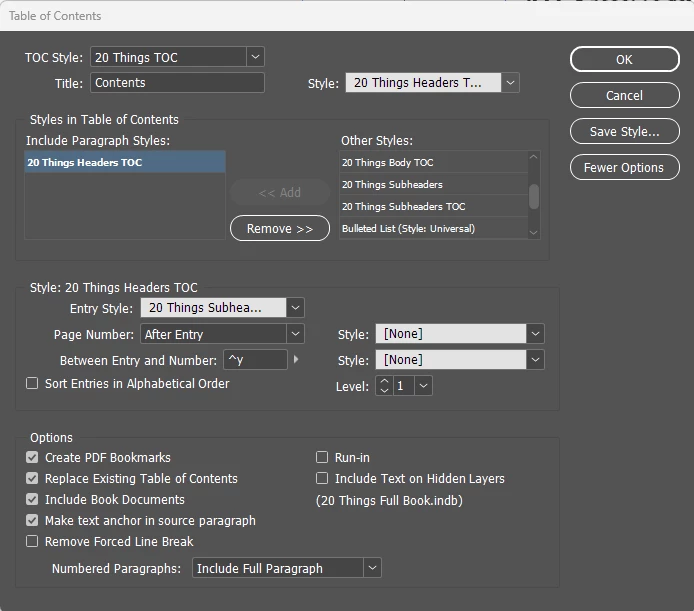


The header style is only used at the beginning of each chapter. Nowhere else. 


Upon export, my epub is giving me the following error in Sigil: 
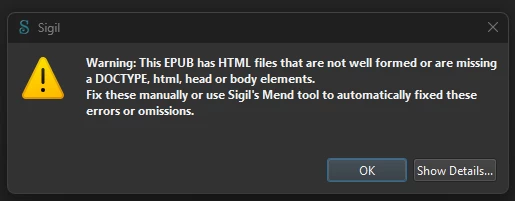


I'm guessing this is related to the other part of my problem, which is that the table of contents in the exported epub is creating entries for every single page. Here it is in Adobe Digital Editions. 
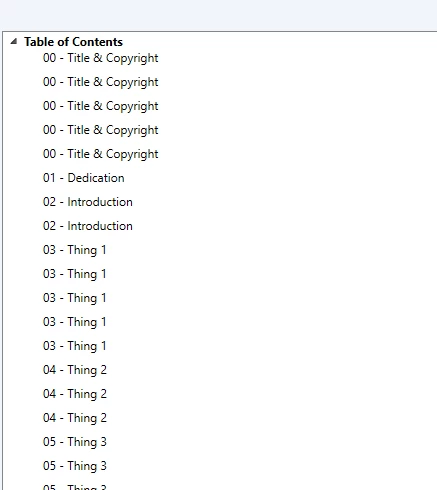


I have no idea what to do. I don't even know if these two problems are actually related, or if they're two separate issues. I've been following along with this tutorial: https://www.youtube.com/watch?v=xkRp7fyP6KM 


And I used this tutorial for the TOC specifically: https://www.youtube.com/watch?v=zRD6wHc14S0


Help very very appreciated! This book is for a client, so unfortunately I can't share files, but I am happy to screenshot any settings menus etc. if you tell me where to go. 


5 replies

Dave Creamer of IDEAS
Community Expert
March 8, 2025

Are you sure you are not picking up the style used in a header/footer? 


David Creamer: Community Expert (ACI and ACE 1995-2023)
James Gifford—NitroPress
Brainiac
March 8, 2025

There's too much to unpack and figure out here, so let's start with some simple, basic changes.

  • Rename all your styles to NOT begin with a number. As Laura Brady points out, it's somewhere between bad practice, confusing and technically faulty to export style names to HTML/EPUB with number-led style names.
  • Delete all your TOC definitions and any existing TOC you've generated.
  • Create a TOC-entry style, a simple one based on your Body text.
  • Create a new TOC 'style' using just that one heading style. It looks as if you've done everything else pretty much right, but be sure not to specify page numbers. Assign the TOC-entry style to it. (One not-uncommon mistake is to use the same style for the TOC entries as for the TOC targets, creating a loop in which the TOC lists its own entries as further entries... make sure the styles are sorted out for this!)
  • Be sure to save the TOC style under a defined name (Just "EPUB" is good enough.) But be sure to save this style every time you open the TOC panel for any further changes — TOC has a maddening glitch in that changes are used once and once only, to generate the next/current TOC, and then lost afterwards, unless you save the 'style' BEFORE you exit or generate the next TOC iteration.
  • In EPUB export, be sure to use Multi-Level TOC and specify your named TOC style. (If there's one error that jumps out here, it looks as if you have a named TOC style but then leave the export at [Default], which is both a fault in itself and a fault of using ANY InDesign default setting or style, ever.)


That should clear up the TOC issues.


As for EPUB errors... I deprecate the use of all legacy EPUB tools (and post-export modifications) and most things like validation for InDesign-generated EPUBs, and most flags, warnings, errors and hassles are more rooted in... useless fussiness than actual faults. The only truly valid passage is Export, review in a vanilla EPUB reader like Calibre or Thorium, and then upload to a sales portal such as KDP or Apple. There may be further steps generated by those checks, but in general if a book passes that simple road, fussy bits over this setting and that setting are irrelvant to real-world use.


(There is a monumental shift going on in the name of accessibility that is causing endless problems with validation and acceptance as the various players take their time about updating their standards in step with each other; if you're deeply concerned about accessibility and perfect validation, you have both a hard road to hoe and will have to use processes different from simple InDesign export. But, by and large, warnings about this jot or tittle or detail or setting do not get in the way of simple commercial production, upload and sale.)

Inspiring
March 8, 2025

🙄

Dave Creamer of IDEAS
Community Expert
March 8, 2025

Your screenshot above carefully presents and highlights a setting that is completely irrelevant to useful export or this conversation.


I remind you again, gently, that this is the InDesign forum, mostly populated by ID users who want to get their project done, and not acolytes avidly absorbing this week's micro-changes to the grossly outdated and contradictory EPUB standard. Deeply technical answers about standards and editing in Sigil aren't of much use to this audience, and nor are flatly off-target answers about ID.


Please take it off line.

David Creamer: Community Expert (ACI and ACE 1995-2023)
Inspiring
March 8, 2025

A few thoughts:

1. Make sure you are linking accurately to your TOC style when you export to EPUB. 


2. Re: the Sigil HTML errors. You can very likely ignore that. Sigil's built-in checkers are not always up to date or are squawking about things that aren't actually errors. The true test of the validity of your EPUB is EPUB Checker. That is the only validator that you can trust. 


3. Finally, style sheet names. HTML and CSS rules are that style names cannot start with a numeral. InDesign will automatically put an "x" in front of that style name but this may be getting in your way, nonetheless. 

I hope this is helpful. You might consider this YouTube playlist instead of others for accurate, up-to-date help. 

Mike Witherell
Community Expert
March 8, 2025

You need two styles to generate the body of the ToC.

20ThingsHeaders would be the style you are searching for, in order to gather a list.

Once found, a second style would be 20ThingsHeadersToC.

The second style dresses the text gathered by the first style in order for the list of chapters to look like a ToC.

Mike Witherell
Community Expert
March 8, 2025

Are you sure your TOC is setup correctly? Did you generate the TOC in InDesign or setup a TOC style, can you show your TOC page in InDesign.


What caught my eyes and maybe you have got it setup correctly, but the paragraph style names are confusing me.

are your paragraphs in the story called 20 Things Headers TOC? 

Your entry style is 20 Things Subheaders

In my mind - the 20 Things Subheaders are the headings your story - and the 20 Things Headers TOC should be the entry style? 


Can you confirm the paragraph style names? 


Other than that @James Gifford—NitroPress is an ePub whiz and probably has more insight to the ePub side.

Known Participant
March 8, 2025

Totally understand the confusion re: the naming - that's a result of banging my head against this for 4 hours yesterday trying everything I could think of, including creating totally new header styles (hence the TOC name,) etc. I am positive that all chapter headers are using the "20 Things Headers TOC" style - the whole header / subheader style thing comes from the TOC tutorial I was following. So the headers use the Header TOC style, and then are styled using the Subheader TOC syle when they're part of the TOC. 


As requested, here's the table of contents (chapter titles censored for client privacy.)


A few more things come to mind as possibly relevant: 

  • As you can see from the screenshot above, the titles of many chapters are long. This caused problems by itself early on, because I was using full line breaks to arrange them on the page, which caused each header to be multiple entries. I had to go back through and use shift-enter for soft line breaks to keep this from happening, so now each entry is now coming through as one page reference. But I had to do a bunch of backspacing / removing the soft line breaks in the TOC on the page to make each title a continuous string. 
    • I do NOT think this is the cause of the "every page is TOC" issue, because pages are included in the epub TOC which are not included in the InDesign TOC (such as the title page.) 


Here's what my epub export settings look like. 


You can see that the TOC is NOT set to be based on file names, but rather on the TOC style. (While I have saved my TOC style, it does not appear on the TOC Style dropdown in this particular menu.) 


I'm sure there's got to be something obvious I'm missing here, but I have no idea what it is.