Known Participant
July 19, 2024
Answered

No fields panel for data merge

  • July 19, 2024
  • 2 replies
  • 1848 views

I'm trying to use a process I've used for years. Now it doesn't work. 

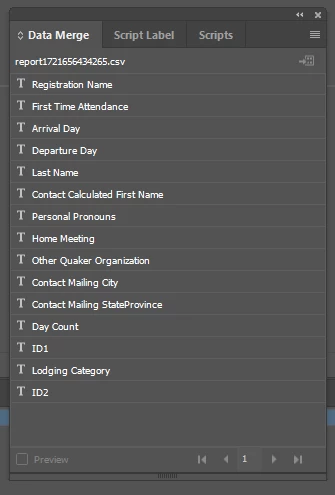
I have an InDesign document with fields; I chose a data source, which seems to work, but I don't get a panel showing the Fields, so I can't drag data fields from the panel to frames on the page.


I'm using InDesign 2024 on a MacBook Pro running Sonoma 14.3.1

This topic has been closed for replies.
Correct answer Robert at ID-Tasker

Hm… What exactly did you do?

Also tried your sample data source and failed with my German InDesign 2024 version 19.5.0 on macOS.


Thanks,
Uwe Laubender
( Adobe Community Expert )


quote

Hm… What exactly did you do?

Also tried your sample data source and failed with my German InDesign 2024 version 19.5.0 on macOS.


By @Laubender


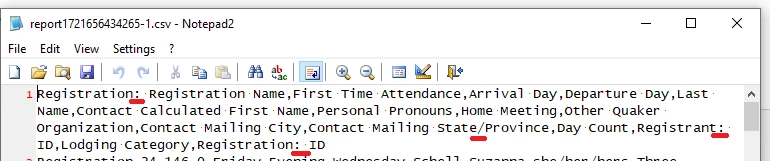
":" and "/" in the column headers.


After removing those:


2 replies

Joel Cherney
Community Expert
July 19, 2024

I don't recall the details but there have been a few posts regarding problems with selecting a Data Source that have been Mac-specific. My understanding is that you're selecting a Data Source as per the instructions that Robert pointed out, but the fields don't show up in the Data Merge panel? My typical first round of advice for all Data Merge questions is usually "make sure to check the Import Options checkbox next to the "Open" button  when selecting your data source, so you can specify the delimiter, encoding, and platform of your data source. The second round is basically "So, what kind of file is your data source? Is it a CSV? Did you make it with Excel? On a Mac? Are you sure it's really a correctly-encoded raw text file?" If just asking you those questions isn't enough to help you solve it yourself, please do come back and post the answers to those questions, and maybe a demo CSV file for us to test?


Gidget5Author
Known Participant
July 22, 2024

I thought the problem might have been that I initially downloaded an Excel file from my database and saved it as a CSV in Excel, but I just tried again and downloaded to CSV. InDesign still is not loading the data source. 

Gidget5Author
Known Participant
July 22, 2024

Here is a demo .csv file


Figured it out--I  needed to remove some columns not used for the merge and edit a column heading.

Robert at ID-Tasker
Brainiac
July 19, 2024

As it says on the tin:


your DataSource has not loaded properly - you still have info what to do?