

Participating Frequently
November 4, 2021
Answered

numbered lists issue

  • November 4, 2021
  • 1 reply
  • 2561 views

I have an issue with numbered lists.

Numbers aren't displayed.. I'm using "Indesign 17.0" and "Minion Pro" font that is Glifi complete .

This topic has been closed for replies.
Correct answer jmlevy

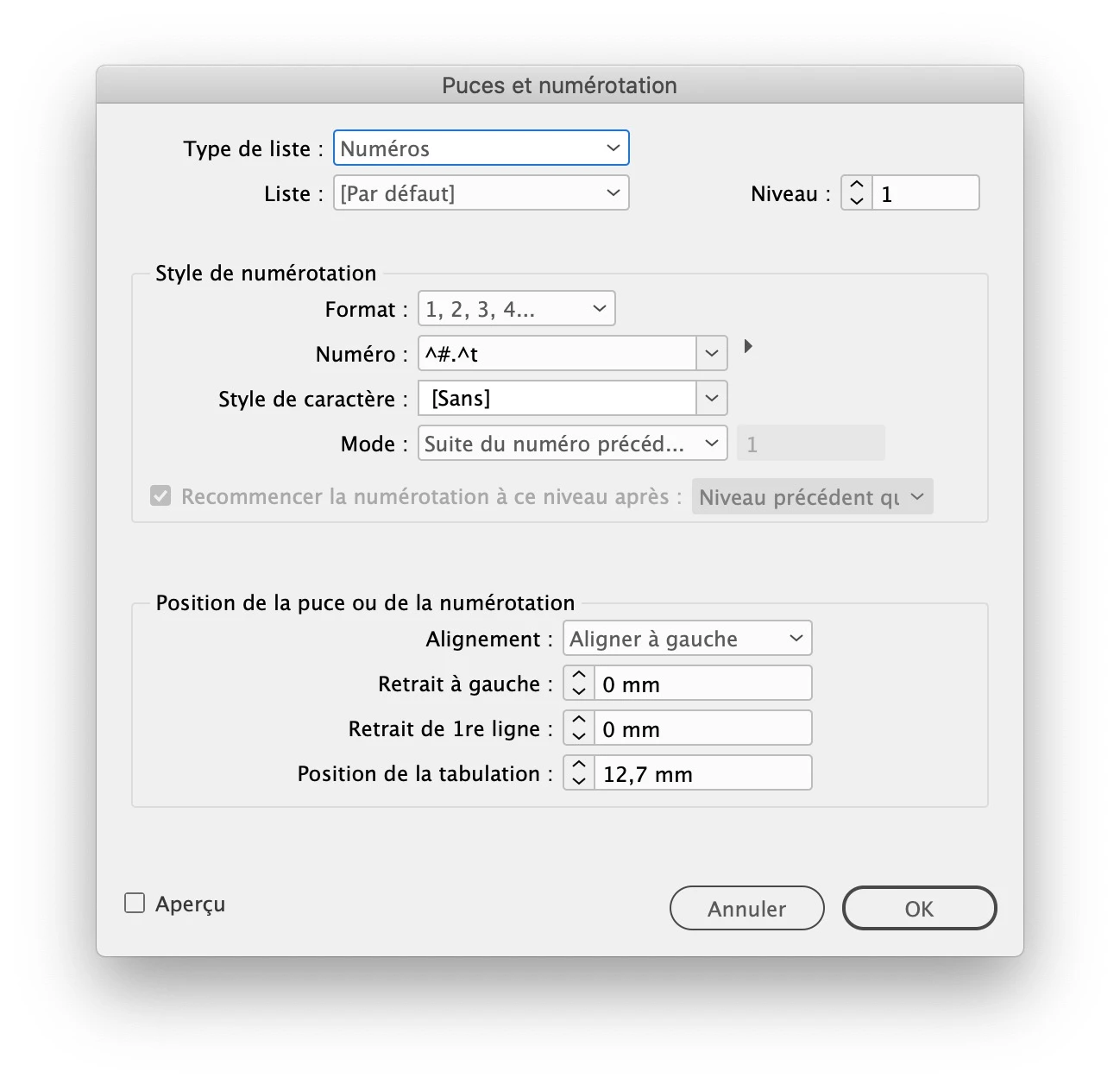
It is because you have deleted the autonumbering metacharacter (^#). See my screen shot
1 reply

jmlevy
Community Expert
Community Expert
November 4, 2021

Are you sure it is a numbered list? It looks like a bullet list.

SimbadAuthor
Participating Frequently
November 4, 2021

Yes, I'm sure.. It happen because Indesign don't recognise numbers.

Bevi Chagnon - PubCom.com
Legend
November 4, 2021

You have an error in the settings of the dialogue box.

In the field labeled Numero: you have .^t (period, carrot, t which creates a period followed by a tab).


Change that to: #.^t (pound sign, period, carrot t).  The # generates the number in the list.


|    Bevi Chagnon   |  Designer, Trainer, & Technologist for Accessible Documents ||    PubCom |    Classes & Books for Accessible InDesign, PDFs & MS Office |
