


Inspiring
October 13, 2021
Answered

Numbering List Current Level + new numbering

  • October 13, 2021
  • 1 reply
  • 638 views

Hi all,


Catalina, newest ID CC.


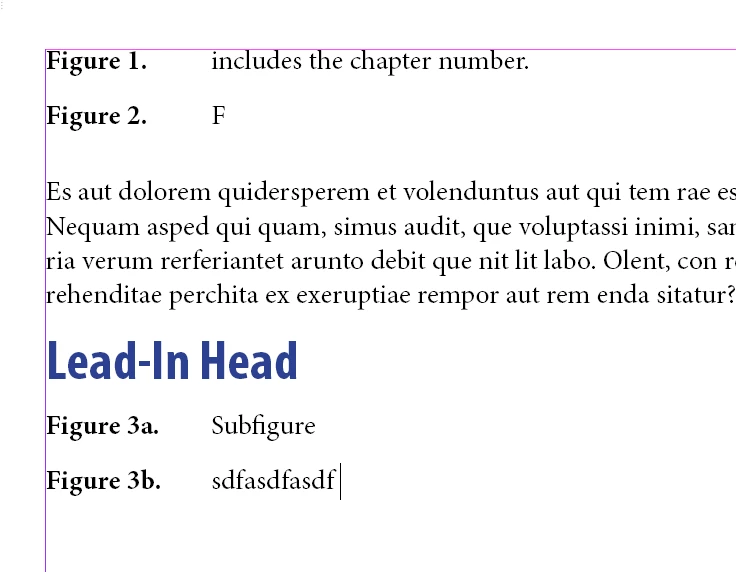
I have to design figures/tables throughout the document most of them are easy enough to apply paragraph style under Bullets and Numbering to such Figure 1, Figure 2, Figure 3. However for some of the figures, I am required to do current level + new numbering list. How does one set this up? (pls see attachment for reference)


thank you,

WS
This topic has been closed for replies.
Correct answer Dave Creamer of IDEAS

Here is one method:

The "Lead-in Head_FigNum" style has a hidden number that repeats on the multi-level figure numbering. 

File attached.

1 reply

Dave Creamer of IDEAS
Community Expert
Community Expert
October 13, 2021

UPDATE: Never mind--I reread your question and saw that you answered my question. I'll work on a solution later unless someone gets a chance to do it earlier. 

Will some figures be single numbers (42, 43, 44, etc.) and some second-level numbers (45a, 45b, etc.)--

OR will everything have second-level numbers?

David Creamer: Community Expert (ACI and ACE 1995-2023)
Inspiring
October 13, 2021

Hi,


Some figures will be single numbers and some second-level.


Example:

Figure1

Figure2

Figure3a

Figure3b


Thank you very much!

Dave Creamer of IDEAS
Community Expert
Dave Creamer of IDEASCommunity ExpertCorrect answer
Community Expert
October 13, 2021

Here is one method:

The "Lead-in Head_FigNum" style has a hidden number that repeats on the multi-level figure numbering. 

File attached.

David Creamer: Community Expert (ACI and ACE 1995-2023)