

New Participant
January 30, 2023
Answered

Numbering pages in Indesign

  • January 30, 2023
  • 3 replies
  • 712 views

Como numerar suprimindo páginas - por exemplo, só as múltiplas de 5 (5, 10, 15, 20...)?

This topic has been closed for replies.
Correct answer Steve Werner

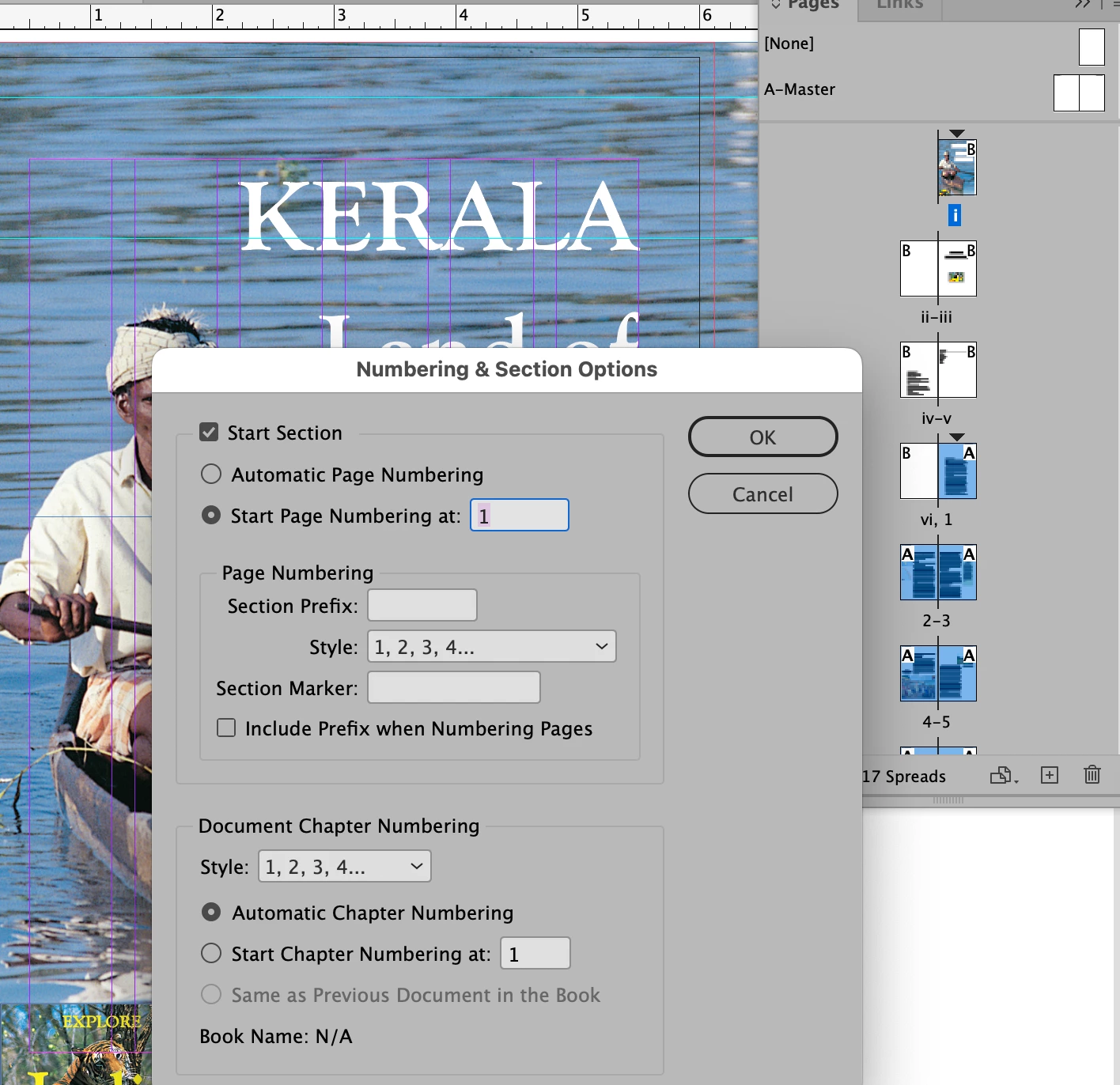
As Uwe says, when you create a new section start in Pages flyout menu > Numbering and Section Options, you can choose its styling and appearance. A section start shows up on the Pages list with an inverted triangle above. You can double-click on the triangle to open the dialog for the section.
 

3 replies

Community Expert
October 31, 2023

@GmaLaurie said: "I don't want two sections, I just want the pages renumbered with the inserted page as #1."


Hi @GmaLaurie ,

that's impossible with automatic page numbering.

For every change with automatic page numbering you need a new section.


That's how InDesign is working…


Regards,
Uwe Laubender
( Adobe Community Expert )

New Participant
October 31, 2023
Hi Uwe,

Actually, I figured out how to do it.
The first three pages did not use the A parent, so got no numbers. So
instead of choosing "start section (highlighting page four) to begin
numbering with 1, when I chose automatic page numbering, it started at the
first parent page and numbered right through! No more double page 1.

Maybe you misunderstood my problem—anyway, thanks for your reply.

GmaLaurie
Willi Adelberger
Community Expert
October 31, 2023

Every page is numbered, even if the master/parent does not have any place holder. Any page 1 which is not the first technical page of an INDD file has to start with a new section. That is how InDesign works.

For the first section, that without numbers I recommend to add a page suffix, even if it will not appear on the page or another numbering system, like roman numbers or alphabet numbers to avoid problems with the output.

New Participant
October 30, 2023

I don't want two sections, I just want the pages renumbered with the inserted page as #1.


Steve Werner
Community Expert
October 30, 2023

Please provide an example showing us how the document looks before you want the pages renumbered. Where does the inserted page exist (in the current document, in a different document)? Also: Please tell us what operating system (exactly) you're running. Please tell us (exactly) what InDesign version you're using.

Community Expert
January 30, 2023

Hi @Ailton_Marques1 ,

for every new start of numbering, create a new page section with a new section start in the Pages panel.


Regards,
Uwe Laubender
( Adobe Community Expert )

Steve Werner
Steve WernerCorrect answer
Community Expert
January 30, 2023

As Uwe says, when you create a new section start in Pages flyout menu > Numbering and Section Options, you can choose its styling and appearance. A section start shows up on the Pages list with an inverted triangle above. You can double-click on the triangle to open the dialog for the section.


New Participant
October 30, 2023

This does not help. I don't want two sections. I want the page I added to be number 1, and the other pages after it to be numbered in orde. How do I get rid of the new section?